
Lieferung heute & morgen

Qualitätsgarantie

Willkommens-Angebote freischalten: KOSTENLOSE Lieferung | Bis zu 80 % RABATT | Kostenlose 30-Tage-JoyPlus-Testphase
App herunterladen
A single keyboard for your PC, tablet, and smartphone—the promise of a multi-device keyboard is a clutter-free desk and a seamless workflow. In practice, however, the selection process often leads to frustration. Many models fail to deliver on their marketing slogans, proving to be unreliable companions in daily digital life. Before you make a decision, you should be aware of the typical pitfalls that can lead to a purchase you'll regret.
The 2 Most Common Mistakes When Buying a Multi-Device Keyboard:
To avoid these problems, focus on the technical fundamentals. Two parameters are crucial for the functionality and longevity of your new keyboard.
A wireless keyboard is the standard, but the technology behind it makes all the difference.
The typing experience is largely determined by the technology built under the keycaps.
Here are some recommendations tailored to specific needs and user groups.

Why This Fits Their Persona: Designed for professionals who switch between multiple devices daily. It offers the precise feel of a mechanical keyboard without the disruptive noise in an office or home office. The standard QWERTY layout and seamless switching function make it a reliable tool for productive work.
The combination of Bluetooth and the Logi Bolt USB receiver ensures a rock-solid connection. The "Tactile Quiet" switches provide a mechanical typing feel but are optimized for office environments, making them significantly quieter than traditional mechanical keyboards.
Smart backlighting that adapts to ambient light and Easy-Switch technology for fluidly changing between up to three devices. The aluminum chassis provides a premium feel and stability.
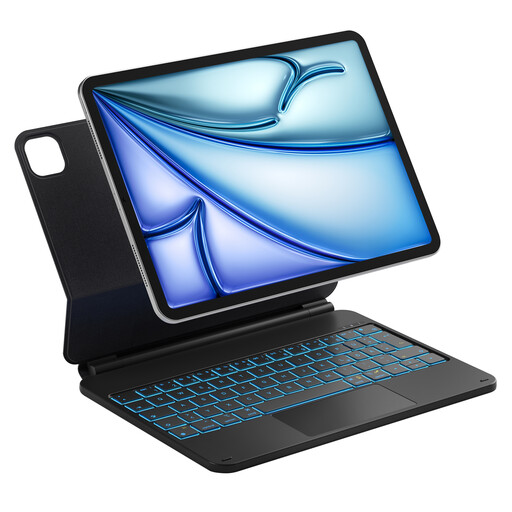
Why This Fits Their Persona: Perfect for students and mobile professionals who use their iPad as their primary work device. This case transforms the tablet into a full-fledged laptop replacement, complete with a keyboard and a precise trackpad, without needing to carry extra accessories.
As an integrated solution for specific iPad models, it bypasses compatibility and connection issues. The magnetic mount ensures a stable connection and power supply directly from the iPad, eliminating separate charging and pairing problems.
The integrated iPad keyboard with trackpad supports multi-touch gestures. Its slim, lightweight design and function as a protective case make it a practical companion for on-the-go use.
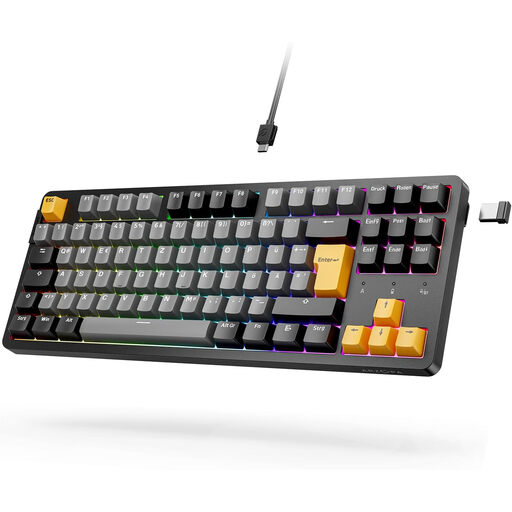
Why This Fits Their Persona: For users who demand performance, customisation, and a premium typing experience. This keyboard offers the low latency crucial for gaming and the ability to swap out switches without soldering to tailor the typing feel to personal preference.
The tri-mode connectivity (Bluetooth, 2.4G, Cable) ensures a stable connection for any situation. The hot-swap capability solves the "wrong typing feel" problem, as users can easily exchange the switches for their preferred type.
The gasket-mount structure provides a dampened, pleasant sound profile. The standard layout and wear-resistant PBT keycaps guarantee durability and high functionality.
We have compiled a complete, up-to-date list of products that fully meet these strict selection criteria and local regulations.
1. How do I switch between devices on a multi-device keyboard? Most multi-device keyboards have dedicated keys (often F1-F3 or separate buttons) marked with a Bluetooth symbol. After pairing a device to one of these channels for the first time, you can switch between connected devices instantly with a simple key press. The exact process is described in the user manual for the specific model.
2. What is the difference between a Bluetooth keyboard and a 2.4 GHz wireless keyboard? A Bluetooth keyboard connects directly to your computer's or tablet's built-in Bluetooth module and does not require a USB port. A 2.4 GHz wireless keyboard uses a small USB dongle to create an exclusive wireless link. This connection is often more stable and responsive, making it advantageous for gaming or in environments with a lot of signal interference.
3. Do I need a mechanical keyboard for the office? Not necessarily. While a mechanical keyboard offers a very precise and, for many, a satisfying typing feel, it can be loud. If you appreciate the precision, look for models with "quiet" or "tactile" (not "clicky") switches. For most office environments, a high-quality keyboard with a scissor-switch mechanism is a quieter and often slimmer alternative that also provides an excellent typing experience.