
Lieferung heute & morgen

Qualitätsgarantie

Willkommens-Angebote freischalten: KOSTENLOSE Lieferung | Bis zu 80 % RABATT | Kostenlose 30-Tage-JoyPlus-Testphase
App herunterladen
A clutter-free desk, seamless workflows between your PC, tablet, and smartphone—it's an appealing vision. A multi-device keyboard promises exactly that: a single input device for all your systems. But the market is flooded with models whose promises often fall short in practice. Incorrect key layouts, unstable connections, or inadequate battery life can quickly lead to frustration instead of productivity.
As your Joybuy Product Recommendation Officer, I'm here to help you identify the common pitfalls and make an informed decision. We will focus on the objective criteria that truly matter, so you can find a model that genuinely simplifies your daily work.
Before you invest, be aware of the most common issues that arise with many keyboards marketed as "universal."
Alt/Cmd mapping may not work as expected.To avoid these problems, you should carefully examine three core technical features. These define the reliability and user-friendliness of your future multi-device keyboard.
The type of connection is crucial for flexibility and performance.
True multi-device capability is revealed in the details. Check if the keyboard explicitly offers features for switching between operating systems like Windows and macOS. This ensures that keys like Ctrl/Cmd and Alt/Option are mapped correctly. For users in Germany, a German QWERTZ layout is essential for efficient typing.
The choice of key type significantly influences the typing feel and noise level.
Here are some recommendations tailored to specific user profiles and the quality criteria mentioned above.
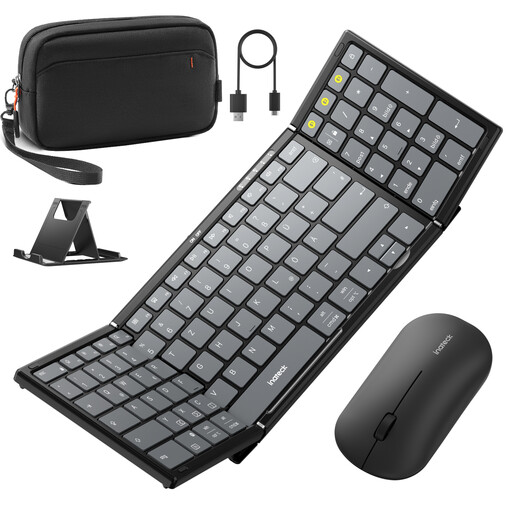
Why This Fits Their Persona: This set is designed for users who don't want to sacrifice a full workstation while on the go. It includes a foldable keyboard, a mouse, a stand, and a carrying case—everything needed for productive work on a tablet or laptop.
With its explicit QWERTZ layout, it bypasses the most common compatibility pitfall. The set supports three Bluetooth channels, and the mouse also supports 2.4G, ensuring stable and flexible connectivity for various devices.
The full 99-key layout with a number pad is a rarity for a portable keyboard and boosts efficiency for data entry. The all-in-one package makes it ready to use out of the box.
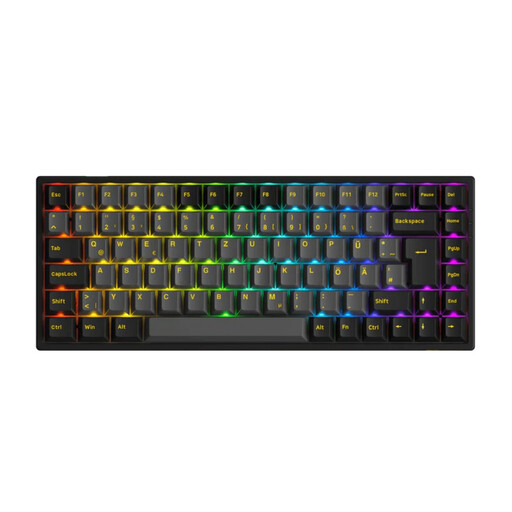
Why This Fits Their Persona: For heavy typists and tech enthusiasts seeking a premium typing experience, customisability, and reliable performance for their stationary workstation. The 75% layout is a great compromise between compactness and functionality.
This keyboard features a correct ISO-DE (QWERTZ) layout, making it ideal for the German market. Its Tri-Mode connectivity (Bluetooth, 2.4G, USB-C) ensures maximum stability and flexibility in any scenario.
The hot-swap capability allows you to change the mechanical switches without soldering. This enables complete personalisation of the typing feel. The 3000 mAh battery ensures long-lasting use.
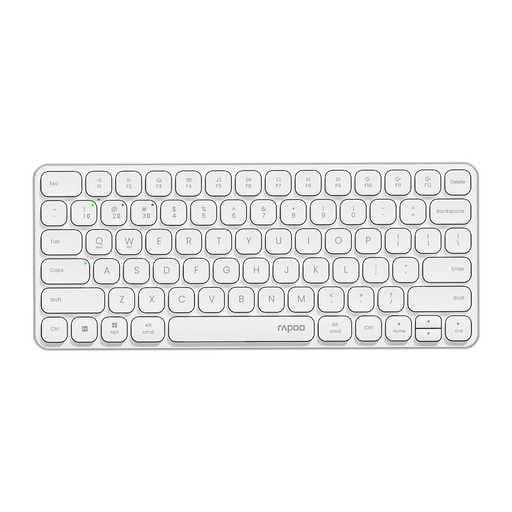
Why This Fits Their Persona: Ideal for users who value a minimalist aesthetic and a clutter-free desk. The ultra-slim design and aluminium frame fit perfectly into modern office or home office environments.
It addresses the battery issue with a manufacturer-stated runtime of up to 90 days and a USB-C charging port. The smart switching between up to 4 devices is designed for a seamless workflow. Note: This model has a QWERTY (US) layout.
The extremely slim profile (only 5.6 mm at its thinnest point, according to the manufacturer) and the aluminium alloy frame provide a premium feel and look. The compact 78-key layout saves valuable desk space.
We have compiled a complete, real-time list of products that fully satisfy these strict selection criteria and UK safety regulations.
1. How do I switch between devices on a multi-device keyboard? Switching is typically done using dedicated keys. Often, these are the function keys (e.g., F1, F2, F3) marked with a Bluetooth symbol. A short press of the corresponding key switches the connection to the previously paired device. Some models also have a separate switch.
2. Does a wireless keyboard work equally well for Mac and Windows? Not always. Look for models that explicitly state dual-system support for Mac and Windows. These keyboards often detect the operating system automatically or can be switched manually, ensuring that keys like Cmd/Win and Alt/Option work correctly. The key layout (QWERTZ for Germany) remains a crucial factor.
3. What is the difference between a Bluetooth and a 2.4G connection on a keyboard? A Bluetooth connection is universal and doesn't require a USB port for a dongle, making it ideal for laptops and tablets. A 2.4G connection uses its own USB dongle and often provides a more stable connection with lower latency, making it the preferred choice for stationary desktops or gaming. A Tri-Mode keyboard combines both wireless technologies with a wired option, offering the greatest versatility.