
Lieferung heute & morgen

Qualitätsgarantie

Willkommens-Angebote freischalten: KOSTENLOSE Lieferung | Bis zu 80 % RABATT | Kostenlose 30-Tage-JoyPlus-Testphase
App herunterladen
An uncluttered desk is the foundation of productive work. But in the modern workday, defined by laptops, desktop PCs, and tablets, the accumulation of peripherals quickly leads to the opposite: cable clutter and the constant need to switch between different mice. A Multi-Device Mouse promises a solution by enabling control of multiple devices with just a single input device.
However, the selection is vast, and not every model delivers on its promise. Before you make a purchasing decision, it's important to be aware of common pitfalls that can severely limit a mouse's everyday utility.
To avoid these problems, you should base your decision on objective technical parameters. Three criteria are of central importance.
The connection type is the core of any multi-device mouse. These models primarily use two technologies, often in combination:
A good multi-device mouse offers both options and allows for easy switching between at least three devices (e.g., one device via 2.4 GHz and two others via Bluetooth).
Anyone who spends many hours at the computer each day should not underestimate ergonomics. Designing an ergonomic wireless mouse involves more than just a curved shape. Look for a thumb rest to relieve hand muscle strain and a size that fits your hand.
A mouse with programmable buttons offers additional functionality. These allow you to assign frequently used commands, such as copying and pasting content or opening specific applications, to a single button. This can significantly boost work efficiency. A side scroll wheel is also a useful feature for horizontal navigation in large spreadsheets or timelines.
The question of power supply is one of the most practical considerations.
Based on the criteria mentioned, we have identified a few models that are particularly well-suited for specific user groups and their requirements.
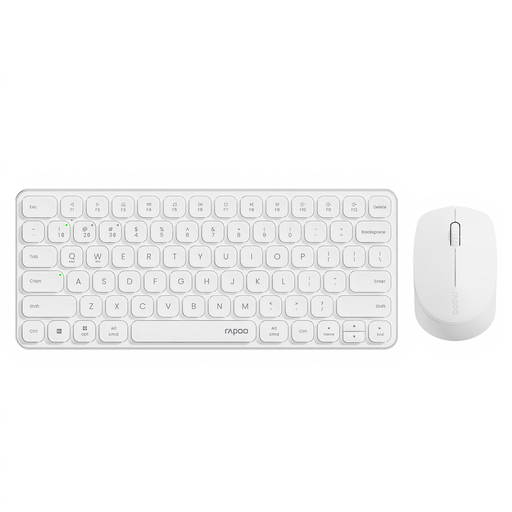
Why This Fits Their Persona: Ideal for users setting up a complete workstation at home or in the office who need a cost-effective solution that covers both a keyboard and mouse for multiple devices. This set delivers a clean setup and functionality in one package.
The set uses a combination of Bluetooth 5.0/4.0 and 2.4 GHz wireless, ensuring a stable connection. The manufacturer's stated 12-month battery life bypasses the short-runtime trap.
Offers a complete multi-device solution for up to 4 devices (keyboard and mouse) at an attractive price-performance ratio. The mouse features an adjustable DPI sensor.
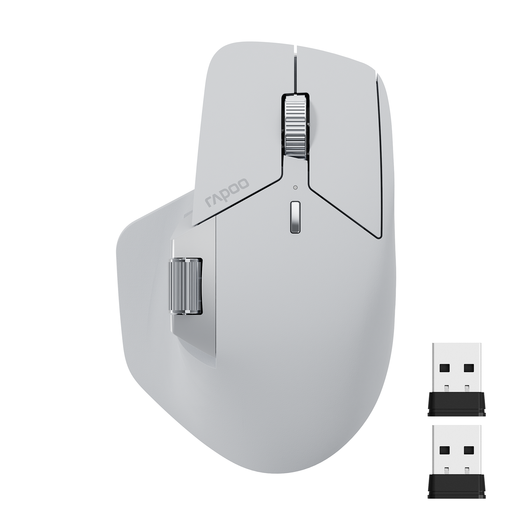
Why This Fits Their Persona: Perfect for professionals and creatives who need to switch seamlessly between multiple computers and operating systems. The demands for customisation, ergonomics, and efficiency are at their peak here.
Addresses the software trap with M+ Cross-Computer Technology, a dedicated feature for seamless control. The 11 programmable buttons and ergonomic design with a thumb rest counteract any compromise on functionality.
Enables control of up to 4 devices. Offers advanced features like cross-computer control, a side scroll wheel, and is rechargeable via USB-C.
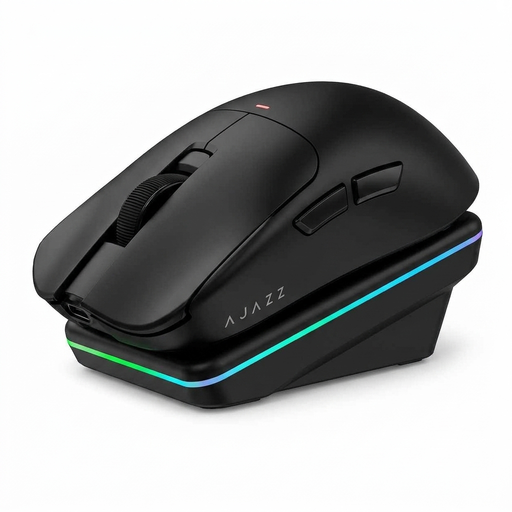
Why This Fits Their Persona: For users who appreciate innovative technology and are looking for more than just a standard mouse. The combination of gaming performance, AI features, and a charging dock appeals to users who prefer a modern, feature-rich setup.
Despite its advanced AI functions, the fundamentals are not neglected: the mouse offers a stable Tri-Mode connection (BT/2.4G/USB-C) and a precise sensor. The magnetic charging dock elegantly solves the recharging problem.
A unique combination of AI voice interaction and a convenient magnetic charging dock. The high-performance PAW3311 sensor ensures high precision.
We have compiled a complete, up-to-date list of products that fully meet these strict selection criteria and German safety regulations.
The process is usually straightforward. Most mice have a dedicated button on the bottom or top that lets you switch between connection channels (e.g., 2.4 GHz, Bluetooth 1, Bluetooth 2). To pair a new device via Bluetooth, select a free Bluetooth channel on the mouse and press and hold the button to activate pairing mode. Then, search for the mouse in your computer's or tablet's Bluetooth settings and establish the connection. Repeat this process for additional devices on the remaining channels.
Yes, most models with this feature are designed for cross-platform use. The main requirement is usually the installation of the manufacturer's software on both computers (both the Windows PC and the Mac). Additionally, both computers must be connected to the same Wi-Fi or Ethernet network. Once this is set up, you can move the mouse cursor seamlessly from one screen to the other and, with some models, even exchange files between systems using copy and paste.
The battery life depends heavily on individual usage. Manufacturer claims like "up to 90 days" are often based on standardised tests (e.g., 8 hours of office work per day). Intensive use, a high polling rate, or leaving the mouse permanently on will shorten the runtime. As a rule of thumb, a high-quality rechargeable mouse should last from several weeks to a few months on a single charge with normal use.