
Lieferung heute & morgen

Qualitätsgarantie

Willkommens-Angebote freischalten: KOSTENLOSE Lieferung | Bis zu 80 % RABATT | Kostenlose 30-Tage-JoyPlus-Testphase
App herunterladen
By Joybuy Product Recommendation Officer, 30 August 2026
Anyone who switches between a laptop, desktop PC, and perhaps even a tablet daily knows the challenge: multiple mice on the desk create clutter and interrupt your workflow. A Multi-Device Mouse promises a solution by allowing you to connect seamlessly to several devices. However, the market is flooded with models whose marketing promises often fall short in practice. Before you make a decision, it's crucial to understand the common pitfalls.
Many users invest in a supposedly advanced mouse, only to find after a few weeks that the advertised features are more of a hindrance than a help. Here are the three most common problems to watch out for:
To avoid a bad buy, you should focus on the technical parameters that make a noticeable difference in your daily work.
A good wireless multi-device mouse typically offers two connection types, often referred to as "dual-mode" or "tri-mode."
A model that supports both technologies provides the greatest flexibility to ensure a stable connection for each of your devices, whether it's a mouse for Mac and Windows or for mobile operating systems.
Instead of focusing on the maximum DPI number, the quality of the sensor and the ability to customise it are what's crucial.
The shape of the mouse should fit your hand and grip style to prevent fatigue and strain.
Here are some models tailored to specific user needs that meet the criteria mentioned above.
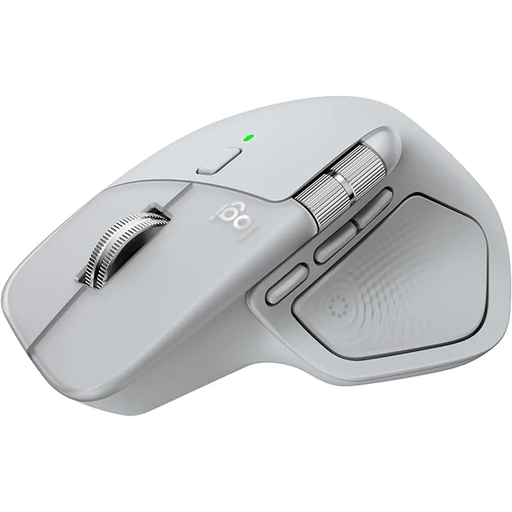
Why This Fits Their Persona: Ideal for developers, designers, and analysts who need maximum efficiency. The mouse allows for seamless switching between up to three devices, while the MagSpeed scroll wheel and thumb wheel accelerate navigation in code or large spreadsheets.
It offers a mature, stable multi-device function and a well-thought-out ergonomic design. The 8K DPI sensor isn't just a marketing figure; it enables precise tracking even on glass surfaces.
Haptic feedback and the customisable Actions Ring provide context-aware shortcuts directly at the cursor. The clicks are 90% quieter than previous models.

Why This Fits Their Persona: Perfect for anyone who spends long days at the computer and wants to prevent wrist pain or alleviate existing discomfort. The vertical design is optimised for a natural hand posture.
Here, "ergonomic" is not an empty promise. The 57° angle is based on research into reducing muscle activity. It bypasses the ergonomics bluff with a scientifically-backed design.
Reduces muscle strain and wrist pressure, according to the manufacturer. It still offers multi-device connectivity for up to three devices and a precise 4,000 DPI sensor.
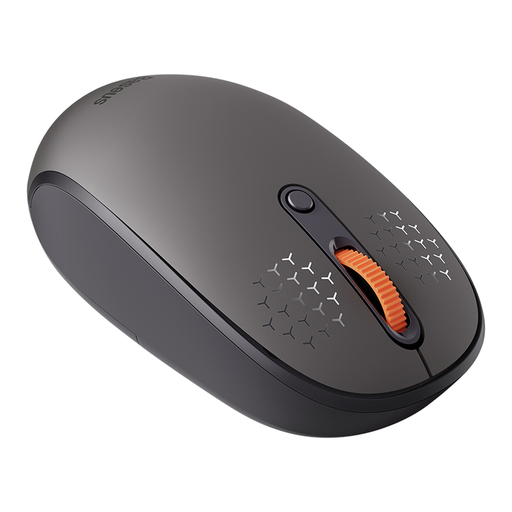
Why This Fits Their Persona: An excellent choice for students or home office users who need a reliable multi-device function without the high cost. It connects to up to three devices (1x 2.4GHz, 2x Bluetooth) and covers all the basic requirements.
This model focuses on the essentials: a stable and easy-to-use switching function. It forgoes inflated DPI values and complex software, which makes it straightforward to operate.
Very quiet clicks (99% reduction according to the manufacturer) and an adjustable DPI (up to 1600) are remarkable in this price range. Operation with a standard AA battery is uncomplicated.
We have compiled a complete, real-time list of products that fully satisfy these strict selection criteria and UK safety regulations.
The process is usually straightforward. First, connect the mouse to the first device, typically via the 2.4 GHz dongle or by Bluetooth pairing. Then, press a dedicated switch button on the mouse to select another channel. Activate Bluetooth pairing mode on this channel and connect the mouse to your second device. Repeat this process for the third device. Afterwards, you can switch between the connected devices with the press of a button.
That depends on the use case. Bluetooth is more convenient for laptops and tablets as it doesn't occupy a USB port. 2.4 GHz wireless often provides a slightly more stable connection with lower latency, which can be advantageous for demanding tasks or a wireless gaming mouse. A mouse that can do both offers the greatest flexibility.
For typical office work on monitors up to 4K resolution, a DPI value between 1,200 and 4,000 is perfectly sufficient. A higher value is not automatically better and can make controlling the cursor more difficult. More important is a precise sensor that works reliably on different surfaces and the ability to adjust the DPI setting to your own needs.