What should you look for when choosing?
First, decide whether a wireless connection or an Ethernet cable can provide the link back to the router. Then check the connection at your workshop spot and make sure the devices support the mode you want to use.
Wireless repeater
Suitable if: There’s a spot with usable reception between the router and the floor where your workshop is taking place, and you don’t have an Ethernet cable.
What to consider: The repeater needs a usable connection to the router itself; walls and floors can interfere with the wireless signal.
LAN-connected access point
Suitable if: An Ethernet cable runs to the other floor and you want to provide Wi-Fi there.
What to consider: You’ll need a cable route and a suitable LAN or access point mode; the quality of your internet connection remains a separate factor.
Multiple mesh nodes
Suitable if: You move between floors or need coverage in several areas, and your router and nodes support the mesh feature you want.
What to consider: Having the same Wi-Fi name alone doesn’t prove that devices from different manufacturers are mesh-compatible; wirelessly connected nodes also need a usable connection.
Powerline with Wi-Fi
Suitable if: There’s no suitable spot for a wireless repeater and no Ethernet cabling, and you can test the connection in the rooms you’ll use.
What to consider: The connection uses your existing electrical wiring, so you should test whether it’s suitable for your particular setup.
| What you need |
What to check before buying |
Who is it most relevant to? |
| Connection between floors |
Reception at the repeater location or the option of a LAN connection |
If I’m joining from another floor, I need a usable connection at my regular spot and a suitable link back to the router. Around 36% of consumers say a connection between floors is their main concern. |
| Moving between rooms during the workshop |
Coverage in every area you’ll use and the mesh requirements of the specific devices |
If I move rooms during the workshop, I want to stay connected wherever I go. Around 29% of consumers focus on moving between workshop locations. |
| Choppy video or audio |
Connection at your workshop spot, plus your internet connection’s download speed, upload speed and latency |
If my video or audio keeps freezing despite having Wi-Fi reception, I want to identify the actual bottleneck before choosing another device. Around 21% of consumers focus on finding the cause of a poor connection. |
| Setup and router compatibility |
Documented operating mode, mesh compatibility and, where applicable, access point mode |
If I want to keep using my existing router, I need a setup that works with its model and the operating mode I want. Around 14% of consumers focus mainly on router compatibility and setup. |
Joybuy products for wireless repeaters and LAN access points
This selection includes wireless repeaters for locations where the router signal is still usable, as well as an Ethernet-connected access point for the workshop floor. When considering a specific listing, check that it has the correct CE marking and the required accompanying documentation, including instructions in German for non-professional users. The German Federal Network Agency describes these requirements for radio equipment offered for sale in Germany.
 No image available
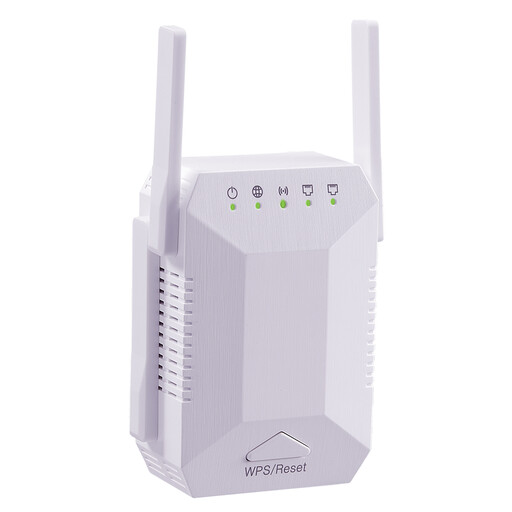
Signal Booster 1200 Mbit/s, 5G Wi-Fi, dual-band, 4 adjustable antennas
Could work as a wireless repeater for a workshop spot further away, provided there’s still a connection to the router where you install it.
The description lists four adjustable antennas and two 10/100 Mbit/s LAN ports.
For the wireless connection back to the router, the device needs to be within range of your existing router.
View at Joybuy
 No image available
TP-Link RE190 AC750 Wireless Repeater, 433 Mbit/s
Could work for a workshop spot further away, provided there’s still a usable connection to the router where you install the repeater.
The description lists dual-band Wi-Fi, a signal strength indicator and WPS setup.
The wireless connection back to the router requires the repeater to be within range of your existing router.
View at Joybuy
 No image available
MERCUSYS ME80X Wi-Fi 6 Range Extender, AX3000 Dual Band
Repeater mode may be suitable if the planned location still receives a signal from the router; with a LAN connection, you can use access point mode.
Specifications include 574 Mbit/s at 2.4 GHz, 2402 Mbit/s at 5 GHz, a Gigabit port and access point mode.
In access point mode, the LAN port must be connected to the router by Ethernet.
View at Joybuy
 No image available
TP-Link RE235BE BE3600 Dual-Band Wi-Fi 7 Range Extender
Could work as a wireless repeater for a workshop spot further away, provided the router is still in range at the planned installation point.
The title lists a 2.5 Gigabit port, MLO, Smart Roaming and EasyMesh compatibility.
The EasyMesh feature requires compatible EasyMesh devices.
View at Joybuy
 No image available
Ubiquiti UniFi U6+ WiFi 6 Access Point
Could be used as an access point on the workshop floor if an Ethernet connection to the network is available there.
The description lists Ethernet, PoE in accordance with 802.3af and wall or ceiling mounting.
To use it, you’ll need an Ethernet connection, PoE in accordance with 802.3af and setup via the UniFi Network application.
View at Joybuy
Frequently asked questions
Where should you put a wireless repeater for your workshop?
Put it somewhere between the router and the dead zone where it can still get a usable connection to the router, rather than at the spot with no reception. On Speed Home WLAN, an LED indicates a weak or missing connection. Then test a call from the actual workshop spot.
Does a repeater have to be the same brand as your router?
For a basic range extension, using the same brand isn’t always necessary. However, the TP-Link RE705X needs an EasyMesh-compatible router for its EasyMesh feature; check the operating mode and the specific combination of devices separately.
What should you check if your workshop call keeps freezing despite having good Wi-Fi?
Check your internet connection’s download speed, upload speed and latency, as well as the connection where you’re using it. Microsoft Support notes that a slow internet connection can also affect call quality; the broadband measurement service records download speed, upload speed and latency, among other things.
Do you need an individual frequency allocation for a home Wi-Fi repeater in Germany?
You don’t need an individual frequency allocation for Wi-Fi in the generally allocated frequency bands, provided you comply with the conditions of the applicable general allocation. The German Federal Network Agency lists the generally allocated Wi-Fi frequency bands; this doesn’t mean that any radio equipment or settings are permitted.
What should you look for in radio equipment sold in Germany?
For the specific product listing, check that it has the correct CE marking and the required accompanying documentation, including instructions in German for non-professional users. The German Federal Network Agency describes these requirements; CE marking doesn’t prove that the Wi-Fi coverage in your building will be good enough for your workshop.


