
Lieferung heute & morgen

Qualitätsgarantie

Willkommens-Angebote freischalten: KOSTENLOSE Lieferung | Bis zu 80 % RABATT | Kostenlose 30-Tage-JoyPlus-Testphase
App herunterladen
A multicolor 3D printer can produce colourful figures, prototypes, cosplay elements or functional parts in a single print run. However, choosing the right one can be challenging: specifications such as “600 mm/s”, “AI monitoring” or “16 colours” often refer to very different technical concepts. For shoppers in the UK, it’s not just about the biggest number on the spec sheet — it’s about whether the printing system, material handling and build volume actually suit your needs.
A figure like 500, 600 or 800 mm/s usually describes a maximum value under specific conditions. For clean outer surfaces, complex geometries and colour changes, a slower speed can be more effective. That’s why acceleration, motion mechanics, cooling and the recommended print speed are also important.
A 16-colour 3D printer requires additional filament modules, tubing and spools. Every colour change can waste material during the purging process. What’s more, filaments must be correctly assigned and stored in a dry environment. So check whether the system genuinely supports 16 colours simultaneously, or whether it only reaches that number through multiple expansion modules.
A 3D printer with automatic bed levelling can compensate for the distance between the nozzle and the build plate on its own. However, that won’t prevent every adhesion issue. A dirty build plate, damp filament or an unsuitable material profile can still cause failed prints. Even an AI camera only detects certain error patterns and doesn’t replace checking the nozzle, build plate and filament.
With a 3D printer for multicolor printing, you should distinguish between a single print head with automatic filament switching and multiple print heads. An automatic system is compact, but can waste material during purging. Also look out for:
Filament drying is especially useful with hygroscopic materials. According to the product data, the Anycubic ACE 2 Pro supports active drying up to 65 °C and drying during printing. That’s a useful technical feature, but it’s no guarantee of success with every print.
The build volume determines whether a model can be printed in one piece. For miniatures, a compact format is sufficient, while model makers, cosplayers and product developers often need at least 250 × 250 × 250 mm. For large enclosures, moulds or prototypes, 3D printers for large models with a 350 mm edge length or more are a sensible choice.
A CoreXY 3D printer moves the print head using a mostly fixed build plate and a coupled belt system. This can offer advantages in motion control at high speeds. However, the actual construction, calibration and frame stability remain decisive.
An FDM 3D printer processes plastic filaments and is suitable for functional parts, larger models and various material types. Post-processing is usually straightforward.
A resin 3D printer works with liquid photopolymer resin and can produce very fine details for miniatures, jewellery models or small precision parts. However, it requires gloves, good ventilation, careful cleaning and appropriate post-curing. Resin must not come into contact with skin or eyes without protection. For living spaces without a suitable working environment, a resin model may not be the right choice.
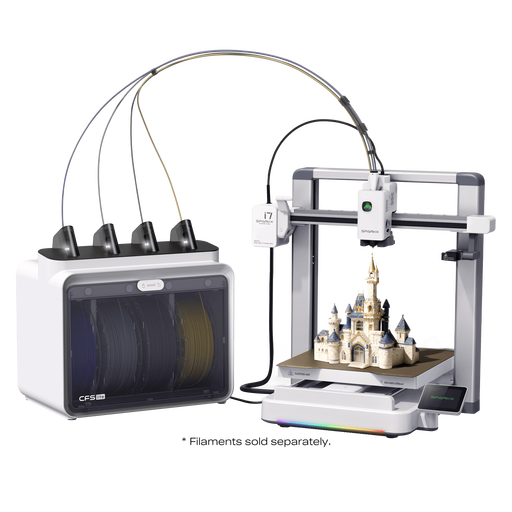
Why this product fits the profile: This model offers a build volume of 260 × 260 × 255 mm, automatic bed levelling and support for four colours. The claims about quick setup and a tool-free hotend swap appeal to users looking for a straightforward entry point.
The colour function, automatic levelling and filament detection reduce manual setup steps. However, material profiles and regular cleaning are still required.
Four-colour printing, 500 mm/s maximum speed, 300 °C maximum nozzle temperature and a 720p camera according to product data.
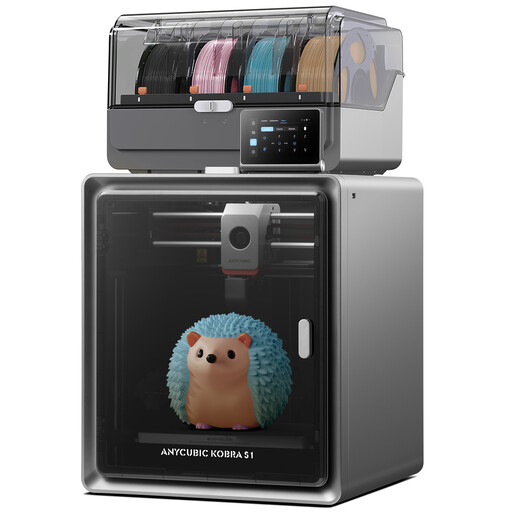
Why this product fits the profile: The fully enclosed CoreXY system combines multicolor printing, automatic bed levelling and a filament box with active drying. This suits users who want a structured workflow for creative and functional models.
Filament storage with moisture control addresses a frequently overlooked issue. However, for TPU 95A, direct feeding is recommended rather than multicolor feeding via the ACE 2 Pro, according to product data.
Up to 16 colours with expansions, 320 °C nozzle temperature, 250 × 250 × 250 mm build volume and quiet operation down to 44 dB according to product data.
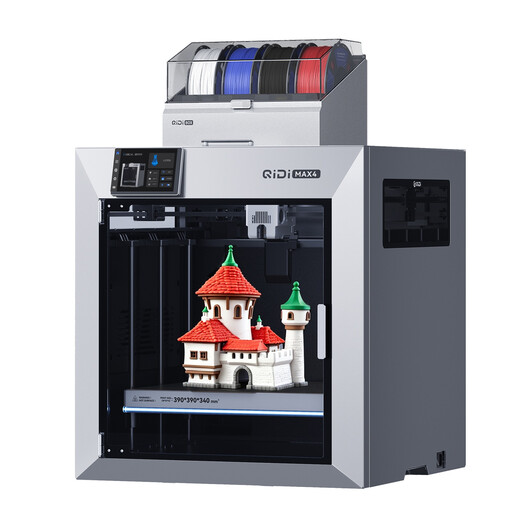
Why this product fits the profile: The build volume of 390 × 390 × 340 mm, heated chamber and high-temperature hotend are aimed at product developers, model makers and small production runs.
The enclosed design and actively heated chamber are built for more demanding materials. Before buying, check the space required, power consumption and material profiles.
390 × 390 × 340 mm build volume, 65 °C heated chamber, up to 800 mm/s and support for the QIDI Box with up to 16 colours according to product data.
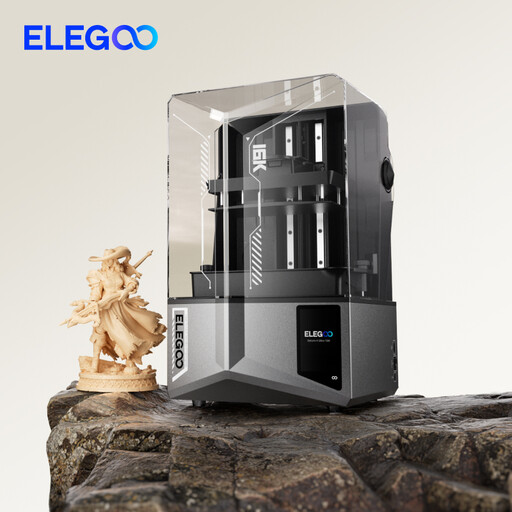
Why this product fits the profile: This resin system is designed for miniatures, jewellery prototypes and small models with fine details. It’s aimed at users who can plan for controlled post-processing and handling liquid resin.
Automatic bed levelling and the AI camera reduce certain setup steps. However, protective clothing, ventilation and cleaning remain absolutely essential with resin printing.
16K monochrome LCD, 211.68 × 118.37 × 220 mm build volume, heated vat and AI camera according to product data.
We’ve put together a complete, regularly updated list of products that fully meet these strict selection criteria and the safety regulations in force in the EU.
In addition to the purchase price, you’ll need to budget for filament, purge material, nozzles, build plates and possibly extra colour modules. With frequent colour changes, material consumption can increase. Electricity costs also depend on the heated bed, chamber, print duration and material. A printer with filament drying may use extra energy, but offers controlled material storage in return.
The lifespan depends on print volume, maintenance and material choice. Regularly cleaning the nozzle, checking belts and guides, and storing filament in a dry environment all help to limit wear. Abrasive filaments such as carbon-fibre-reinforced materials may require hardened nozzles and a suitably designed extruder.
Models with automatic bed levelling, filament detection, print resume after power failure and user-friendly slicer software make getting started easier. Beginners should start with PLA, set up a single colour profile cleanly, and only then move on to complex multicolor prints or technical filaments.