
Lieferung heute & morgen

Qualitätsgarantie

Willkommens-Angebote freischalten: KOSTENLOSE Lieferung | Bis zu 80 % RABATT | Kostenlose 30-Tage-JoyPlus-Testphase
App herunterladen
A multicolour 3D printer can produce models, prototypes and decorative objects in several colours without having to replace the filament manually every time the colour changes. These systems are therefore appealing to makers, model builders, cosplay creators and small businesses. However, the devices differ considerably in terms of colour capacity, material feed, build volume and maintenance requirements.
Figures such as 500 or 600 mm/s usually refer to the maximum movement speed. The most suitable actual speed depends on factors including the model’s geometry, layer height, material, acceleration and cooling. A fast FDM 3D printer is therefore not automatically the most time-saving choice for every model.
You should also look at the recommended print speed, acceleration values and features such as vibration compensation. These details provide a more realistic indication of whether the device is suitable for producing batches of small components or highly detailed models.
Many devices support four colours as standard. Expanding to eight, 16 or more colours, however, often requires additional modules, filament spools and space. Check whether the advertised number of colours is already included in the box or can only be achieved with optional accessories.
Material consumption during colour changes is also relevant: purging the print head creates what is known as purge material. With frequent colour changes, this can result in additional costs and waste.
A 3D printer with automatic levelling can simplify preparation. However, uneven print beds, incorrect Z offsets and dirty print surfaces cannot be ruled out completely. Similarly, a monitoring system cannot prevent every failed print.
Especially when using PETG, TPU or fibre-reinforced filaments, the correct temperature profiles, a clean nozzle and dry materials remain essential.
Distinguish between a simple manual colour change, an automatic colour-changing 3D printer and a system with several independently controlled filament channels. Important factors include:
A system with dry, protected filament storage may be more practical for everyday use than a device offering many colours but leaving its spools exposed to a humid environment.
The build volume determines whether you can produce one-piece helmets, larger housings or only smaller figures. The dimensions should be compared with your intended use. For many maker projects, build volumes between approximately 250 × 250 × 250 mm and 260 × 260 × 300 mm are relevant.
Layer height, nozzle width and the mechanical design all affect visible detail quality. A specification such as “under 0.02 mm precision” should not be equated with the actual dimensional accuracy of every component. The material, calibration and design remain decisive factors.
A 3D printer for PLA and PETG covers many typical applications. If you want to produce technical components or flexible parts, you should also look for support for TPU, ABS, ASA, PVA or fibre-reinforced filaments.
Check the following:
Integrated filament drying at temperatures of up to 65 °C, for example, can simplify storage and preparation. It does not replace proper storage in a sealed container.
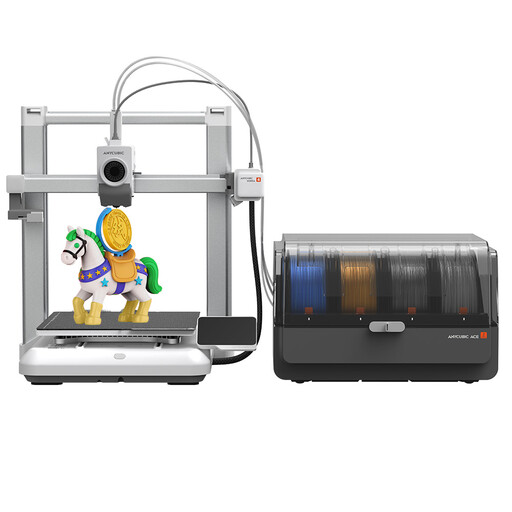
Why this product suits this profile: The combination of four-colour printing, automatic levelling and a build volume of 260 × 260 × 260 mm is aimed at beginners who want to enter the world of multicolour printing without buying several additional devices.
The colour capacity, automatic LeviQ-3.0 levelling and monitoring functions are clearly described in the product specifications. Nevertheless, the maximum speed of 600 mm/s should not be treated as suitable for every print job.
Four colours as standard, nozzle temperatures of up to 300 °C, a 100 °C heated bed, plus detection of spaghetti errors and foreign objects.
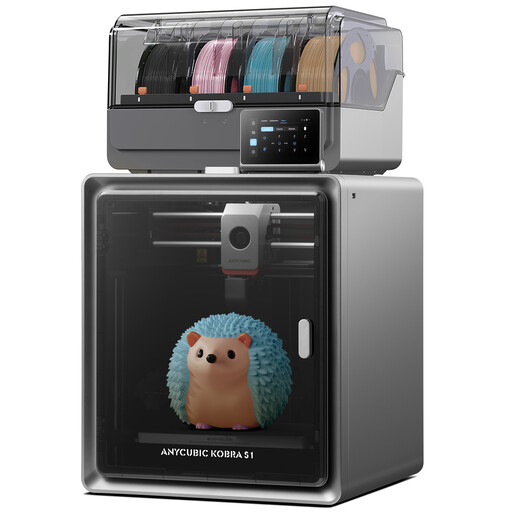
Why this product suits this profile: The enclosed CoreXY system combines automatic calibration and camera monitoring with an ACE-2-Pro unit featuring active filament drying.
The standard configuration supports four colours; expanding to 16 colours requires additional compatible units. TPU 95A must be fed directly into the printer for multicolour printing.
250 × 250 × 250 mm build volume, nozzle temperatures of up to 320 °C, active drying up to 65 °C and support for PLA, PETG, ABS and ASA.
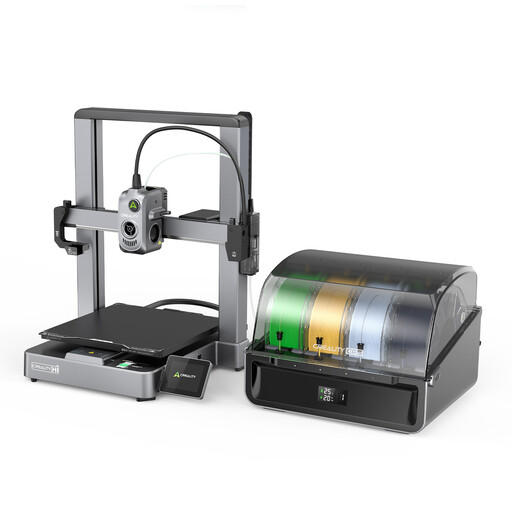
Why this product suits this profile: The Creality filament system is designed for regular print jobs, automatic filament selection and potential expansion to support up to 16 colours.
The CFS units and RFID detection are clearly described as system components. Before buying, check how many CFS modules are actually included.
260 × 260 × 300 mm build volume, maximum speeds of up to 500 mm/s, automatic levelling and support for PLA, PETG, ABS and PLA-CF.
Ready-made Rainbow filaments are a simple alternative to frequent automatic colour changes when creating colour gradients. According to its product name, CaiLab PLA Rainbow Gradient – Orchid is suitable for colourful PLA prints. eSUN PLA Matte Rainbow 1.75 mm is also available in variants with a matt finish and colour gradient:
Always check the filament diameter, temperature range and material profile before buying. PLA is generally easier to use than PETG or ABS, while matt filaments may require different temperature and speed settings depending on the manufacturer.
We have put together a complete, regularly updated list of products that fully meet these strict selection criteria and the safety regulations applicable in the EU.
An automatic filament system feeds different filaments to the print head one after another. Before the change, material is purged from the nozzle to minimise colour mixing as much as possible. This process requires additional time and filament.
Many models support PLA and PETG. However, the specifications provided by the respective manufacturer, the maximum nozzle temperature and the appropriate print profile are all important. PETG can adhere more strongly and often requires adjusted print-bed and nozzle settings.
In addition to electricity and filament, you may also need to factor in purge material, nozzles, print beds and, where applicable, additional colour modules. Filament consumption increases with frequent colour changes. For simple colour gradients, Rainbow filament may be more economical than a fully multicolour printed model.