
Lieferung heute & morgen

Qualitätsgarantie

Willkommens-Angebote freischalten: KOSTENLOSE Lieferung | Bis zu 80 % RABATT | Kostenlose 30-Tage-JoyPlus-Testphase
App herunterladen
A multicolour 3D printer can produce coloured models, prototypes and decorations without the need for painting afterwards. In practice, however, the stated number of colours is not the only factor that determines whether a system is suitable. For makers, model builders, educational institutions and small businesses, material handling, build volume, automation and running costs are equally important.
A system advertised as a 16-colour 3D printer does not necessarily work with 16 filaments straight out of the box. Four colours are often supported as standard, while additional colours require extra modules or compatible filament stations. According to Anycubic’s product information, the Kobra S1 ACE 2 Pro Combo supports four colours as standard and up to 16 colours with additional ACE 2 Pro units.
Before buying, you should therefore check:
A fast 3D printer may be advertised as reaching speeds of up to 600 or 800 mm/s, depending on the model. These maximum values do not apply to every layer height, material or model. Multiple colour changes create additional purging and retraction movements. As a result, a coloured model can use significantly more filament than a single-colour print.
For everyday use, the recommended speed is often more informative than the maximum value. Acceleration, cooling, nozzle diameter and slicer profile also affect the actual production time.
A 3D printer with a filament dryer can reduce moisture during processing or actively dry filament. However, it does not replace airtight storage. PLA, PETG and fibre-reinforced materials in particular should be stored in a dry environment and protected from dust as much as possible after opening.
Pay attention to the difference between:
A 3D printer with multi-colour printing requires a reliable filament feed. Independent motors, filament detection and automatic refeeding can reduce the amount of manual work involved. TPU requires particular care: according to Anycubic’s product information, TPU 95A must be fed directly into the printer when using the Kobra S1 ACE 2 Pro Combo and is not intended for multi-colour printing via the ACE 2 Pro module.
For many coloured models, PLA 3D printer filament is a practical starting point. PLA can be processed at relatively moderate temperatures and, with the filaments mentioned, does not require a heated print chamber. A matt dual-colour PLA filament creates a two-colour gradient within a single reel, but this should not be confused with genuine multi-colour printing using separate filaments.
A build volume of 220 × 220 × 220 mm is suitable for figures, brackets and smaller prototypes. A volume of 260 × 260 × 260 mm provides more room for larger models or several parts in a single print job. For moulds, housings and large functional prototypes, 350 × 350 × 350 mm or 390 × 390 × 340 mm may be a sensible choice.
However, a larger build-volume 3D printer usually requires more floor space, weighs more and may involve higher purchase and energy costs. So measure not only the printer itself, but also the space needed for filament feeding, maintenance and opening doors or covers.
A 3D printer with automatic levelling can simplify preparation of the build plate. Systems such as LeviQ 3.0 or automatic mesh levelling do not, however, replace cleaning the build plate or carrying out correct calibration.
A CoreXY 3D printer moves the print head using a different axis system from conventional Cartesian machines. In the available models, this design is often combined with high speeds and an enclosed housing. For ABS, ASA or fibre-reinforced filaments, nozzle and bed temperature, enclosure design and ventilation are more important than the CoreXY designation alone.
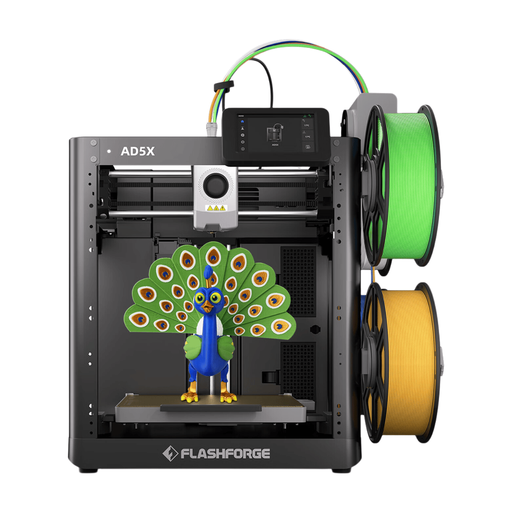
Why this product suits this profile: This compact FDM 3D printer supports four colours, offers a build volume of 220 × 220 × 220 mm and features automatic levelling. It is therefore well suited to creating your first coloured models and smaller DIY projects.
The supported colour count and print size are clearly stated, so the included equipment is not confused with a later expansion.
Four-colour printing, CoreXY construction, speeds of up to 600 mm/s according to the product information, and a 300 °C hot-end system.
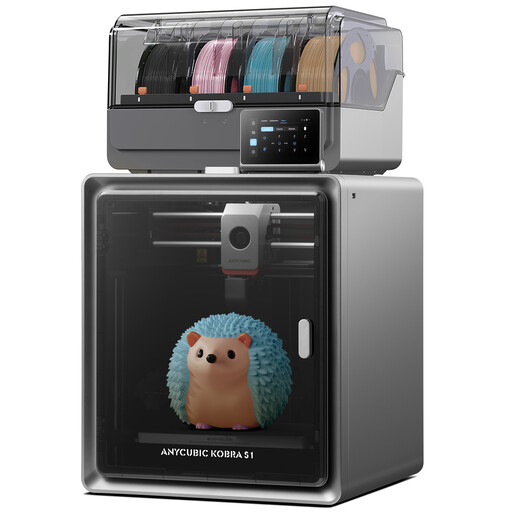
Why this product suits this profile: This enclosed CoreXY system combines multi-colour printing with automatic levelling, filament monitoring and active drying at up to 65 °C.
The standard four-colour configuration is listed separately from the maximum expansion to up to 16 colours.
250 × 250 × 250 mm build volume, nozzle temperatures of up to 320 °C and active drying during printing according to the manufacturer’s information.
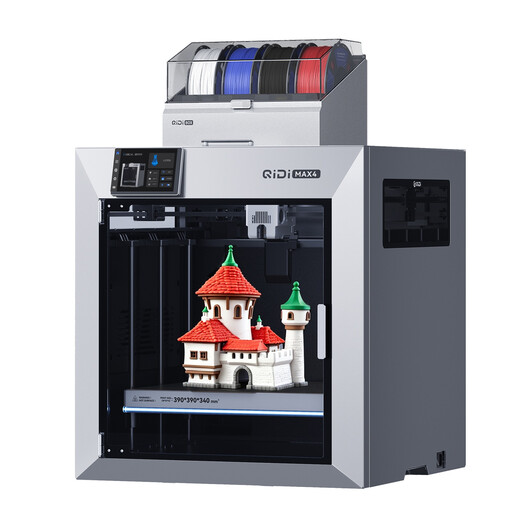
Why this product suits this profile: The large 390 × 390 × 340 mm build volume is designed for users who want to produce prototypes, moulds or several components in a single print job.
Build volume, heated chamber and filament compatibility are considered separately. This prevents you from buying a large print area without suitable temperature control.
390 × 390 × 340 mm build volume, an active 65 °C chamber and support for up to 16 colours with the QIDI Box, according to the product description.
Multi-colour printing often produces purge material during colour changes. So do not calculate only the price per kilogram of filament. Also factor in:
For decorative models, matt dual-colour PLA filament can be a straightforward alternative. The eSUN matt dual-colour PLA variants are available as 1.75-mm, 1-kg reels and, according to the product information, are supplied vacuum-packed with desiccant. The two-colour surface is created by the filament itself, not by several separately fed reels.
We have put together a complete, regularly updated list of products that fully meet these strict selection criteria and the safety regulations applicable in the EU.
Four colours are often enough for simple figures and coloured lettering. 16 colours are particularly useful when models contain many colour transitions or complex details. Always check whether the stated colour count is available as standard or only with additional modules.
Service life depends on print volume, material, maintenance and the environment. Regularly cleaning the nozzle and build plate, storing filament in a dry place and replacing worn parts in good time can help extend the printer’s useful life. A general figure in years is not reliable without specific operating conditions.
Multi-colour printing can use more filament due to colour changes and purging cycles. Dryers, heated chambers and multiple filament modules can also increase power consumption. Compare the purchase price, expansions, material consumption and maintenance requirements together.