
Lieferung heute & morgen

Qualitätsgarantie

Willkommens-Angebote freischalten: KOSTENLOSE Lieferung | Bis zu 80 % RABATT | Kostenlose 30-Tage-JoyPlus-Testphase
App herunterladen
A multifunction printer should reliably handle several everyday tasks: printing documents, copying pages and scanning paperwork. For a home office, university studies or a small office, it is not just the low purchase price and high page yield that matter. The key is whether the device, consumables and connection options suit your actual usage profile.
Figures such as “22 pages per minute” generally refer to standardised conditions and usually to black-and-white printing in A4 format. Actual speed can be affected by the first print job, data transfer, paper type and selected print quality. For individual pages, the time to first print is also more important than the maximum page output.
A duplex printer can print on both sides of the paper, but that does not automatically mean the process runs entirely by itself. With some devices, the paper must be manually reinserted for the second side. If you regularly print longer documents, make sure you distinguish clearly between automatic and manual duplex printing.
A Wi-Fi printer is convenient when you want computers, smartphones and tablets to access the device without cables. However, set-up may depend on your router, frequency band, app and operating system. Functions such as AirPrint, Mopria, Wi-Fi Direct and Bluetooth provide additional ways to print from mobile devices. A USB port can also be useful if the Wi-Fi connection is unavailable.
A laser printer uses toner and is often well suited to regular black-and-white documents such as invoices, lecture notes or contracts. A black-and-white printer with a single toner cartridge does not require colour consumables. Even so, buyers should check whether toner for the specific model is readily available and what yield the manufacturer specifies.
Inkjet printers, on the other hand, are a good choice when colour printing, photos or colour graphics are the priority. If you print infrequently, the printer’s design and maintenance requirements should also be taken into account. The purchase price alone therefore says little about the total cost.
A printer with scanner and copier should match your document workload. For standard documents, an optical scan resolution of 1,200 × 1,200 dpi is a clearly defined technical specification. For multi-page documents, an ADF, or automatic document feeder, makes processing easier.
Important: a flatbed scanner and an ADF are not the same thing. A flatbed scanner is suitable for individual sheets, books or delicate originals. An ADF is designed for several loose pages. Before buying, you should also check whether scanning and copying are genuinely available in colour if you need these functions.
A compact A4 printer should have enough clearance on the intended work surface for ventilation and paper feeding. In addition to the external dimensions, consider the paper tray capacity and supported paper weights. The Pantum models featured here, for example, specify paper weights of 60 to 163 g/m², as well as A4, A5 and A6 formats.
The maximum monthly output should not be confused with the recommended workload. For the Pantum BM2300AW and BM2300NW, a maximum duty cycle of 10,000 pages per month and a recommended range of 250 to 2,000 pages per month are stated. For a home office, the recommended range is the more useful guide.
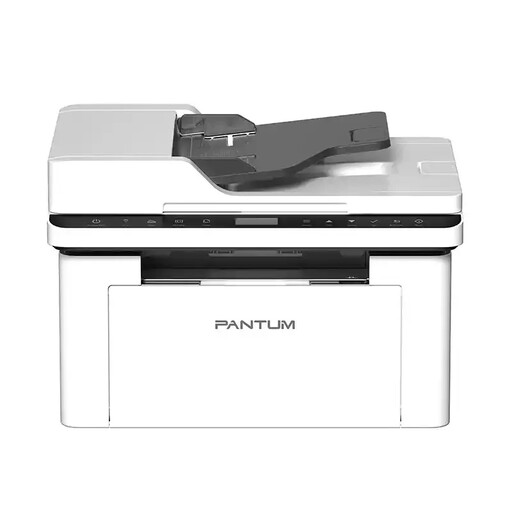
Why this product suits this profile: This device combines printing, copying and scanning in a compact body and is designed for black-and-white documents. With speeds of up to 22 ppm in A4, it is suitable for university work, invoices and typical home-office tasks.
The specifications explicitly state black-and-white printing, A4 speed and a single toner cartridge. Duplex printing should be planned for as a manual function before purchase.
22 ppm, USB 2.0, Wi-Fi, Bluetooth and 1,200 × 1,200 dpi optical scan resolution; supports AirPrint, Mopria, Wi-Fi Direct and the Pantum app.
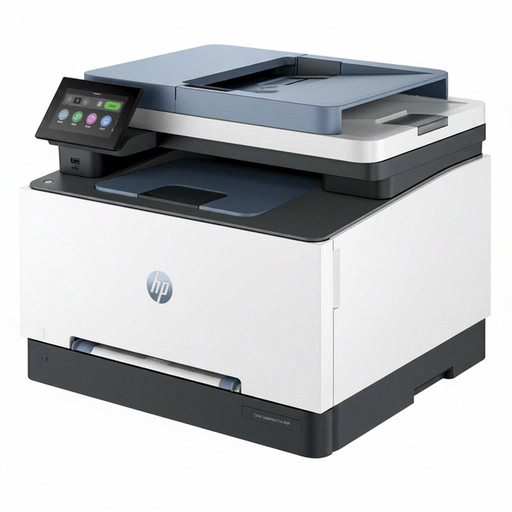
Why this product suits this profile: If you need colour output as well as documents, this multifunction device combines colour laser printing with scanning and copying. Wi-Fi, Ethernet and USB provide various ways to connect it in the office.
The automatic double-sided printing function is explicitly specified. The product also features two paper trays and an input capacity of 350 sheets.
Up to 25 pages per minute in black and white and colour, touchscreen, automatic duplex printing, plus Wi-Fi, Ethernet and USB.
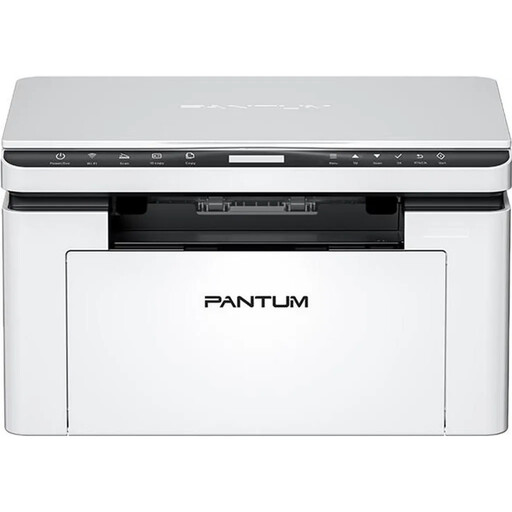
Why this product suits this profile: For a small office handling multiple document jobs, this model offers an LCD control panel, print speeds of 22 ppm and support for 2.4 and 5 GHz Wi-Fi.
The technical specifications indicate manual duplex printing and no fax function. If you need automatic page turning or fax, you can rule out these points before buying.
22 ppm print speed and 23 cpm copying speed, 150-sheet paper input, LCD display, plus Wi-Fi, Bluetooth, AirPrint, Mopria and Wi-Fi Direct.
Before buying a multifunction printer, compare the following points:
For frequent black-and-white documents, a laser printer may be a good choice thanks to its toner technology and consistent text output. Inkjet printers offer advantages if you regularly print colour documents and photos. Your decision should be based on your actual print volume, colour requirements and consumable costs.
Its lifespan depends on print volume, maintenance, paper quality and how toner or ink is handled. The manufacturer’s recommended monthly workload provides a useful guide. A device should not be operated continuously at its maximum duty cycle. Regular cleaning in accordance with the instructions, along with a dry, well-ventilated location, can help support reliable use.
First, check that the printer and end device are connected to the same network. With dual-band models, selecting the 2.4 or 5 GHz band may also be relevant. Restarting the router and printer, using the latest manufacturer app, or setting up the printer via USB or Wi-Fi Direct can help if the local Wi-Fi network is not detected.