Web developers testing keyboard navigation
You want to navigate the collection and use its controls without a mouse. What matters is how the website responds to keyboard input, not whether the keyboard itself is described as accessible.


When testing a museum collections website, it helps to have a keyboard that gives you reliable access to the standard and navigation keys you need. However, the keyboard itself cannot make the website accessible. A full-size keyboard with a number pad is practical for frequent inventory entry, while a split or compact layout may be a better fit if typing posture or desk space is a priority. The W3C Web Accessibility Initiative recommends testing how the website actually works with keyboard input.
You want to navigate the collection and use its controls without a mouse. What matters is how the website responds to keyboard input, not whether the keyboard itself is described as accessible.
You write object descriptions and enter identifiers regularly. The layout, number pad and suitable connections all affect which keyboard will work best at your desk.
You’re weighing up a split keyboard for longer typing sessions against a compact, configurable model for limited desk space or use with multiple devices.
First, decide whether your main priority is testing website navigation, entering lots of inventory data, or adapting the layout and saving desk space. This will help you choose between a standard layout, a split keyboard and a compact design.
| Buying priority | What to check | Who is it important to? |
|---|---|---|
| Standard keys for testing | Check that the keys and function layers you need work with your operating system, then navigate the website without a mouse. | When I test navigation without a mouse, I want to see whether the focus moves in a predictable way and all controls are accessible. This is the top testing priority for around 33% of consumers. |
| Layout for text and identifiers | Check the exact key layout, number pad and connection you need; the model name alone doesn’t confirm which version you’re getting. | When I enter lots of object descriptions and inventory numbers, I need a layout that suits the way I type and, if necessary, a number pad. Data entry is the main priority for around 27% of consumers. |
| Key layout for long typing sessions | Consider the split layout, dimensions, connection and any adjustment period needed for the specific model. | When I spend long periods typing at my desk, I want to weigh up whether a split keyboard suits the way I work. Key layout is the main priority for longer typing sessions for around 20% of consumers. |
| Space and customisation | Check the layout, function layers, operating system compatibility and the connection you need. | When desk space is limited or I work across multiple devices, I want to weigh up size against customisation options. Around 20% of consumers prioritise space, switching between devices or customisation. |
The German manufacturer version of the CHERRY KC 6000 SLIM is listed alongside a Joybuy offer with a US layout. So even products with the same family name may have different layouts.
Before ordering, compare the full version identifier and stated layout with what you need.
A different hand position won’t change whether features are accessible, the focus remains visible or a keyboard trap occurs.
Treat your choice of hardware and testing the website as separate tasks.
A compact layout and customised keys may work differently from a conventional full-size keyboard. Custom key mappings mustn’t obscure whether visitors can use the website with standard keyboard input during testing.
Check that the keys you need work on the specific device, then test the website using standard keyboard input as well.
The KC 6000 SLIM is an example of a slim, wired, full-size keyboard for a fixed workstation.
According to Logitech, the ERGO K860 combines a split layout and number pad with wireless connectivity.
The PERIBOARD-512 is a wired option with a split keyboard and number pad.
The K3 Pro is an example of a compact, programmable keyboard.
The Joybuy products below include wired and wireless full-size keyboards with a QWERTZ layout, as well as a split keyboard. Compare the layout, connection and number pad to find the right fit for your workspace.
 No image available
The full-size layout with number pad is well suited to workstations where inventory numbers are entered regularly.
The set includes a keyboard and mouse. Features listed include a 2.4 GHz USB connection, quiet keys and a detachable wrist rest.
The product name lists three DPI settings for the mouse, and Windows and Mac as compatible systems.
 No image available
This wired, full-size keyboard with a German QWERTZ layout is an option for a fixed workstation and regular data entry.
The product name lists CHERRY MX2A Red switches and RGB backlighting.
 No image available
With its wired, full-size design and German QWERTZ layout, the K120 is an option for a fixed workstation.
The product name lists USB plug-and-play and compatibility with Windows.
 No image available
A split keyboard may suit you if you’d like to try a different layout for longer typing sessions.
The product name lists a QWERTZ layout, Bluetooth and a USB receiver. Logitech also lists a number pad for the ERGO K860 model.
According to the product description, wireless use requires two AAA batteries.
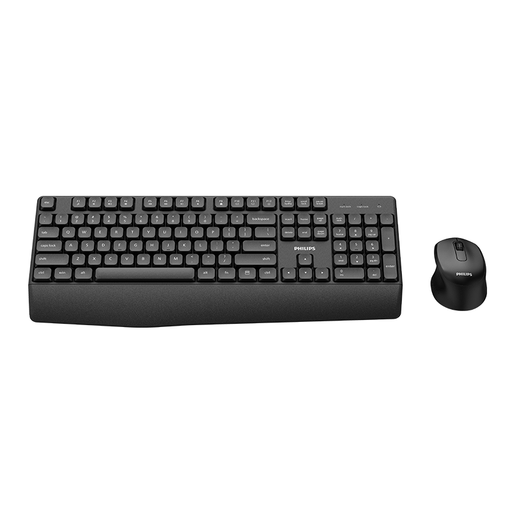 No image available
This set is an option if you want to use a keyboard and mouse together wirelessly.
The version is listed as German.
No. W3C requirements apply to how the web content works: features must be accessible through a keyboard interface, and focus order and visible focus must also be checked. So test how people actually navigate the website, not just the hardware.
First, check the key layout and connection on your computer. Then use the site without a mouse to navigate search, filters, object views and, where relevant, dialogue boxes. Check whether the focus moves predictably, remains visible and doesn’t get trapped on a control.
Check whether the specific offer requires batteries or additional connection accessories, and read the service terms listed for that offer. Logitech says the ERGO K860 requires AAA batteries; details for a particular offer shouldn’t be assumed to apply to listings from other retailers.
No. You can’t determine which requirements apply based on the word “museum” alone. The Federal Government Commissioner for Matters relating to Persons with Disabilities’ Accessibility Office states that BITV 2.0 applies to federal public bodies; for other public bodies, you need to check the relevant state law. In its May 2025 BFSG FAQ, the Accessibility Office describes the possible scope for e-commerce services provided at the request of consumers with a view to concluding a consumer contract. The organisation responsible for the project and the website’s features therefore also matter.