Which microphone is right for you?

Speaking alone at a shared table

If you’re recording your museum commentary from a fixed spot, a wired lapel microphone may be enough for a single voice. Check the connection and listen to a test recording rather than assuming it will block out a particular level of table noise.

Commentary duos

If you’ll both be speaking in the recording, you’ll need a suitable two-person setup, such as a set with two lapel transmitters. Check the exact set configuration and make sure the receiver is compatible with your recording device.

Using different recording devices

If you’ll be switching between a smartphone and a computer, the microphone connection needs to work with each device you plan to use. Remember to factor in any adapters and the recording app, too.

What should you look for when choosing?

Wired USB-C microphone

A good fit if: you’re recording alone from a fixed spot and your device supports the intended USB-C audio connection. Sennheiser lists a 2 m cable for the XS Lav USB-C.

Bear in mind: The cable limits how far you can move, so test whether your device and recording app recognise the microphone.

Wired 3.5 mm microphone

A good fit if: your device supports the relevant microphone input. Shure says the MVL is designed for a compatible TRRS connection, while RØDE specifies a TRS microphone input or a compatible wireless transmitter for the Lavalier GO.

Bear in mind: TRRS and TRS aren’t interchangeable just because they have the same plug diameter. Check which adapters and accessories you’ll need.

Wireless set with two transmitters

A good fit if: two people will be speaking or you’d like to move around while recording. The RØDE Wireless Micro and DJI Mic Mini are also available in versions with two transmitters.

Bear in mind: Check the exact set configuration, receiver connection and power supply. DJI notes that a separate adapter may be needed for Lightning devices.

What you need What to check before buying Who should pay particular attention?
Recording your voice clearly Check the clip position and recording level, and make a short test recording with the usual background noise. If I’m recording alone, I want to capture my voice clearly and hear how much of the surrounding sound comes through. Around 33% of consumers say that recording a clear solo voice is their top priority.
Connecting to devices you already own Check your device model, microphone input, plug wiring, adapters and whether the recording app recognises the microphone. If I want to use the same microphone with different devices, its connection needs to suit every setup I have in mind. Around 25% of consumers put device compatibility first.
Two voices or freedom to move Check the number of transmitters and the receiver connection; make a test recording with both voices first. If we’re speaking as a pair or changing seats, I want to be able to mic up both people appropriately. Around 25% of consumers prioritise two voices or freedom to move.
Easy set-up Check what’s included, any power requirements and the set-up steps before recording. If I have little time to set up at the table, I want to connect as few components as possible while still being able to make a test recording. Around 17% of consumers say getting started easily is their top priority.

Common buying pitfalls

  • The same jack size doesn’t guarantee compatibility

    Shure says the MVL is designed for a compatible TRRS connection, while RØDE specifies a TRS microphone input for the Lavalier GO. An incompatible connection may prevent you from setting up as planned.

    Before choosing a model, check your device’s specific microphone input and plug wiring.

    Depending on your device, you may need a suitable adapter or a different recording device.

  • A wireless model name doesn’t tell you which set you’re getting

    The DJI Mic Mini is available as a one- or two-transmitter set. The one-transmitter version isn’t enough to equip two people with a lapel transmitter each.

    Check how many transmitters are included and whether the receiver and connection will work with your recording device.

    If a component you need is missing, you may have to buy it separately and spend extra time setting everything up.

  • A sound specification can’t replace a test at the table

    Manufacturers’ information about sound and features can’t tell you how a particular recording will sound with the background noise at a shared table.

    Before recording your commentary, make a short test recording in the conditions you’ll actually be using and listen back to it.

Brands to consider

Sennheiser

According to Sennheiser, the XS Lav USB-C is a wired option for recording one voice with a compatible mobile device or computer.

  • Sennheiser lists a 2 m cable, a clip and a foam windshield as included features.
  • For greater distances from the recording device or to mic up two people separately, you’ll need a different setup.

Shure

The MOTIV MVL is designed for close-miked speech recording with a mobile device that has a compatible 3.5 mm TRRS input.

  • Shure lists an omnidirectional pickup pattern, a clip and a windshield.
  • If your mobile device doesn’t have a compatible connection, make sure the adapter solution suits it. An omnidirectional pickup pattern doesn’t mean conversations at the next table will be suppressed.

RØDE

RØDE offers different setups for fixed positions and wireless recording, including the wired Lavalier GO and the separate Wireless Micro.

  • The Lavalier GO is designed for a compatible TRS microphone input or wireless transmitter; the Wireless Micro is available as a two-transmitter system for smartphones.
  • The Lavalier GO on its own isn’t a complete wireless system. For the Wireless Micro, make sure the USB-C or Lightning receiver version suits your phone.

DJI

The DJI Mic Mini is available in versions for one or two people speaking.

  • DJI offers, among other options, a set with one transmitter and a version with two transmitters, a receiver and a charging case.
  • A separate Lightning adapter may be needed for a smartphone with a Lightning connection.

BOYA

BOYALINK 2 is a wireless range for people who switch between different connection types.

  • BOYA describes interchangeable USB-C, Lightning and 3.5 mm TRS adapters, as well as selectable mono and stereo output.
  • Before buying, check the exact set configuration and compatibility with your recording device.

Joybuy product selection

This selection includes a lavalier microphone for smartphones, PCs, laptops and cameras, as well as wireless sets with one or two transmitters. The key is choosing the right connection and set configuration for your recording device.

SYNCO S8 lavalier microphone for smartphone, PC, laptop and camera

SYNCO S8 lavalier microphone for smartphone, PC, laptop and camera

For recording speech at a table when using one of the devices listed in the product title.

The product title lists smartphones, PCs, laptops and cameras as compatible recording devices.

View at Joybuy

Moman M1CXT wireless lavalier microphone, USB-C, 2TX+1RX

Moman M1CXT wireless lavalier microphone, USB-C, 2TX+1RX

The two-transmitter configuration is suitable for recording two people speaking, provided the receiver is compatible with the USB-C recording device.

The product title lists USB-C and 2TX+1RX.

View at Joybuy

Moman M1CT wireless lavalier microphone, USB-C, 1TX+1RX

Moman M1CT wireless lavalier microphone, USB-C, 1TX+1RX

A one-transmitter configuration is an option for a single voice if your recording device supports the USB-C receiver.

The product title lists USB-C and 1TX+1RX.

View at Joybuy
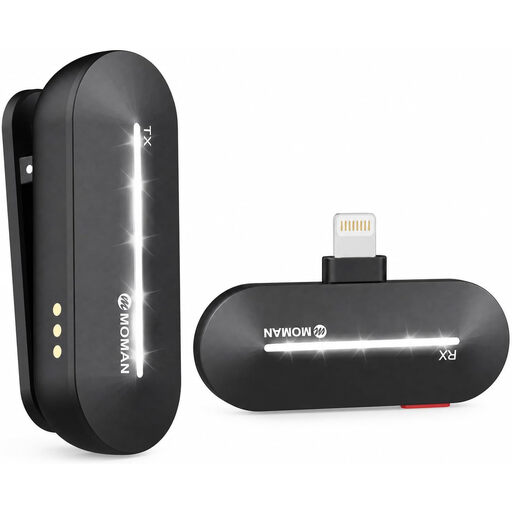
Moman M1CL wireless lavalier microphone for iPhone 14/13/12/11/X, 1TX+1RX

Moman M1CL wireless lavalier microphone for iPhone 14/13/12/11/X, 1TX+1RX

For recording a single voice with one of the iPhone models listed in the product title; check that the receiver is compatible with your device.

The product title lists 1TX+1RX.

View at Joybuy

Moman MC1(C) wireless lavalier microphone for USB-C mobile phones, 1TX&1RX

Moman MC1(C) wireless lavalier microphone for USB-C mobile phones, 1TX&1RX

For recording a single voice with a compatible USB-C mobile phone; check receiver compatibility before recording.

The product title lists 1TX&1RX and 2.4 GHz.

View at Joybuy

Frequently asked questions

Will a 3.5 mm connection work with every lavalier microphone?

No, the connection needs to match both the microphone and the recording device. Shure says the MVL is designed for a compatible mobile TRRS connection or a CTIA-compliant adapter; RØDE specifies a TRS microphone input for the Lavalier GO. Also check whether your recording app recognises the microphone.

What should I check when recording with two people?

Choose a set with two transmitters if both people are to wear a lapel microphone. Also check that the receiver is compatible with your recording device, and make a test recording with both voices beforehand.

How should I attach the microphone for a test recording?

Attach it to your collar or lapel and listen to a short recording. For its XS Wireless Digital lavalier set, Sennheiser recommends a distance of around 25 cm from the mouth and notes that the ideal distance depends on how loudly you speak. Don’t assume this measurement applies to other models without checking.

Am I allowed to record other people’s conversations at a shared table?

Under section 201 of the German Criminal Code (StGB), recording another person’s non-publicly spoken words without permission may be a criminal offence. The law is published by the Federal Ministry of Justice and the Federal Office of Justice on “Laws on the Internet”. Point your recording at the people taking part and get permission from anyone else beforehand.

Do I need permission to record a museum commentary?

That depends on the museum, recording location and intended use. The Berlin State Museums require an application for certain film, photography and audio recordings at the relevant site. Check the rules with the museum concerned before recording there.