Joybuy products for voice recording
The Joybuy products below are intended for voice recording with a computer or mobile device. Depending on the model, they focus on USB/XLR, wireless or microphone kit setups.
 No image available
FIFINE K688CTW
For voice and voice-over recording on a computer, with a boom arm that lets you position the microphone as needed.
Dynamic, unidirectional microphone with USB and XLR connections. According to the product description, the gain control, mute and headphone monitoring work in USB mode; an XLR cable isn’t included. The set includes a boom arm and C-clamp.
View at Joybuy
 No image available
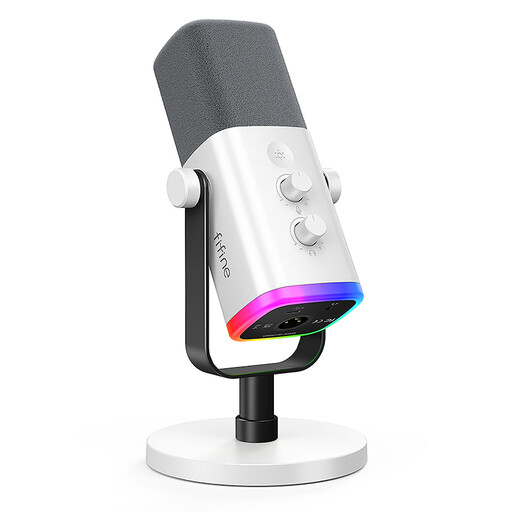
FIFINE AM8 White
An option for recording voice on a computer with the microphone on a fixed stand.
Dynamic, unidirectional microphone with USB and XLR connections. Gain control, mute and a headphone connection are listed for USB use. An XLR cable isn’t included.
View at Joybuy
 No image available
DJI Mic Mini 2S (2 TX + 1 RX + Charging Case)
For voice recording with a microphone attached to the speaker; the product description mentions interviews and use with a PC.
The set includes two transmitters, one receiver and a charging case. According to the description, the transmitters can be attached with a clip or magnet.
View at Joybuy
 No image available
Yinkaer G10-P15-XB
For a computer or mobile device setup with a microphone and audio mixer.
According to the product description, the kit includes a 3.5 mm condenser microphone, a sound card mixer and a boom arm.
View at Joybuy
 No image available
Yinkaer G10-P17
For voice recording with a microphone kit and audio mixer on compatible devices.
The product description lists a condenser microphone and compatibility with PC, Mac and mobile devices. A microphone stand is also included.
View at Joybuy
Frequently asked questions
How should I position the microphone when recording?
Position the microphone for your fixed speaking spot, following the instructions for the specific model, then listen through headphones to a recording of the actual text. Sennheiser notes that positioning and distance affect the input level; you can adjust the signal using the gain control.
Do I need extra equipment for an XLR microphone?
For XLR-only operation, you’ll need a suitable interface to connect it to your recording device. According to the manufacturer, the RØDE PodMic USB also offers USB-C. Check the cable, stand and pop filter against the contents listed for the exact version.
What are my rights if a product develops a fault in Germany?
For the relevant purchase, your statutory consumer rights are against the seller and are separate from any voluntary guarantee. The Verbraucherzentrale explains that, if a product is faulty, repair or replacement may be considered first as a form of subsequent performance. The requirements depend on the individual purchase.
Can I record someone else’s museum text for an audio guide?
A microphone doesn’t give you rights to the text. Under § 31 UrhG, rights of use can be granted for specific types and scopes of use. If the text belongs to someone else and is protected by copyright, check with the rights holder that recording it and your intended use are covered. The Federal Ministry of Justice and the Federal Office of Justice provide the text of the law.
What should I check on product labelling?
For products under its market surveillance, the Bundesnetzagentur lists the CE marking and the accuracy of the manufacturer’s information among the points to check. The requirements for a particular microphone depend on the model; a brand name alone doesn’t prove that a product meets the applicable requirements.


