For speaking from one spot
If you’ll be recording your commentary mostly sitting down, you could consider a wired model and attach the microphone close to your voice. Shure notes that microphone position affects how much room sound is picked up.


For recording a museum commentary in a noisy home, a suitable wired microphone is a sensible starting point if you’ll be speaking mostly from one spot. If you need to move around, consider a wireless set; for a separate audio file, a lavalier with a recorder may be a better fit. Whichever recording method you choose, start with a test: a lavalier won’t remove room noise or echo by itself. Shure and Biamp recommend positioning the microphone close to the speaker. You should also check the connection, how it’s attached and how it sounds with your own voice.
If you’ll be recording your commentary mostly sitting down, you could consider a wired model and attach the microphone close to your voice. Shure notes that microphone position affects how much room sound is picked up.
If you’ll be moving around or gesturing as you speak, a wireless set can do away with the cable running to your recording device. Make sure the receiver and power supply are suitable for your recording setup.
If you want to create an audio file independently of a live smartphone recording, a lavalier with a recorder could be an option. Remember to factor in transferring the file and, if necessary, syncing it during editing.
A good fit if: you’ll usually be speaking from one spot and the cable can reach the right input.
Things to consider: the cable type, input and, where required, plug-in power all need to be compatible. A plug that looks the same size doesn’t guarantee compatibility.
A good fit if: you want to move around while recording your commentary, or your recording device isn’t right next to you.
Things to consider: the receiver, transmitter and batteries need to suit your setup. Noise cancellation is no substitute for good microphone placement or a listening test.
A good fit if: you want to record audio separately from a live smartphone or camera recording.
Things to consider: recording and transferring the file add extra steps. 32-bit float, which Zoom says is available on the Zoom F2, won’t remove background noise.
| Priority | What to check when buying | Who is this particularly important to? |
|---|---|---|
| Clear speech in a room | Attach the microphone close to your voice; listen to a test recording with the actual background noise you’ll be dealing with. | If you can hear noise or echo in your home, you’ll want to record your voice clearly without relying on a silent environment. This is the top priority for around 36% of consumers. |
| Compatible device connection | Check the exact model, microphone input and any plug-in power requirements; test the external microphone in your recording app. | If you’re recording with your existing smartphone, computer or recorder, you’ll want that specific device to pick up the microphone signal. The right connection is the top priority for around 29% of consumers. |
| Freedom to move | Check the receiver connection and which transmitters are included; test the battery level and recording at your intended location. | If you’ll be walking or gesturing as you explain, you’ll want to move freely without a cable to the recording device getting in your way. This is the top priority for around 21% of consumers. |
| Separate audio file | Check what’s included with the microphone and recorder, as well as the storage medium, power supply and file transfer options. | If you want to record independently of your smartphone or vary your speaking volume, a separate recording option that suits your needs will matter to you. Around 14% of consumers put this first. |
A microphone won’t automatically change the acoustics of a room. A manufacturer’s claims about noise cancellation don’t tell you how the processing will sound with the noise in your home and your voice.
First, check the microphone position and identify the source of the noise. Then make a short test recording and compare the sound with processing switched on and off.
If you only notice background noise or a change in your voice when listening back later, you may need to record it again.
The RØDE Lavalier GO is a TRS model for which the manufacturer specifies plug-in power. The Sennheiser XS Lav Mobile has a TRRS connection, while the ME 2 is designed for certain bodypack transmitters.
Check the full model name against the microphone input and required power supply. Record a file and listen to it before you start your commentary.
Depending on the device you already have, you may need a suitable adapter or a different microphone or recording system.
With the Zoom F2, the recording is made on the standalone recorder. This is a different process from recording directly on a smartphone.
Decide in advance where you want your audio file to be recorded, and test the process from recording through to editing.
With a separate recording setup, you’ll need to allow time for transferring the file and, if necessary, syncing it.
The XS Lav range includes options for different connection types; the ME 2 is part of a product line designed for certain bodypack transmitters.
The Lavalier GO is designed for compatible 3.5 mm TRS microphone inputs; the smartLav+ is a TRRS option for smartphones.
The Mic Mini is a wireless set with a clip-on transmitter, designed for a mobile recording setup.
The F2 is a standalone recorder, which Zoom says is available with a lavalier microphone.
The LARK M2 is a compact wireless set for which Hollyland describes environmental noise cancellation.
The products below are wireless lavalier systems for recording while moving around. Before buying, check that the receiver variant is compatible with your recording device.
 No image available
This wireless lavalier system could be an option if you want to record while moving around.
According to the product description, the transmitter weighs 9 g. It also lists ENC and a camera receiver with mono/stereo switching. Check that the specific receiver variant is compatible with your device.
 No image available
This model could suit a mobile recording setup as a wireless lavalier microphone.
The product description lists receivers for USB-C, Lightning and cameras, as well as a magnetic clip. Check which connections are included in the specific package.
 No image available
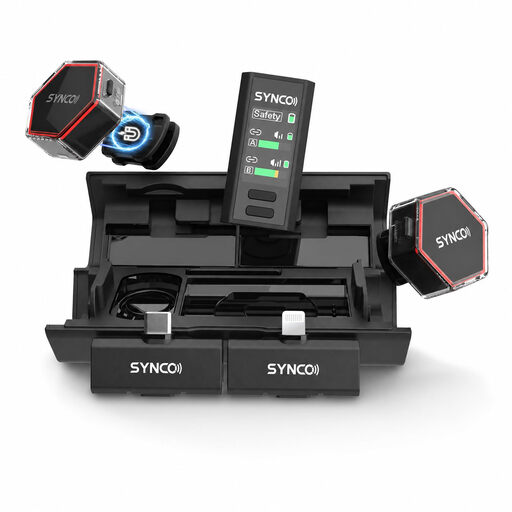
If you want to move around while recording, this set with two transmitters could be a wireless option to consider.
Features listed include 2.4 GHz, USB-C and Lightning connections, and DSP noise cancellation. Check that the connection is right for your device, and listen to the processing with your own voice.
 No image available
If you’re recording two people on the move, this set with two transmitters could be a suitable option.
The product description lists USB-C, two omnidirectional microphones and real-time monitoring. It also includes DSP noise cancellation; make a test recording to judge how it affects the sound.
 No image available
If you want to record wirelessly with one transmitter and one receiver, this USB-C model could be an option.
The product details specify up to 6 hours of battery life and a noise-cancelling chip. Test the effect of the processing with a recording that includes the actual noise in your room.
Attach it close to your voice, making sure it won’t rub against your clothes or jewellery, then listen to a short test recording with the actual noise in your home. Shure notes that a microphone won’t improve room acoustics by itself, and that rubbing sounds can be an issue with lavalier microphones.
Not necessarily. Keeping the microphone close to your voice is a basic way to affect how much room sound is picked up. DJI describes two noise-cancellation levels on the Mic Mini as a manufacturer specification; use a test recording to decide whether the processing suits your voice and the background noise.
In Germany, online purchases generally come with a right to cancel, usually within 14 days. You need to notify the retailer that you wish to cancel. If a product is faulty, statutory rights against the seller are separate from a voluntary guarantee. The specific terms of the purchase apply; the German consumer advice centre explains these rights.
Permission to record your own voice doesn’t automatically include permission to record other people’s conversations. Section 201 of the German Criminal Code (StGB) covers the unauthorised recording of another person’s non-public speech. If other people’s conversations could be picked up, set up your recording so they aren’t captured. The circumstances matter when assessing a specific case.
There isn’t a simple yes-or-no answer for every wireless microphone. Germany’s Federal Network Agency publishes general frequency allocations, including rules for short-range devices and wireless microphones. Whether a particular model is covered depends on its frequency and device specifications.