What should you look for when buying?
First decide whether you’ll record from a fixed spot, move around as you speak or save an independent audio file. Then check that the microphone works with your recording device and listen to how your voice sounds in the room.
| Buying priority |
What to check before buying |
Who is this particularly important for? |
| Clear speech with fan noise in the background |
Microphone position and distance from your voice; compare noise reduction settings with a test recording made at the intended spot. |
If I want to record clear commentary despite the fan, I’ll test the position in the room itself. Around 31% of consumers prioritise clear speech when there is fan noise. |
| Connection and a simple setup |
The input and pin configuration on your recording device; check any adapters, app requirements and cable length if needed. |
If you want to use your existing smartphone or recording device at a fixed commentary spot, you need a connection that the device actually recognises. Around 25% of consumers prioritise a compatible connection and a simple setup. |
| Freedom of movement |
Receiver type and connection to your recording device; consider power requirements and wireless operation at the location. |
If I want to speak while moving between exhibits, I don’t want a cable restricting me from my recording device. Freedom of movement is the top buying priority for around 25% of consumers. |
| Recording a separate backup |
For a recorder, plan for a memory card and power supply; start a recording and play the file back in advance. |
If you want to capture commentary that’s hard to repeat without relying on a nearby smartphone or wireless link, you’ll need a separate way to record. Around 19% of consumers prioritise having an independent recording backup. |
Joybuy products for recording commentary
This selection includes wired and wireless lapel microphones for commentary from a fixed spot or while moving around. Before buying, check that the connection and receiver are compatible with your recording device.
 No image available
DJI Mic Mini 2S (2 TX + 1 RX + Charging Case)
For commentary while moving around; the product description mentions AI noise reduction, which you should assess with a test recording in the museum room.
2 transmitters and 1 receiver; built-in 32-bit float recording. Check the connection with the recording device you’re using.
View at Joybuy
 No image available
SYNCO S8 lapel microphone
For a fixed commentary spot, if your recording device is compatible with the wired connection.
The product description lists a 3.5 mm connection and an adapter set. Check which input works with your smartphone, PC, laptop or camera.
View at Joybuy
 No image available
Moman M1CXT (USB-C, 2TX + 1RX)
For commentary while moving around or recording with two transmitters; check that the USB-C receiver works with your device.
The product description mentions DSP noise reduction. Assess the results with a test recording while the fan is running.
View at Joybuy
 No image available
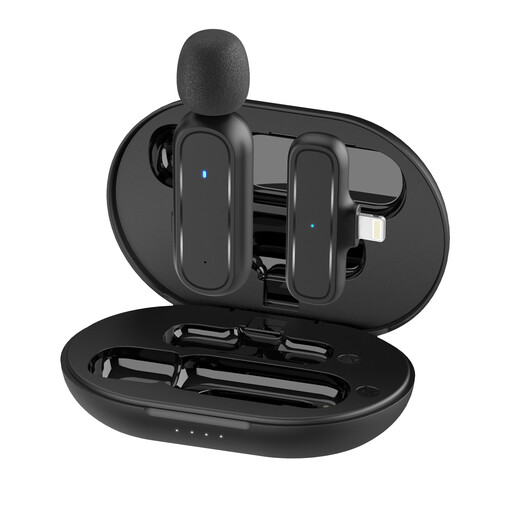
Moman MC1(A) (Lightning, 1TX + 1RX)
For recording speech while moving around with a compatible iPhone or iPad; the receiver connects via Lightning.
The product description lists three noise reduction modes. Test how well they work at your recording location and check device compatibility.
View at Joybuy
 No image available
Moman MS1X(C) (USB-C Android phones, 2TX + 1RX)
For commentary while moving around with a compatible USB-C Android phone; check that your device supports the receiver.
The product description mentions omnidirectional recording and a pop filter. A pop filter doesn’t prove that fan noise will disappear.
View at Joybuy
Frequently asked questions
Can noise reduction remove all the noise from a museum fan?
There’s no guarantee. DJI describes the Mic Mini as reducing noise, including fan noise; Shure points out that a microphone’s pickup pattern can’t reliably predict which sounds will be captured in a particular room. Listen back to a test recording made at the intended spot.
How should I attach and check a wired lapel mic before recording commentary?
BOYA recommends attaching the BY-M1 to the front of your clothing, around 20–25 cm from your face. Route the cable so that it doesn’t rub against your clothing or equipment, then listen to a short test recording. This positioning guidance is a manufacturer’s recommendation for this specific model.
What should I prepare when using a standalone recorder?
You’ll need a compatible microSD card and a power supply for the Zoom F2. According to the instruction manual, recording and playback are both unavailable without a card inserted. Before your session, also check that you can play back the recorded file.
Can I simply record other people’s conversations in a museum?
Not as a general rule. Section 201 of the German Criminal Code (StGB) makes it a criminal offence to record another person’s private spoken words without authorisation. If personal data is processed, the Federal Commissioner for Data Protection and Freedom of Information states that an applicable legal basis is required; consent is one possible basis, but not the only one. Before recording, clarify the purpose, whether other people’s voices may be captured and the museum’s rules.
Can I use any wireless microphone in Germany without checking anything else?
No. In its general allocation issued in April 2026, the Federal Network Agency specifies permitted frequency bands and technical and operational conditions; this notice replaces earlier general allocations, including notice 109/2025. Check the frequencies and applicable conditions for the specific set. The product name alone does not establish either permission to use it or an individual registration requirement.


