Clip the lavalier microphone close to the person speaking, then choose a recording method to suit the situation. For a fixed position, a compatible wired microphone may be all you need; for a tour, a wireless set gives you more freedom to move, while a body-worn recorder saves a separate audio file. Check the connection, power requirements, contact with clothing and the workflow afterwards. Manufacturer specifications alone can’t tell you how clearly a quiet voice will come through in a particular museum room.
Which recording method is right for you?
Teams recording a quiet speaker
If someone is speaking quietly, you can clip a lavalier microphone close to their mouth rather than recording them from further away. RØDE highlights close placement as an important consideration; a test recording can help you check for clothing noise and sounds from the room.
Teams with an existing smartphone or recorder
If you want to keep using a device you already own, first check the connection type, pin configuration and power requirements. Shure and RØDE specify different connection requirements for their lavalier models.
Teams recording tours or separate audio files
When you’re walking, a wireless set can connect you to the recording device; alternatively, a body-worn recorder can save a separate file. DJI describes different transmitter combinations, while Zoom highlights the extra file transfer and synchronisation steps involved when using a separate recorder.
What should you look for when buying?
First decide how you want to record the voice. Then check the device connection, how the microphone attaches and how much freedom to move you’ll need for the situation.
| What matters |
What to check before buying |
Who is it important to? |
| Recording quiet speech clearly |
Clip the capsule close to the speaker; check for clothing noise and whether you need a windscreen at the recording location. |
If I want to record one quiet voice despite sounds from the room and clothing, microphone placement matters more to me than a high recording level. Around 36% of consumers put clear speech first. |
| Connecting a device I already own |
Check the connector pin configuration, any adapter required, power requirements and whether the recording app recognises the microphone. |
If I want to use my existing smartphone, camera or recorder, the whole signal path needs to be compatible. Around 29% of consumers prioritise compatibility with their recording device. |
| Moving freely during a tour |
Check how many transmitters you need, the receiver connection and power supply; consider the wireless conditions at the venue. |
If I’m walking through several rooms while speaking, I want to move freely without being tied to a fixed recording device. Around 21% of consumers focus above all on freedom of movement. |
| Recording a separate audio file |
Allow for a memory card, batteries, file transfer and any synchronisation in your workflow. |
If I want to edit the voice as a separate file, independently of the recording device, I’m happy to do an extra transfer step. Around 14% of consumers prioritise a separate audio file. |
Avoid common buying mistakes
-
Assuming all 3.5 mm connections are interchangeable
A plug may fit physically even when its pin configuration and power requirements aren’t compatible with your recording device. Shure describes the MVL as suitable for compatible mobile connections or the appropriate CTIA adapters; the RØDE Lavalier GO needs a suitable TRS input with plug-in power.
Before buying, check the pin configuration, power requirements and whether your particular recording device recognises the microphone. Depending on the connection, you may need a suitable adapter or a different microphone.
-
Thinking a recording format can make up for poor placement
32-bit float doesn’t replace positioning the microphone close to the speaker. Clothing can rub against the capsule or cable, and sounds from the room will still be part of the recording.
Secure the capsule and cable, then listen to a test recording made at the actual location while wearing the clothing you plan to use.
-
Assuming a wireless set or recorder needs no upkeep
A wireless set needs charged components and a suitable connection. A recorder saves files that you’ll need to check and may need to transfer or synchronise afterwards.
Before recording, test the full process from switching on to playing back the finished file. Depending on the system, you’ll need batteries, a memory card and time to handle the files.
A guide to relevant brands
Shure
According to Shure, the MVL is designed for recording speech with compatible mobile devices. MoveMic Two is a different, app-based solution for two speakers.
- Shure lists an omnidirectional polar pattern, clip and windscreen for the MVL.
- For mobile devices without a suitable 3.5 mm connection, check that the adapter is compatible. Features of MoveMic Two don’t automatically apply to the MVL.
RØDE
The Lavalier GO is a wired lavalier microphone for suitable 3.5 mm TRS inputs or compatible Wireless GO transmitters.
- RØDE lists a small omnidirectional capsule, clip and pop filter.
- According to the specifications, the microphone needs 2.7 V plug-in power via a TRS connection. The manufacturer’s description isn’t an independent test in a museum.
DJI
Mic Mini offers a body-worn wireless option; DJI distinguishes between combinations with one or two transmitters.
- You can choose the right transmitter combination depending on whether one or two people will speak at the same time.
- Manufacturer figures for battery life and range apply under the conditions specified and don’t guarantee an uninterrupted wireless connection in a museum.
Zoom
According to Zoom, the F2 pairs a body-worn recorder with a supplied lavalier microphone and saves separate mono audio files.
- Zoom lists 32-bit float, memory card recording and battery power.
- Compared with recording directly, you’ll also need to transfer the file and may need to synchronise it.
Sennheiser
The ME 2 is described as a speech microphone, while the MKE 2 is available in several connection options.
- For the MKE 2, Sennheiser lists EW, 3-pin, XLR and unterminated cable options, among others.
- The specific connection option matters. Claims about durability on stage don’t prove that quiet voices will be clearer in a museum.
Joybuy products for different recording methods
This selection includes a wired lavalier microphone for smartphones, PCs or cameras, as well as wireless sets with Lightning or USB-C receivers. The key is to make sure the connection matches the recording device you’ll actually use.
 No image available
SYNCO S8 lavalier microphone
For recording one voice with the microphone close to the speaker, provided your existing device supports a compatible 3.5 mm connection.
The description lists a clip, omnidirectional recording, windscreen and adapter kit. Check that the connection, including any adapter you may need, is compatible with your recording device.
View on Joybuy
 No image available
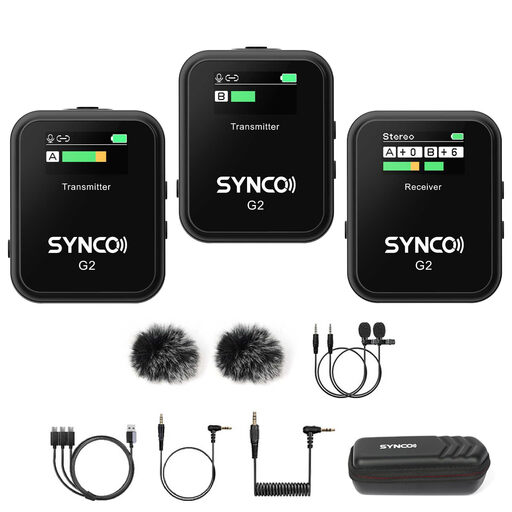
SYNCO G2(A2) dual-channel wireless lavalier microphone
For mobile recordings with two transmitters, provided your recording device supports the compatible Lightning receiver.
The described set includes two transmitters and a receiver with a Lightning connector. Compatible devices listed include iPhone 11/12/13/X/XS and iPad series; check your specific model against this list.
View on Joybuy
 No image available
SYNCO G3PRO wireless lavalier microphone system
For recordings with two people, provided the receiver and recording device are compatible in your chosen set-up.
The description lists two transmitters and two lavalier microphones. The receiver has TRS, TRRS and USB-C outputs, as well as real-time monitoring; check which output your device needs.
View on Joybuy
 No image available
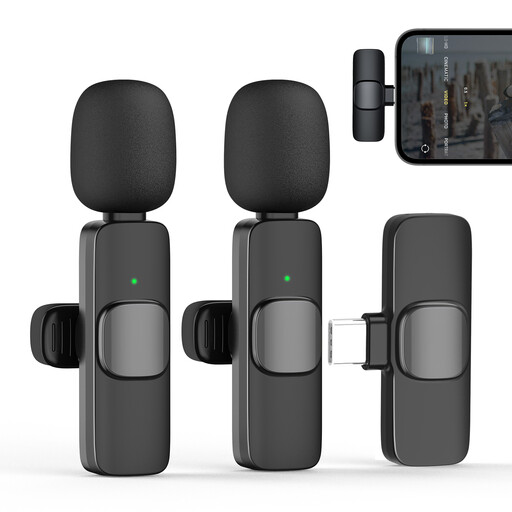
Moman CP1X(C) 2.4GHz wireless lavalier microphone
For mobile recording with a compatible device that supports the USB-C receiver described.
The title specifies the 1TX & 1RX version; the receiver plugs into a USB-C port. Check that the connection matches your recording device before buying.
View on Joybuy
 No image available
SYNCO P2ST dual wireless lavalier microphone
For recordings with two microphones, provided your device has a compatible USB-C connection.
The description lists a dual-microphone kit with a charging case and USB-C receiver. Check that the receiver is compatible with your smartphone or tablet.
View on Joybuy
Frequently asked questions
How should I attach the microphone to minimise clothing noise?
Clip the capsule close to the speaker and position it so that fabric doesn’t rub against it. RØDE describes using a cable loop for strain relief; then listen to a short test recording with the clothing you plan to wear and at the actual speaking volume.
Do I need two transmitters for two volunteers speaking at the same time?
In the DJI Mic Mini product range, the version with one transmitter and one receiver is different from the one with two transmitters. Also check how your recording device will save the two voices.
What should I know about batteries, memory cards and the guarantee?
The described operation of the Zoom F2 requires AAA batteries and a suitable microSD card. For goods bought by consumers from a business seller in the EU, EU consumer information generally states that consumers have a minimum of two years’ legal guarantee rights from the date they receive the goods. These are separate from any voluntary manufacturer’s guarantee.
Can I simply record conversations in a museum?
No. The fact that a recording is technically possible doesn’t mean it’s permitted: Section 201 of the German Criminal Code covers the unauthorised recording of another person’s non-public spoken words. Processing personal recordings also requires an appropriate legal basis under data protection law. Consent is one possible basis, but it isn’t always the only one. Discuss the purpose of the recording, who will be involved and any plans to publish it with the museum in advance.
Can I use wireless microphones in Germany without registering them?
Some frequency uses are permitted without registration, provided you meet the conditions of the relevant general assignment; this isn’t blanket approval for every wireless set. In April 2026, the Bundesnetzagentur published general assignment Vfg. 37/2026, which replaces several earlier notices. Check the frequency and technical specifications of your chosen system against the relevant regulations.


