Which option is right for you?

Museum team recording a single speaker

If you need to record one seated person with minimal setup, positioning the device correctly and listening back to the recording are important. Zoom describes mounting the H1essential on a tripod for conversations, while Tascam offers handheld recorders for voice recording.

Team in a busy museum space

If visitor noise or the distance from the recorder is hard to avoid, a microphone worn by the speaker may be an alternative. Tascam describes the DR-10L Pro as coming with a lavalier microphone; the speaker should agree to having it attached to their clothing.

Team creating a permanent audio archive

For repeated recordings, plan how files will be stored, transferred and used later. The BfDI highlights the duty to provide information when processing personal data.

What to look for when buying

Recorder with built-in microphones

Best suited when: the seated speaker can talk in a reasonably quiet room and the device can be positioned appropriately.

Consider: Poor positioning, such as placing the recorder directly on a table, can affect speech clarity. 32-bit float does not make good microphone placement any less important.

Recorder with a lavalier microphone

Best suited when: you want the microphone closer to the speaker and they are happy to wear both the microphone and recorder.

Consider: Check the speaker’s clothing, cables and any clothing rustle during a test recording.

What you need What to check when buying Who it matters most to
Clear speech Built-in microphone, tripod mount or supplied lavalier microphone; listen to a test recording made in the intended position. If I need to capture clear speech from the actual seat, I check the distance and room noise first. Around 36% of consumers put speech clarity first.
Recording controls Check the record button, visible recording indicator, headphone socket and ease of use on location. I want to be able to check that recording is running before the story begins, so no part is missed without me realising. Around 29% of consumers prioritise a straightforward start and clear recording status.
Files and power Check the storage medium, power supply, recording format and actual file transfer method for the specific model. For several sessions, I want to organise and transfer files reliably. Around 21% of consumers put these processes first.
Additional microphones Only if you have a specific expansion plan, check how many separate inputs and tracks you will need. If I plan to record additional audio sources in future, I need the right connections rather than unnecessary features for a one-off session. Around 14% of consumers prioritise the option to add microphones later.

Avoid common misconceptions

  • Assuming 32-bit float makes correct microphone placement unnecessary

    The recording format does not tell you whether reflections from a table or the recorder’s position will affect speech clarity. Zoom warns that placing the H1essential directly on a table may cause reflections.

    Make a test recording in the intended position and listen back before the session. Follow the manufacturer’s guidance on where to place the recorder.

    A failed test may mean you have to record the story again.

  • Assuming a lavalier microphone requires no extra setup

    With the DR-10L Pro, the microphone is attached to the speaker, so the setup is different from a recorder placed nearby.

    Agree how it will be attached in advance, then check the microphone position and any clothing rustle with the clothes the speaker will actually wear.

    Allow extra time for fitting the equipment and making a test recording.

  • Assuming the advertised maximum recording time applies to every format

    The stated maximum recording time is not necessarily available at every audio quality setting or for every session.

    For the specific model, check the planned session length, available storage and power supply. The H1essential requires a suitable memory card.

    Depending on the model and recording plan, you may need to have a storage medium or an additional charger or power supply ready.

Key brands at a glance

Zoom

The H1essential is designed for compact recordings with a built-in X/Y microphone; the H4essential also has XLR/TRS inputs.

  • Zoom lists 32-bit float and describes tripod mounting the H1essential for conversations.
  • Zoom’s quick start guide warns of possible reflections when the recorder is placed directly on a table. The H4essential’s extra inputs are not automatically necessary for a single speaker.

Tascam

The DR-05XP is a handheld recorder with built-in microphones, while the DR-10L Pro comes with a lavalier microphone.

  • Tascam lists 32-bit float and an input for external microphones on the DR-05XP.
  • The microphone on the DR-10L Pro needs to be attached to clothing. The manufacturer’s claims about sound and reliability do not independently prove that it is suitable for a particular museum space.

Philips VoiceTracer

The DVT4115 is a voice recorder with internal storage and app-based remote control.

  • The supplier lists three microphones, 8 GB of internal storage and a rechargeable battery.
  • The advertised cloud transcription involves additional processing of voice files and is not required for local recording.

OM System

The LS-P5 is a compact recorder with adjustable directionality across its three-microphone system.

  • The manufacturer lists 16 GB of internal storage, microSD support and remote control.
  • A test recording will show whether the adjustable directionality helps from the intended speaker position.

Sony

The UX570 series is a voice recorder option for teams who value a recording indicator, playback and file transfer.

  • Sony describes a clearly visible recording LED and a direct USB connection.
  • Features designed to optimise or normalise audio do not guarantee that an original recording made from a poor position will be free from unwanted noise.

Joybuy products for voice recording

The Joybuy products below are voice recorders with built-in microphones and storage, suitable for stories recorded over several sessions. Before using cloud transcription or transferring a recording, check how the voice file will be used and who should have access to it.

PLAUD Note Pro voice recorder with 64 GB storage

PLAUD Note Pro voice recorder, 64 GB

An option for multiple sessions if you want a built-in microphone and internal storage.

Product details list 64 GB of storage, four MEMS microphones and up to 30 hours of continuous recording time.

Before transcribing or sharing voice files, clarify the purpose, legal basis and how the speaker will be informed.

View at Joybuy

Mobvoi TicNote Lite voice recorder with 4 GB storage

Mobvoi TicNote Lite voice recorder, 4 GB

This model may suit a single seated speaker if you want a built-in microphone rather than a lavalier mic.

The product description lists 4 GB of storage, a triple-microphone system and Bluetooth. It says recording starts once the device is switched on and paired via Bluetooth.

Before recording, and before processing or sharing the voice later, check the legal requirements and inform the speaker.

View at Joybuy
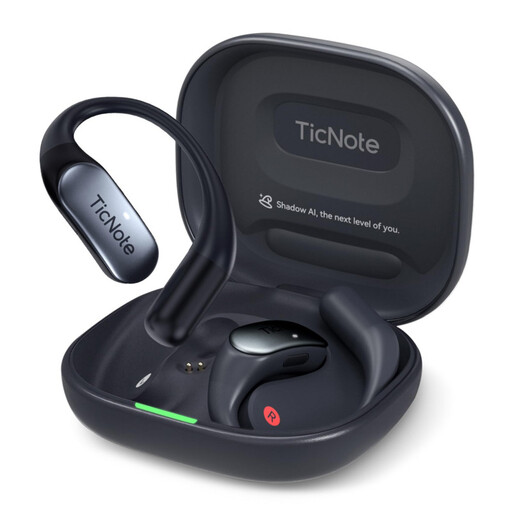
Mobvoi TicNote Pods 4G voice recorder with 32 GB storage, Navy Blue

Mobvoi TicNote Pods 4G, 32 GB, Navy Blue

This model may suit you if you want to start recording with a button press and save files locally before transferring them later.

Product details list 32 GB of local storage, two microphones and up to 5 hours of battery life.

The 4G cloud upload described involves additional processing of voice files. Before using it, clarify the purpose, legal basis and how the speaker will be informed.

View at Joybuy

Mobvoi TicNote Standard voice recorder with 64 GB storage, Dark Grey

Mobvoi TicNote Standard, 64 GB, Dark Grey

An option for repeated recordings if internal storage and later file transfer are important to you.

Product details list 64 GB of storage, a three-microphone array, an OLED display, Wi-Fi and Bluetooth. The product name states a recording time of 20 hours.

Before recording, and before processing or sharing the voice later, check the legal requirements and inform the speaker.

View at Joybuy
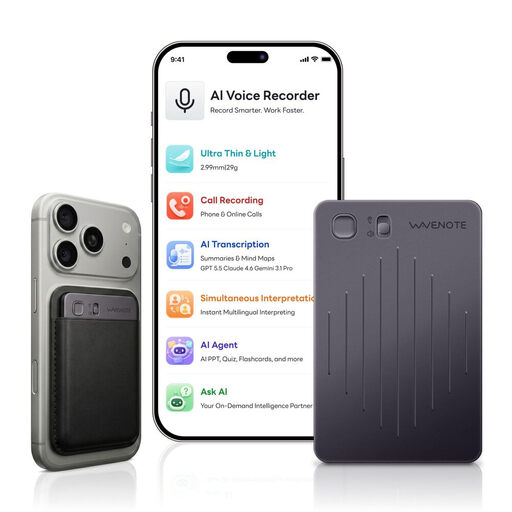
WaveNote AI Voice Recorder with 64 GB storage, Black Grey

WaveNote AI Voice Recorder, 64 GB, Black Grey

This model may suit repeated voice recordings if integrated sensors and WAV recording meet your needs.

Product details list 64 GB of internal storage, a dual-sensor system combining vibration and air-conduction sensors, and WAV recording.

Before recording, and before processing or sharing the voice later, check the legal requirements and inform the speaker.

View at Joybuy

Frequently asked questions

How should I position a recorder with a built-in microphone for a seated speaker?

For a test recording, point it towards the speaker and listen back to the result. Zoom notes that placing the H1essential directly on a table may reduce clarity due to reflections; using a tripod is one possible alternative.

What should I prepare before a longer recording session?

Check the power supply, available storage, recording and playback on your chosen model. Zoom describes the H1essential as using a microSD card and battery or USB power; the supplier lists internal storage and a rechargeable battery for the Philips DVT4115.

What should I consider if I plan to transcribe the recording or use cloud services later?

Agree in advance who will receive the voice file and how it will be processed. The supplier of the Philips DVT4115 describes optional cloud transcription. When processing personal data, you should consider the appropriate legal basis and, as a general rule, provide information at the time the data is collected.

Can a museum record a volunteer without their knowledge?

Under § 201 StGB, recording speech that is not intended for the public without authorisation is prohibited. So, speak to the person about the recording before you begin. You must also consider an appropriate legal basis for processing personal data. If you rely on consent, it must be freely given, among other requirements, and the person must be informed.

Does agreeing to a recording automatically include permission to publish it later?

You should not assume that it does. The BfDI explains that consent must be informed and given for specific processing purposes. Agree the planned publication, potential recipients and who is responsible in advance, and check separately that the legal basis is appropriate.