When listening to music behind thick internal walls, first work out whether the Wi-Fi connection is weak where you listen or whether your music collection hasn’t been made available to the playback device. If the signal is poor mainly in a distant room, adding an access point may be a more targeted solution than replacing your router. A wired backhaul avoids the wireless link between mesh nodes, if you can run a cable. If you want your router to provide the files, the storage connection, media server and playback device’s access method all need to be compatible.
Who needs to make this decision?
Music listeners behind thick walls
If you want to get a reliable signal to a room where you listen to music, the location of the access point and the connection between Wi-Fi points both matter. Check both wireless links, not just the connection to your playback device.
Owners of a local music collection
If you want to play music from USB storage or network storage, the shared files and playback device need to be compatible. Wi-Fi coverage and access to your files are two separate considerations.
Households with an existing router
If you already have a router, check whether adding an access point will be enough. If you replace it, make sure the connection type and, where applicable, your existing modem are compatible with the new device.
What should you look for when buying?
Consider Wi-Fi coverage where you listen separately from how your music files are made available. Then check how the new device will fit into your existing internet connection.
| What matters |
What to check before buying |
Who should pay particular attention? |
| Connection where you listen |
Check the signal where you listen and where you plan to place a node. If you can run a cable, check for a wired backhaul and the necessary ports. |
If I want to listen to music in a room behind thick walls, I need a reliable connection all the way to my playback device. Around 36% of consumers put Wi-Fi coverage first. |
| Sharing music files |
Check that the storage location, media server or shared folder works with the playback device’s access method. |
If my collection is stored locally, I want to be sure my playback device can access the files over my home network. Around 29% of consumers prioritise music sharing. |
| Fitting into your internet connection |
Check the connection type, existing modem, operating mode and available LAN ports. |
If I’m deciding between replacing my router and adding to my existing network, the device needs to work with my internet connection. Around 21% of consumers focus mainly on compatibility with their connection. |
| Setup and home network |
Check that your playback devices can access shared files on your home network and find out what network settings the device offers. |
If I’m connecting several devices, I want to keep shared files accessible and understand the settings. Around 14% of consumers put easy setup and secure home networking first. |
Avoiding buying pitfalls
-
Assuming the advertised Wi-Fi speed guarantees good coverage
A high advertised data rate doesn’t tell you whether the signal will reach your listening spot through the walls in your home. With mesh, the connection between nodes also needs to work at each node’s location.
Check the signal where you listen and where you plan to place a node before replacing your router for a higher Wi-Fi rating.
-
Assuming every mesh node supports a wired backhaul
Ports can vary even between similarly named model variants. With Deco, the recommended cabling may also depend on the operating mode.
Check the ports on the exact model and the recommended cable layout before planning a wired backhaul.
-
Confusing Wi-Fi coverage with music sharing
Even with a strong signal, your music files need to be accessible to your playback device on your home network.
Check the storage location, media server or shared folder, and the access method supported by your playback device separately from Wi-Fi reception.
Key brands to consider
FRITZ!
Worth considering if you need a router, home network expansion and, potentially, a media server.
- According to FRITZ!’s technical specifications, the FRITZ!Box 7690 has a DSL modem and USB 2.0. The modem-free FRITZ!Box 4060 has USB 3.0 and a media server.
- The FRITZ!Box 4060 needs a compatible modem upstream or an existing connection to access the internet. USB and mesh support don’t guarantee that the signal will reach through the walls in your home.
TP-Link
Deco is worth considering if you need extra Wi-Fi points in rooms further away.
- TP-Link describes Ethernet backhaul between Deco units as a way to connect them using a network cable.
- According to TP-Link, the right cabling depends on the operating mode and network layout. This doesn’t confirm that a built-in music server is included or that a particular Deco model will get a signal through your walls.
ASUS
AiMesh-compatible routers such as the RT-AX86U Pro are an option if you want a router to work with additional compatible Wi-Fi nodes.
- ASUS lists the RT-AX86U Pro as suitable for use both as an AiMesh main router and as an AiMesh node.
- These specifications don’t guarantee coverage behind thick internal walls. Check the specific device’s media-sharing features and your playback device’s access method separately.
eero
The eero 6+ is a mesh option that the manufacturer describes as suitable for use as a main router or as an access point on an existing eero network.
- According to the manufacturer, the eero 6+ has two Gigabit Ethernet ports.
- According to the manufacturer, the differently named eero 6+ Extender doesn’t have Ethernet ports. Don’t treat these variants as the same if you’re planning a wired backhaul. Coverage claims are no substitute for testing the signal in your home.
Joybuy products
These products cover mesh expansion and routers for a home network where you want to listen to music in rooms further away. Before buying, check that the connection type, existing network and way you share your music collection will work with your setup.
 No image available
TP-Link Deco BE22, mesh Wi-Fi system, 2-pack
This mesh system could be a good choice if you want to add Wi-Fi points to your home network. Check the signal where each node will be placed.
- Wi-Fi 7, dual-band
- Gigabit Ethernet
- 2-pack
Joybuy
 No image available
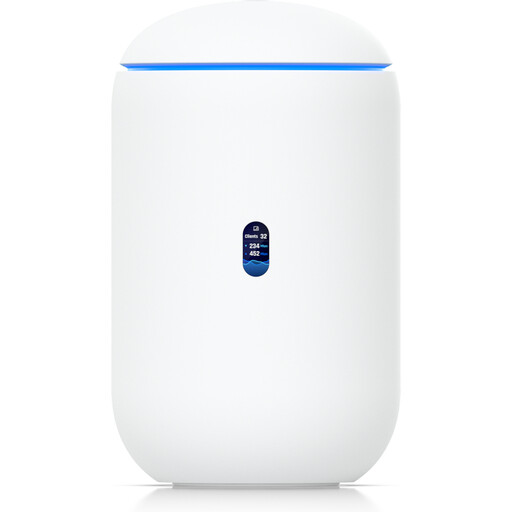
Ubiquiti UniFi Dream Router 7 Cloud Gateway
This standalone router could be an option if you’re planning to add a router to your home network. First, check that it’s compatible with your internet connection and the way you want to share music.
- Wi-Fi 7
- 10G SFP+, 2.5 GbE PoE
- 64GB microSD
Joybuy
 No image available
Ubiquiti UniFi U6 Mesh Access Point
This model could be a useful extra access point for a compatible UniFi setup. Check that its management system works with your existing network.
- Wi-Fi 6, indoor/outdoor
- 6 spatial streams
- PoE adapter included
Joybuy
 No image available
Ubiquiti U7 Mesh
This model could be a suitable extra mesh access point if it fits your network setup. You’ll need a compatible PoE injector or PoE switch to power it.
- 5000 Mbit/s
- Power over Ethernet
Joybuy
 No image available
FRITZ!Box 7530 AX Wi-Fi 6 DSL router
If you want to replace a DSL router, check that this model is compatible with your connection. Mesh support alone doesn’t guarantee a strong Wi-Fi signal through thick walls.
- VDSL Supervectoring 35b, up to 300 Mbps
- Dual-band, mesh, VPN
- 4× Gigabit LAN, USB
Joybuy
Frequently asked questions
Can I put an extra mesh node straight in the room where the signal is poor?
Only if it can still get a strong enough connection to the rest of your network from that spot. Check the signal there. If you can run a suitable network cable, a wired backhaul can replace the wireless link between nodes.
How does music get from the router to my playback device?
A compatible media server can make music available on your home network. Check that the storage connection and file sharing work with your specific playback device. You can also use network storage to make the files available.
Do I have to buy a new DSL router because of thick walls?
No. If the signal is poor mainly in a distant room, adding an access point could be a suitable alternative to replacing your router. If you do replace it, make sure the device and its modem are compatible with your DSL connection.
Can I use my own router in Germany, and what should I look for in a Wi-Fi device?
Germany’s Federal Network Agency confirms that users can choose their own end devices at the network termination point, including on passive fibre-optic networks. It also points to the established freedom of choice on VDSL and cable networks. For wireless devices, its market surveillance checks, among other things, CE marking, device and manufacturer details, and declarations of conformity.


