Check game compatibility first
If you’ve already chosen a particular mystery game, check which controllers and devices it supports before you buy. Steam lists controller support separately for each game.


Choose your controller based first on the device running your mystery game, then on whether the game supports that controller – not just on screen size. Also check that the connection reaches your seat, and that the power supply and extra features suit your game and device.
If you’ve already chosen a particular mystery game, check which controllers and devices it supports before you buy. Steam lists controller support separately for each game.
If you play from the sofa, check the connection between the controller and your device, as well as whether your TV supports it. Wireless connections and TV support vary by model.
If you play for longer, compare the power supply, charging accessories and button layout. Extra features matter most when the game you’re playing supports them.
First check that the game and your device support the controller. Then check the connection reaches your seat, followed by the power supply and any additional costs.
| Buying consideration | What to check before buying | Who is it important to? |
|---|---|---|
| Game and device compatibility | Check the specific game and the device you plan to use. For PC games, also look out for partial controller support. | If I already have a particular puzzle game in mind, I want to know whether I can play it with my device and controller. Around 40% of consumers put game and device compatibility first. |
| Connection to your seat | Check the connection type and device support. If you’re using a cable, make sure it safely reaches your seat. | If you play from the sofa, you need a connection that suits your device and the distance. Around 30% of consumers prioritise the connection between their seat and device. |
| Controls and power supply | Check the button layout, battery type and included charging accessories. Make sure the features you want meet the game’s requirements. | For longer gaming sessions, I look for a suitable button layout and a practical power supply. Around 20% of consumers put controls and power supply first. |
| Upfront and ongoing costs | Check what’s included and the power supply for the specific version. For TV gaming, also check the service requirements. | If I need to budget for extra batteries, charging accessories or a gaming service, I want to know the total cost. Around 10% of consumers prioritise upfront and ongoing costs. |
A controller may connect to a PC without being fully supported by a particular mystery game. Steam lists support for each title and also distinguishes partial support.
Before you buy, check the details for the specific game and compare them with your device and the controller you want.
For the Ultimate 2C Wireless, 8BitDo specifies Bluetooth for Android, while Windows uses a 2.4 GHz receiver or a cable. Support for one device doesn’t automatically apply to another.
Check the connection type for your specific device and model version.
Samsung notes that games and content may vary by country and TV model. Requirements for the game and service in question may also apply.
Before you buy, check your TV model, whether the game is available and the terms of the gaming service.
The Verbraucherzentrale distinguishes between your statutory rights against the seller and a voluntary guarantee with its own terms and conditions.
Make a note of the seller and the guarantee terms. If there’s a fault, check your statutory rights separately.
Xbox Wireless Controllers are suitable for Xbox and other explicitly supported devices – for example, if a PC game lists Xbox controller support.
DualSense is an option for PS5, as well as PC and mobile devices that explicitly support it.
According to 8BitDo, the Ultimate 2C Wireless is designed for Windows PCs using a 2.4 GHz receiver or cable, and for Android via Bluetooth.
The Switch Pro Controller is an option for playing Switch games on your TV.
The REPLAY Midnight Blue is an option for Samsung Gaming Hub TVs and monitors from 2022–2024.
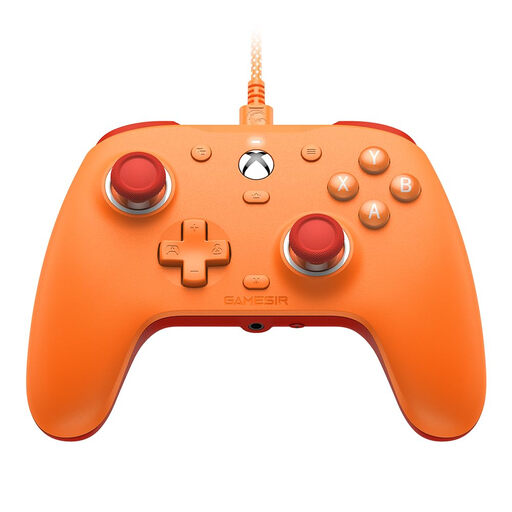
The Enhanced Wired Controller is a wired option for compatible Xbox consoles and Windows.
The Joybuy controllers below include wired options for Xbox or PC, as well as models for Switch and PS5 or supported PC devices.
 No image available
An option if your game runs on Xbox or Windows and you can run a cable to your seat.
The model is specified for Xbox and Windows, and comes with a detachable 3 m cable.
 No image available
Before you buy, check whether the specific game and your device support the controller.
The product title lists PC, Switch Lite and PS4, and describes the model as wired.
 No image available
An option if you use your Switch to play mystery games on your TV.
Nintendo confirms wireless use with Switch 2 and lists an included USB-C charging cable.
 No image available
An option for PS5 or a supported PC. Check that the specific game supports it.
Sony describes pairing via USB and Bluetooth. Haptic feedback on PC requires a supported game and a USB connection.
 No image available
A wired option if your mystery game runs on Xbox or Windows and the cable reaches your seat.
The product title lists Xbox Series X|S, Xbox One and Windows 10/11, along with Hall Effect joysticks and a 3.5 mm audio jack.
No, a Bluetooth connection alone isn’t enough. Check that your TV supports the gaming service and controller, and that the game you want is available there. Samsung notes that availability and requirements vary by country, model, game and service.
Sony describes connecting via USB or Bluetooth. To pair via Bluetooth, hold down the PS and Create buttons until the light bar flashes, then select the controller on your device. After that, check whether your game supports the controller.
Check the details for the specific version: Microsoft specifies AA batteries for the standard Xbox Wireless Controller and sells a rechargeable battery separately. Nintendo lists an included USB-C charging cable for the Switch Pro Controller.
No. Your statutory rights cover faults and apply against the seller; a guarantee is a voluntary extra with its own terms and conditions. According to the Verbraucherzentrale, many online purchases of goods also generally come with a 14-day right to cancel.
When monitoring the market, the Federal Network Agency checks factors including CE marking, product identifiability and accurate manufacturer details for affected products. This is general guidance and doesn’t indicate whether a specific product listing has been checked by the authorities.