First, choose a controller for your console or PC, then check that it’s supported by the specific mystery game you want to play. Next, decide whether to connect your headphones directly to the controller or use another connection: according to Sony, the DualSense headset jack only works on PC when the controller is connected by cable.
Who should consider which controller features
Console players with wired headphones
If you want to plug your headphones directly into the controller, you’ll need to make sure your console, controller model and socket are compatible. Sony, Microsoft and Nintendo specify different connection and platform requirements for their devices.
PC players who want flexible audio options
On PC, your controller support and audio connection need to work together. According to Sony, the DualSense headset jack requires a wired controller connection when used with a PC.
Players settling in for longer puzzle sessions
If you play for longer, look for easy-to-reach controls and a power option that suits your space. Microsoft says the Xbox Wireless Controller uses AA batteries or a compatible rechargeable battery pack, while the GameSir G7 SE requires a wired connection.
What to look for when choosing
Start by checking your platform and whether your game supports the controller. Then you can decide which audio connection and controls best suit your gaming setup.
| Buying consideration |
What to check before you buy |
Who it matters most to |
| Platform and game |
Check the console generation, operating system, connection type and whether the specific game supports the controller. |
If I play on a particular console or PC, the controller needs to work with my device and mystery game. That’s why around 36% of consumers put platform and game compatibility first. |
| Headphone audio |
Check that the headphone connection, microphone support and audio features work with your specific platform and connection. |
If I want to hear the game through headphones connected directly to the controller, the headphone socket needs to work with my setup. Around 29% of consumers prioritise the headphone socket and a suitable audio connection. |
| Controls for solving puzzles |
Compare the game’s control requirements with the available button mapping options; try the grip and reach of the buttons for yourself if needed. |
If I want to perform repeated puzzle-solving actions comfortably, I look for controls that are easy to reach and suit the game. Around 21% of consumers put puzzle controls first. |
| Power and setup |
Check the cable routing, USB connection or receiver required, as well as the model’s battery or charging options. |
If I want to keep my seating area clear or power the controller without fuss, its connection needs to suit my gaming space. Around 14% of consumers prioritise power and the space around their gaming device. |
Common assumptions to avoid
-
Assuming the ‘Switch Pro Controller’ and ‘Switch 2 Pro Controller’ are the same
Nintendo says the Switch 2 Pro Controller cannot be used with the original Switch. The headphone jack is specified for the Switch 2 model.
Before you buy, check the full model name against your console generation.
-
Assuming a controller socket will work for audio with every connection
According to Sony, the DualSense headset jack only works on PC and Mac when the controller is connected by cable. A Bluetooth connection does not meet this requirement.
Check the audio and controller connection you plan to use together, especially if you want to pair your DualSense wirelessly with a PC or Mac.
-
Assuming Bluetooth headphones are a no-compromise option for Switch
Nintendo notes that Bluetooth audio may have delays, Bluetooth microphones aren’t supported, and no more than two wireless controllers can be connected at once.
If you need a microphone or multiple controllers, plan the audio and controller connections for your whole gaming setup.
-
Forgetting about batteries or cables
The Xbox Wireless Controller uses AA batteries or a compatible rechargeable battery pack; the GameSir G7 SE connects via USB cable.
Make sure the power option and cable routing suit your gaming space. According to Microsoft, rechargeable AA batteries can’t be charged inside the controller.
Key brands at a glance
Sony / PlayStation
The DualSense range is relevant for PS5 and other supported devices if you want to connect a headset to your PS5 controller.
- Sony specifies a 3.5 mm headset jack; haptic features and adaptive triggers depend on the game.
- According to Sony, the headset jack requires a wired controller connection on PC and Mac.
Microsoft / Xbox
The Xbox Wireless Controller is designed for supported Xbox consoles, Windows PCs and other devices specified by Microsoft.
- Microsoft specifies a socket for compatible 3.5 mm headsets.
- Power comes from AA batteries or a compatible rechargeable battery pack; rechargeable AA batteries can’t be charged inside the controller.
Nintendo
The Pro Controllers for the original Switch and Switch 2 are different models, which matters if you want to connect headphones directly.
- Nintendo specifies a headphone jack for the Switch 2 Pro Controller.
- Nintendo says this Switch 2 controller cannot be used with the original Switch. You can’t assume the older Pro Controller has a socket just from its name.
GameSir
The G7 SE is a wired option for Xbox and Windows, with a headset jack and additional mappable buttons.
- GameSir specifies a detachable 3 m USB-C cable, 3.5 mm audio and two rear buttons.
- The model connects to your gaming device by cable.
8BitDo
The Ultimate 2C Wireless is an option for Windows PCs, using a 2.4 GHz receiver or USB; the manufacturer specifies Bluetooth for Android.
- 8BitDo specifies customisable extra buttons and an included USB-A receiver.
- Plan your headphone connection separately if you use this model for gaming.
Joybuy controllers for different gaming setups
This range of Joybuy controllers includes wireless PC and Switch models, wired Xbox and PC options, and a controller for Switch 2. For each one, make sure the audio connection suits your device and how you want to connect your headphones.
 No image available
The G-Lab K-PAD-HELIUM-WL Wireless 2.4 GHz PC Controller, 2 Back Paddles
For Windows players who want to play wirelessly and use extra rear buttons.
The product title specifies a 2.4 GHz connection and two rear buttons.
View at Joybuy
 No image available
Razer Wolverine V3 Tournament Edition White
For Xbox or Windows players whose gaming space suits a wired controller.
According to the product details, it connects via USB-C cable. Before you buy, check that the button layout suits the inputs you use most often.
View at Joybuy
 No image available
Black Wireless DualShock Controller for PS4 and PC
For players looking for wireless control with PS4 or PC, as stated in the product title.
If you want to connect your headphones to the controller, check before you buy that audio and, if needed, the microphone work with your specific device and game setup.
View at Joybuy
 No image available
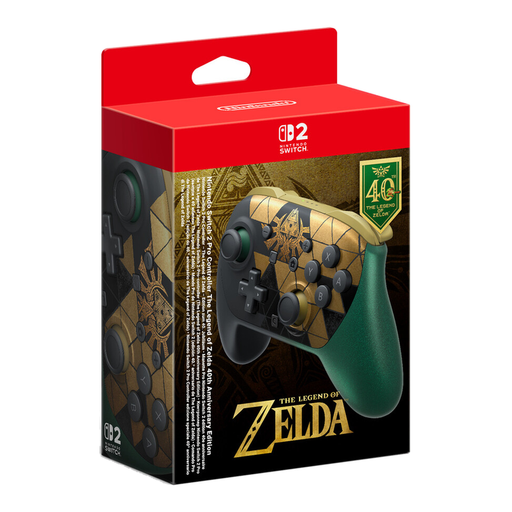
Nintendo Switch 2 Pro Controller The Legend of Zelda 40th Anniversary Edition
For Switch 2 players who want to connect headphones directly to the controller and map extra inputs.
Nintendo says the Switch 2 Pro Controller cannot be used with the original Switch.
View at Joybuy
 No image available
Gaming Controller with Dual Vibration & Gyro for Switch & PC
For Switch or PC players planning a wireless setup with separate audio output.
The product title specifies dual vibration and gyro. Check that the connection and motion controls work with your device and game.
View at Joybuy
Frequently asked questions
Can I use the DualSense headset with a PC over Bluetooth?
No. Sony requires the DualSense to be connected by cable for the headset jack to work on PC and Mac. Sony also specifies Bluetooth for controlling supported PC games.
Can I use the Switch 2 Pro Controller with the original Switch?
No. Nintendo says the Switch 2 Pro Controller cannot be used with the original Switch. Make sure you check the console generation in the full model name.
What should I know about using Bluetooth headphones with Switch?
Nintendo says that with Bluetooth audio enabled, you can connect no more than two wireless controllers, Bluetooth microphones aren’t supported, and audio delays may occur. This is especially important if you play with others or need a microphone.
Will rechargeable AA batteries charge inside the Xbox Wireless Controller?
No. According to Microsoft, the controller doesn’t charge rechargeable AA batteries inserted into it; you’ll need a suitable external charger. A compatible Xbox rechargeable battery pack has different charging instructions.
What are my rights when buying a controller online in Germany?
For a standard online purchase by a consumer, you generally have 14 days from delivery to withdraw from the contract; exceptions may apply, and return postage costs should be checked. Your Europe, the European Union’s information portal, also explains the legal guarantee for faulty goods, which is separate from a voluntary manufacturer’s warranty.


