Check game support first
You play specific mystery games and mainly want to know whether they support your controller and platform. Valve lists controller support on Steam for individual games and device types.


First, check whether the specific mystery game you want to play supports your chosen controller on your platform. Valve lists controller support on Steam for individual games and device types. If you want to keep cables off your small desk, compare Bluetooth and 2.4 GHz wireless, along with the connections each option requires. If you have a dedicated gaming spot, a wired controller may work well, provided you can route the cable neatly. Grip, buttons and power supply can then help you choose between the models that are suitable for your game.
You play specific mystery games and mainly want to know whether they support your controller and platform. Valve lists controller support on Steam for individual games and device types.
You want to avoid adding another cable alongside your keyboard, mouse or puzzle notes. Check whether your PC has Bluetooth or whether a wireless receiver will take up a spare port. Microsoft and 8BitDo list different connection options for their respective models.
You mostly play at the same desk and are weighing up grip, buttons and wired or battery power. GameSir, PowerA and Microsoft list features for their respective models; these are not independent assessments of comfort.
| Priority | What to check before buying | Who is this important to? |
|---|---|---|
| Game and platform support | Check the information for the specific game and the controller types listed. Make sure they match your platform. | If I want to play a particular mystery game with a controller, I first check the game and platform. Around 36% of consumers put support for the specific game first. |
| Cables and connections | Consider the cable route and check for spare USB ports and existing Bluetooth support. Don’t assume the connection type from the word “wireless” alone. | If there’s hardly any room on my small desk for another cable, I look at the connection type and available ports. Around 29% of consumers prioritise a clear desk. |
| Grip and buttons | Try the button layout and grip yourself, if possible. Only consider extra buttons if you plan to use them in your games. | If I want easy-to-reach buttons and a comfortable grip for longer puzzle sessions, I compare these features carefully. Around 21% of consumers say ease of use is their top priority. |
| Power and ongoing costs | Check the battery type, charging options and included accessories for the specific model. Consider whether you’ll need batteries or a separate rechargeable battery solution. | If I want to spend less time changing or charging batteries, I check the power supply before buying. Around 14% of consumers put this first. |
Knowing that a controller can connect to your PC doesn’t tell you whether your mystery game supports it or which device types the game recognises.
Before comparing models, check the information for your specific game and platform.
For the 8BitDo Ultimate 2C Wireless, the manufacturer lists 2.4 GHz or wired connections for Windows. Bluetooth is listed for Android with this model.
Check the connection type for the exact model variant and make sure your PC has the port it needs.
Models vary in whether they use AA batteries, a built-in rechargeable battery or a cable while you play.
Check the battery type, charging options and what’s included with the specific offer.
With a model that uses AA batteries, you’ll need batteries or a rechargeable alternative you choose separately. A built-in battery needs charging.
According to Sony, adaptive triggers and haptic feedback require support from the game itself. On PC, haptic feedback also requires a USB connection.
Check whether your game supports the features you want and whether the required connection works for you.
An option if you’re looking for a controller for Xbox or a supported Windows PC, with the choice of Bluetooth or a USB connection depending on your setup.
The Ultimate 2C Wireless is worth considering if you want to use a 2.4 GHz receiver or a wired connection with a Windows PC.
The G7 SE is a wired option for a dedicated gaming spot with Windows 10/11 or Xbox, provided a USB-C port is within reach.
The DualSense is an option for PS5 or for PC games where you’ve checked controller and feature support.
The Enhanced Wired Controller for Xbox Series X|S is another wired option for a dedicated Windows or Xbox gaming spot.
This selection includes controllers for PC gaming with wireless or wired connections; one model also lists PS5 compatibility. Remember to check controller support for each specific game.
 No image available
A good fit if you want to play on PC without a controller cable and have a spare USB port for the wireless receiver.
The description lists a 2.4 GHz USB receiver, two programmable rear buttons and a rechargeable battery.
 No image available
Worth considering if you’re looking for a controller listed for PC that offers both wireless and wired connections.
The product title mentions Hall Effect triggers and four customisable buttons; the description lists Bluetooth 5.0 and a USB-C cable.
 No image available
A good fit if you want to use Bluetooth with a supported Windows PC and have checked that your game supports it.
The description lists a textured grip, a hybrid D-pad and two AA batteries. Check whether you’d prefer to use batteries or another rechargeable battery solution.
 No image available
A good fit for PS5 or for PC games where you’ve checked controller support.
The description lists Bluetooth and USB-C. According to Sony, haptic feedback requires support from the game and, on PC, a USB connection.
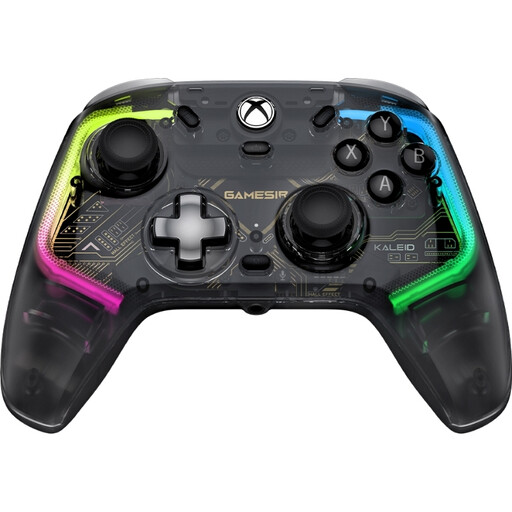 No image available
A good fit for a dedicated Windows or Xbox gaming spot if you can route the cable neatly on your small desk.
The title lists Xbox Series X/S, Xbox One and Windows 10/11; the description lists a detachable 3-m USB-C cable.
No. Also check the information for the specific game and the controller types it lists. Steam lists Return of the Obra Dinn as having full controller support, specifically naming Xbox controllers, while support for other devices is listed as unknown.
No. Microsoft lists Bluetooth as a connection option for the Xbox Wireless Controller on compatible Windows PCs; for the Ultimate 2C Wireless, 8BitDo lists 2.4 GHz or wired connections on Windows. Check the connection type for the exact model and the ports available on your PC.
Microsoft describes connecting Xbox Series X|S controllers to a PC with a USB-C cable that can transfer data. Older Xbox controller versions may use a different connection.
No. According to Sony, adaptive triggers and haptic feedback must be supported by the game itself. Haptic feedback also requires a USB connection on PC.