Choose a controller that works with your console or PC first, then check whether your particular mystery game supports gamepad input. When investigating clues, the right controls and clearly labelled buttons matter. A new controller won’t help with screen glare or hard-to-see details, though – check your screen and room lighting for that.
Who is this selection for?
Mystery game players on PC or console
You need a controller that works with your platform and the specific game you want to play. Steam lists Xbox controller support for Return of the Obra Dinn and The Case of the Golden Idol; you can’t automatically assume the same is true of other games or input devices.
Players who examine clues on screen
If you often select details or navigate menus, check the in-game controls and button mapping. Extra buttons alone don’t prove that you’ll be able to solve puzzles more quickly or accurately.
Players in bright rooms
Distinguish control issues from hard-to-see on-screen details or glare. Nintendo explains how to adjust the Switch screen brightness in handheld and tabletop mode; this is a console setting, not a controller feature.
What should you look for when buying?
The main things to consider are game compatibility, ease of use when investigating clues, visibility, and the effort involved in powering and connecting the controller.
| What matters |
What to check before buying |
Who is this particularly important to? |
| Platform and game compatibility |
Check the operating system or console, as well as the controller details for your exact game and the connection you plan to use. |
If I don’t want to risk my game not supporting the controller, I check the platform and game version first. Around 36% of consumers are likely to put compatibility first. |
| Controls for investigating clues |
Check whether you can use the gamepad to control the pointer, make selections and navigate menus in the game, and whether you can customise the button mapping. |
If I select lots of details or switch between clues and menus, the controls need to suit those tasks. Around 29% of consumers are likely to prioritise controls for investigating clues. |
| Visibility in a bright room |
Check for glare and screen brightness first. You can adjust the brightness of a Switch in handheld or tabletop mode. |
If screen details are hard to see even with the right controls, I focus on the screen and lighting rather than extra controller buttons. Around 21% of consumers are likely to have this visibility concern. |
| Power and ongoing effort |
Compare wired and wireless connections, power options and what’s included in the box. Check whether you’ll need an adapter for the connection you want to use. |
If I want to minimise charging, cables or extra accessories, I check the specific connection and what’s included. Around 14% of consumers are likely to prioritise keeping this ongoing effort to a minimum. |
Common buying mistakes
-
Buying a new controller when screen glare is the real problem
A different controller won’t change what’s on screen or reduce glare, so buying one may not address the visibility problem you’re actually having.
Check your screen and the position of your lights first. You can adjust the screen brightness on a Nintendo Switch in handheld or tabletop mode.
-
Assuming Bluetooth supports every feature
On Windows, the features supported by the Xbox Wireless Controller vary depending on how you connect it. Microsoft doesn’t list audio through the controller or firmware updates as Bluetooth features.
Decide which features you need and check that they’re supported by the exact model and connection you’ve chosen.
-
Assuming similarly named controller versions are identical
Connections and compatibility can vary between models. For the 8BitDo Ultimate 2C Wireless, the manufacturer lists 2.4 GHz or wired connections for Windows and Bluetooth for Android. The Switch Pro Controller and Switch 2 Pro Controller are different model names.
Compare the full model name, platform, connection and what’s included, rather than relying on the brand or product image alone.
-
Confusing a voluntary guarantee with your statutory rights
Your statutory rights against the seller and a voluntary guarantee are separate forms of protection.
Check the terms and cover of any extra offer separately from your statutory rights.
Key brands to consider
Microsoft Xbox
A relevant product range for compatible Xbox consoles and Windows PCs.
- For Windows, Microsoft documents USB, an Xbox Wireless Adapter and Bluetooth as connection options.
- According to Microsoft, audio through the controller and firmware updates aren’t supported over Bluetooth on Windows. Features vary depending on the connection.
Sony PlayStation
DualSense controllers for PS5 and supported games on Windows PCs.
- Sony lists USB-C and Bluetooth for connecting to compatible PCs.
- Adaptive triggers require game support. According to Sony, haptic feedback on PC also requires a USB connection.
Nintendo
The Switch Pro Controller is designed for Nintendo Switch and, according to Nintendo, can also be used wirelessly with Switch 2.
- Nintendo lists motion controls, HD Rumble and a USB-C charging cable for the Switch Pro Controller.
- Accessory compatibility with Switch 2 doesn’t prove PC compatibility or support in every game.
8BitDo
The Ultimate 2C Wireless is one Windows option with extra buttons.
- For this specific model, 8BitDo lists a 2.4 GHz or wired connection for Windows. According to the manufacturer, you can remap the two extra bumpers.
- Bluetooth is listed for Android with this version. Manufacturer claims about the sticks or polling rate don’t prove a particular advantage for mystery games.
GameSir
The G7 SE is a wired option for compatible Xbox consoles and PCs.
- GameSir describes the G7 SE as having Hall Effect sticks and customisable profiles.
- This is a wired model. The manufacturer’s claims about preventing stick drift aren’t independently verified durability measurements.
Controllers at Joybuy
This selection includes controllers for Windows PC, Xbox, Nintendo Switch and PS5. Before buying, check that your specific game and preferred connection are supported.
 No image available
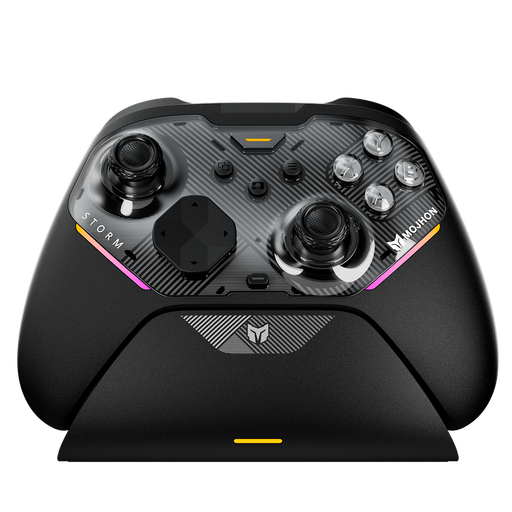
BIGBIG WON Storm Gale2 Wireless Controller
The product title lists Windows PC, Nintendo Switch and Switch 2 as platforms; check support for the specific game you want to play.
The title lists 16 mechanical buttons and four customisable back paddles.
View at Joybuy
 No image available
The G-Lab K-PAD-HELIUM-WL Wireless Gaming Controller
The product title lists a 2.4 GHz connection for PC; check that your game supports gamepad input.
The title lists two back paddles.
View at Joybuy
 No image available
Nintendo Switch Pro Controller, Black
Designed for Nintendo Switch; Nintendo also confirms that this Pro Controller model can be used wirelessly with Switch 2. Check that your game supports it, too.
Nintendo lists motion controls, HD Rumble and a USB-C charging cable.
View at Joybuy
 No image available
PlayStation DualSense Wireless Gaming Controller, White
The product title lists PS5, PC, Mac and Android as platforms; check support for your specific game and device.
According to Sony, haptic feedback on PC requires a supported game and a USB connection.
View at Joybuy
 No image available
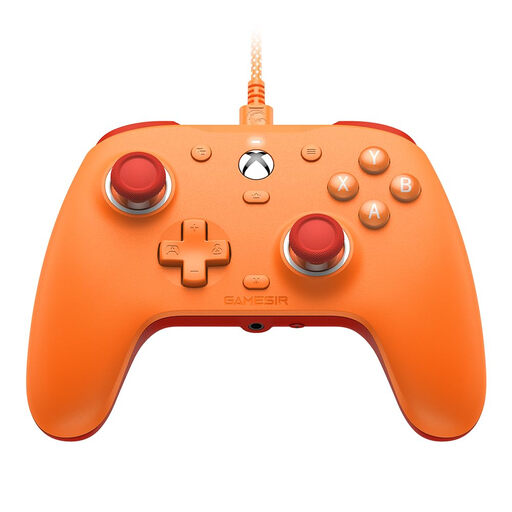
GameSir G7 SE Wired Gaming Controller, Orange
A wired option for Xbox and Windows PC. Check compatibility with your game and make sure you’ll be able to sit close enough to the cable.
The product title lists Hall Effect sticks and a 3.5 mm audio jack.
View at Joybuy
Frequently asked questions
Is the label ‘mystery game’ enough to assume controller support?
No. Check the specific game version and platform. The Case of the Golden Idol is labelled as a point-and-click game, and its Steam page lists full controller support. The genre alone doesn’t tell you enough about how you can control it.
Can a different controller make clues easier to see in daylight?
No, a controller doesn’t change what appears on screen. Check for glare and adjust your display’s brightness. Nintendo explains how to set the Switch screen brightness automatically or manually in handheld and tabletop mode.
How do I connect a controller for PC games?
Use the connection specified for your exact model, then check the controls in the game. For the Xbox Wireless Controller on Windows, Microsoft lists USB, an Xbox Wireless Adapter and Bluetooth; firmware updates aren’t supported over Bluetooth.
What extra costs and rights should I be aware of when buying in Germany?
Check whether any cables or adapters you need are included, and distinguish voluntary guarantees from your statutory rights against the seller. Most online purchases are generally covered by a 14-day right to cancel; the Verbraucherzentrale notes that exceptions may apply and that the specific contract matters.


