PC gamers looking for a wider view of the game world
If you want to see more of your surroundings in mystery games that support it, a 21:9 monitor could be a good fit. RTINGS.com notes that support for the format depends on the game.


For consoles or a large, sharp 16:9 picture, a 32-inch 4K monitor is a natural starting point. On PC, a 34-inch 21:9 model can show more of the game world horizontally, provided the mystery game you play supports the format. OLED is an option for dark scenes; check the care guidance for the specific model and compare it with alternatives such as IPS or Mini LED.
If you want to see more of your surroundings in mystery games that support it, a 21:9 monitor could be a good fit. RTINGS.com notes that support for the format depends on the game.
If dark scenes are especially important to you, you can weigh OLED’s contrast against the care guidance for the specific model. A 4K Mini LED model is also worth comparing.
If you use both, compare a large 16:9 picture with the resolutions and refresh rates your gaming device can output through the connection you plan to use.
First, check whether your gaming device and mystery game can make good use of 16:9 or 21:9. Then compare the resolution and panel type. For dark scenes, consider the picture quality alongside the care requirements for the specific model.
| What matters | What to check before buying | Who it matters to |
|---|---|---|
| Large gaming area | Aspect ratio and support in the specific game; monitor width and stand dimensions. | If I want to see as much of the game world as possible on PC, I first check whether my game supports 21:9. Around 33% of consumers put a wide PC gaming view first. |
| Dark scenes | Panel type, plus the HDR and dimming features of the exact model. | If dark mystery worlds are especially important to me, I compare OLED with the specific features of a Mini LED model. Around 27% of consumers prioritise dark gaming scenes. |
| Device and connection compatibility | Gaming device, game support, desired resolution and refresh rate on the input you will use. | If I switch between a console and PC, I want to know in advance which picture format and refresh rate my device can output through the connection I have chosen. Around 20% of consumers prioritise gaming device and connection compatibility. |
| Care and operation | Care guidance for the specific OLED model and the details on its EU energy label, including for HDR. | If my monitor is often left on for long periods, I consider care requirements and clear energy consumption information as well as picture quality. Around 20% of consumers prioritise hassle-free operation and running costs. |
RTINGS.com notes that consoles do not support an ultrawide aspect ratio. So the extra width of a 21:9 monitor does not provide a native ultrawide experience for console games.
If you mainly play on a console, start by comparing large 16:9 models. Choose ultrawide only after checking whether your PC game supports it.
For the AW3423DWF, Dell lists 3440 × 1440 pixels at 165 Hz over DisplayPort and 100 Hz over HDMI. These figures apply to this model and vary by input.
Match your desired resolution and refresh rate to the connection you will actually use.
ASUS lists different panel and HDR details for the PG32UCDM3 and PG32UCDMR. Dell also documents model-specific pixel refresh for the AW3423DW and AW3423DWF.
Check the full model number and read the care guidance for the exact version on offer, rather than assuming that similar names or features mean the models are the same.
The PG32UQXR and PG34WCDN offer different ways to enjoy a bigger view of your games.
The AW3423DWF is an example of a 34-inch monitor with a 21:9 aspect ratio.
The 34GS95QE-B is a 34-inch OLED option in an ultrawide format.
The MAG 323UPFDE is an example of a large 16:9 4K monitor with a Rapid IPS panel.
The Odyssey OLED G8 G81SF, model number LS32FG814SUXEN, is an example of a 32-inch 4K QD-OLED monitor.
This selection includes large 4K monitors, mostly in 16:9 format. Check which resolution and refresh rate the relevant connection supports on your gaming device.
 No image available
For a large 4K picture with an OLED panel; the product title specifies a 32-inch screen and 4K UHD.
The title lists 240 Hz, as well as 480 Hz at FHD, and 0.03 ms GtG. These figures relate to the respective resolution or specification in the product title.
 No image available
For a large 4K picture on PC or console; the product title specifies a 32-inch screen and QD-OLED.
The product title lists 240 Hz, 0.03 ms, DisplayHDR True Black 400, HDMI 2.1, DisplayPort 2.1a and USB-C with 98 W Power Delivery.
 No image available
For a large 16:9 4K picture with QD-OLED; the product title specifies a 32-inch screen and the PG32UCDMR model number.
The title lists 240 Hz, 0.03 ms GtG, DisplayHDR 400, HDMI 2.1 and USB-C with 90 W.
 No image available
For a large 4K gaming picture; the product title specifies a 32-inch screen and 3840 × 2160 pixels.
The product title lists HDMI, DisplayPort and USB as connections. It also says the monitor can be tilted, swivelled and height-adjusted, and rotated into portrait orientation.
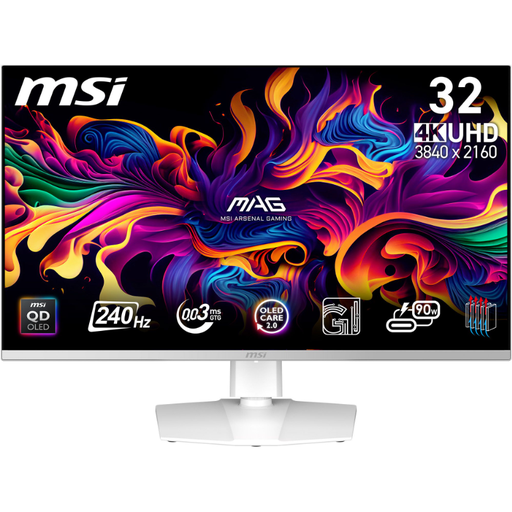 No image available
For a detailed 4K picture with QD-OLED; the product title specifies a 31.5-inch screen.
The title lists 240 Hz and a 0.03 ms response time.
For a PC and a game with good 21:9 support, ultrawide can give you a wider view. For a console or a large 16:9 picture, a 32-inch 4K monitor is a good starting point; also check how much space it needs and which connection you will use.
Match your desired resolution and refresh rate to the input you will actually use, then check the output on your gaming device and in the monitor menu. For the AW3423DWF at 3440 × 1440 pixels, Dell lists 165 Hz over DisplayPort and 100 Hz over HDMI; these figures apply only to this model.
Follow the care guidance for the exact model and use its recommended care features. Dell describes a pixel refresh reminder for the AW3423DW and AW3423DWF after every four hours, followed by a process lasting less than ten minutes; these details do not automatically apply to other OLED monitors.
Monitors covered by EU rules for electronic displays are subject to ecodesign and energy labelling requirements. The European Commission specifies an energy label; this does not mean that your choice has to meet a minimum energy efficiency class.
Compare the EU energy label details for the specific model, including for HDR, and work out running costs based on how long you use it and your electricity rate. According to Your Europe, when you buy goods from a trader in the EU, you are generally entitled to a minimum two-year legal guarantee from the date you receive them; this is separate from any voluntary manufacturer’s warranty.