What should you look for when buying?
First, check where your mythology titles come from, their file format and whether they’re copy-protected. Then compare ease of use and lighting. Colour and a larger screen matter most when your specific edition will benefit from them.
| Buying criterion |
What to check |
Who it matters most to |
| Book source and file format |
For a specific title, check where it comes from, whether it’s an EPUB or PDF, whether it’s copy-protected and how it’s meant to be transferred. |
If I want to read specific purchased, borrowed or personal titles, the e-reader must be able to open those exact files. Around 31% of consumers say book source is their top buying priority. |
| Portability |
Compare screen size, stated device weight and how easy it is to use with any case you might need. |
If I often take my e-reader to a café, it should fit comfortably in my bag and feel comfortable to hold. Around 31% of consumers say portability is their top buying priority. |
| Lighting and text |
Check whether you can adjust the brightness and, where applicable, the colour temperature, and whether the text in your edition is easy to read. |
In cafés with changing light, I want to be able to adjust the lighting and text to suit my reading conditions. Around 25% of consumers say readability is their top priority. |
| Images and PDF pages |
Look at a sample page from the edition you’ll actually read. Check the colour display, available screen space and any accessories you might need for making notes. |
If maps, illustrations or annotations are important in my edition, the specific device must display them well. Around 13% of consumers say illustrations or notes are their top buying priority. |
Joybuy products for reading on the go
The following Joybuy picks include colour E-Paper e-readers, a 6-inch e-reader and an audio player with a TXT e-book function.
 Image unavailable
Bigme HiBreak Pro Color Display, 6.13''
An option if you want to read colour pages and use reading apps too.
6.13-inch Kaleido 3 display; according to the product description, 300 ppi for black-and-white content and 150 ppi for colour content.
Android 14 with app installation, according to the product description. Check in advance whether your chosen app and specific protected file will work.
View at Joybuy
 Image unavailable
Bigme E-Book Reader B6, 6-Inch
An option if you’re looking for a 6-inch e-reader with adjustable front lighting and Android features.
6-inch E-Ink display with front light adjustable across 36 levels, according to the product description.
Android 14 and integrated Google Play, according to the product description. Check that the reading app you need and your specific file are compatible.
View at Joybuy
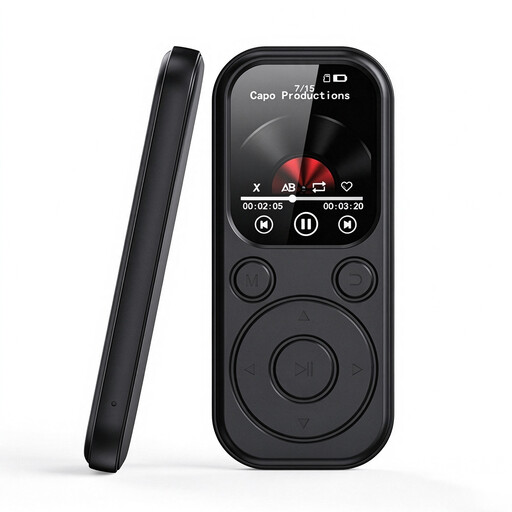 Image unavailable
MP3 player with e-book function, 2.01-inch colour display
A compact option for carrying TXT e-books if you’re also looking for an audio player.
2.01-inch colour display; the e-book function described supports TXT files.
The small display offers less room for continuous reading than an e-reader with a larger screen.
View at Joybuy
Frequently asked questions about e-readers
Can I read German Onleihe e-books on any e-reader?
No. According to Onleihe, protected Onleihe e-books can’t be opened on Kindle e-readers. For direct access to Onleihe 3, Onleihe lists specific tolino models with software version 5.15.253009 or later and PocketBook devices with version 6.3 or later. Rakuten Kobo documents LCP support from software version 6.0, but Onleihe doesn’t guarantee that it will work on Kobo devices.
How do I transfer my own mythology files to an e-reader?
First, check whether the specific file is copy-protected. Rakuten Kobo explains how to transfer unprotected EPUB and PDF files using a computer; this guidance isn’t a way to transfer protected files. Also check the formats supported by your device and how files are meant to be transferred.
Do I need a library card to use Onleihe in a café?
To access the service described, Onleihe requires a valid membership card from a participating library and the associated password. Set up access on a supported device and check the title you want before you plan to read it on the go.
Does the e-reader come with a case, stylus or power adapter?
That depends on the model and the specific offer. tolino lists additional accessories for the shine 5th Generation as sold separately; the stylus compatible with the vision color is also sold separately. Check what’s included with the version you’ve chosen before buying.
What rights apply when buying an e-reader online in Germany?
According to the consumer advice centre, a typical online purchase generally comes with a 14-day right to cancel, starting from the day you receive the goods; exceptions and deadline rules apply. If the product is faulty, you have statutory rights against the seller, which are separate from any voluntary guarantee.


