What should you look for when buying?
First check your games’ input options, then how the controller connects to your computer, and finally which controls and extra features you’ll actually use.
This table groups shoppers by the factor that matters most to them when choosing a controller for narrative puzzle games in a home office.
| Priority |
What to check before buying |
Who is it important to? |
| Game and platform compatibility |
Check the input information for the specific game, as well as the platform and operating system supported by the exact model. |
If I want to avoid buying a controller that won’t work with my game or device, compatibility comes first. Around 31% of shoppers prioritise game and platform compatibility. |
| Comfortable controls for puzzles |
Compare the button layout and how easy the controls are to reach; consider whether a D-pad or analogue stick better suits the way you play. |
If I want to navigate dialogue and puzzles comfortably, a suitable button layout matters more than extra features for fast-paced action. Around 25% of shoppers prioritise comfort and ease of use. |
| Cable routing and wireless connection |
Check the distance to your computer and where a cable would run. For wireless use, check for Bluetooth support or the USB port needed for a receiver. |
If a cable gets in the way on my desk, I want a wireless connection that my computer actually supports. Around 19% of shoppers focus mainly on connectivity and cable routing. |
| What’s included |
Check what comes with the specific product and how it’s powered; allow for any cable or receiver you’ll need. |
If I want to avoid finding that an accessory is missing for my chosen connection, I check what’s included before buying. Around 13% of shoppers focus on what’s included and potential extra costs. |
| Extra features |
Check that the specific game supports the feature you want; for DualSense on PC, also check the required connection. |
If I want to use haptics or adaptive triggers, my game needs to support them. Around 12% of shoppers prioritise extra features. |
Joybuy controllers for PC and console
The Joybuy controllers featured here include wired and wireless PC options, as well as a DualSense for PS5 and PC. What matters most is whether your games support the controller and whether its connection suits your computer and desk.
 No image available
EasySMX D10 PC controller
This gamepad is worth considering as a wireless PC option if its connection works with your computer and your games support controllers.
Listed features include a TMR joystick, dual-mode triggers, mechanical buttons, a 1000Hz polling rate and RGB backlighting. The product title lists PC, Switch, Android and iOS.
View at Joybuy
 No image available
Microsoft Xbox Series X/S Wireless Controller, Pulse Red
A wireless PC option if your computer has Bluetooth and your games support controller controls.
Features listed for this model include Windows PC, Bluetooth, a hybrid D-pad, textured grips and customisable button mapping. The product title lists Xbox One, Xbox Series X/S and PC.
View at Joybuy
 No image available
GameSir G7 HE Wired Controller, Black
This wired option could suit you if a USB-C cable is practical at your desk and your PC and games support it.
Listed features include Hall Effect sticks and a 3-metre USB-C cable. The product title lists Xbox Series X|S, Xbox One, Windows 10/11 and PC; the description also mentions Steam and customisable controls.
View at Joybuy
 No image available
PlayStation DualSense Wireless Controller
This option is worth considering if you use a PS5 or your PC game explicitly supports DualSense features.
The product title lists PS5 and PC; the description mentions USB-C and Bluetooth. According to Sony, haptic feedback on PC requires USB and game support; adaptive triggers also depend on the game.
View at Joybuy
 No image available
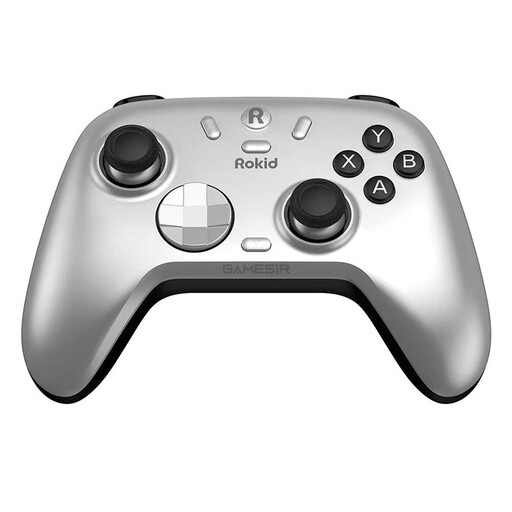
Rokid × GameSir Co-Branded Controller
A choice for PC players who want to switch between wireless and wired connections; check that the connection works with your computer and that your games support the controller.
Bluetooth, a dongle and a cable are listed for PC. Other listed features include Hall Effect sticks and additional mappable buttons.
View at Joybuy
Frequently asked questions
Is “PC-compatible” enough to play a puzzle game with a controller?
No. You should also check the input options for the specific game. For “Stories of Blossom” on Steam, Soft Leaf Studios lists both mouse controls and full controller support; you can’t assume the same applies to other titles.
How do I connect an 8BitDo Ultimate 2C Wireless to a Windows PC?
For this model on Windows, 8BitDo lists the 2.4 GHz adapter or a cable connection. The manufacturer’s instructions list Windows 10, version 1903 or later, for the 2.4 GHz connection; the product page lists Bluetooth for Android.
What can I do if a new controller is faulty?
Your statutory rights against the seller for faulty goods are separate from any voluntary guarantee. For ordinary new goods, § 438 BGB generally sets a two-year limitation period from delivery for the claims relating to defects specified there; if a product is faulty, repair or replacement may be the first remedy. The Federal Ministry of Justice publishes the statutory text, while the Verbraucherzentrale explains the difference between statutory rights and a guarantee.
Can I cancel an online controller purchase in Germany?
Consumers generally have a right to cancel a distance contract; for ordered goods, the Verbraucherzentrale says the usual period is 14 days from receipt. Statutory exceptions and the terms of the specific contract should be taken into account. The right to cancel is separate from claims relating to faulty goods.


