For a one-off backup of a family computer before moving home, a removable external hard drive is usually the easiest place to start. A NAS is more suitable if you want to back up regularly over your home network or include several family devices. Whichever option you choose, keep a copy somewhere separate and test that you can restore files from it. A NAS also requires setup, and depending on the model, you may need to buy drives separately.
Which option is right for you?
Families about to move home
If you want to protect important files before the move, keep a copy separately from your computer. The German Federal Office for Information Security recommends storing backups away from home if an incident could affect several devices in the same location.
Families with an ongoing backup plan
If you want to back up PC folders regularly over your home network after the move and restore them when needed, a NAS could suit your routine. Synology describes the DS223j as supporting real-time or scheduled backups of PC folders; this is a manufacturer claim specific to that model.
Families with several devices
If you want to include devices other than the family computer in a shared storage and backup routine, check that each device is compatible with your chosen backup software. Features and setup can vary depending on the NAS model and the system you use.
What should you look for when buying?
| What matters |
What to check before buying |
Who this matters to |
| A separate copy for the move |
Check whether you can transfer the backup to removable storage and keep it separate from your computer and NAS. |
If I don’t want to transport my computer and backup in the same place during the move, I need a copy that I can store separately. Around 36% of consumers put this at the top of their list. |
| Being able to restore files |
Decide which folders or systems you want to back up, then test restoring individual files. |
If I need to retrieve important photos and documents after the move, I want to know that the backup is readable. Around 29% of consumers prioritise being able to test a restore. |
| Regular backups |
Check that the backup software supports your operating system and chosen folders, and lets you set a suitable schedule. |
If I add new files after the move, I don’t want to have to back them up manually every time. Around 21% of consumers prioritise regular follow-up backups. |
| Setup and what’s included |
Compare what’s in the box, drive installation and setup requirements with those of an external hard drive. |
If I mainly want to back up one computer and keep new setup to a minimum before the move, the extra work matters. Around 14% of consumers place the greatest importance on easy setup and a complete package. |
Common data backup mistakes
-
Assuming mirrored drives count as separate backups
According to the Synology Knowledge Center, RAID 1 writes the same data to both drives in a system. If your NAS and computer are lost or damaged together during the move, mirroring is no substitute for a separately stored copy.
Set aside an additional storage device, keep it somewhere separate and test that the files are readable by restoring a few.
A separate copy requires an additional storage device and a separate backup step.
-
Assuming an empty NAS enclosure is ready to use straight away
The Synology DS223j is an empty enclosure; the manual does not list a hard drive as included. Installing an HDD may also take extra time.
Before your backup date, check what’s included with the specific offer, whether the drives are compatible, and how much time installation and setup will take.
-
Never testing a backup by restoring files
A backup file is only useful if you can actually read and restore the data you need. The German Federal Office for Information Security recommends checking that restoration works.
Before the move, try restoring a few important files.
NAS brands to consider
Synology
The DiskStation DS223j is one example of a NAS for backing up PC folders and storing files centrally on your home network.
- Synology describes scheduled PC folder backups for the DS223j. Btrfs snapshots are listed from DSM 7.2 onwards.
- PC-WELT describes the firmware as easy to navigate in its review, but says installing the HDD is comparatively fiddly. These comments relate to the DS223j, not all Synology models.
QNAP
The TS-233 is a home NAS option with two drive bays and Gigabit Ethernet.
- QNAP describes Hybrid Backup Sync as allowing you to create a backup job from the NAS to an external drive.
- PC-WELT notes that larger storage tasks require patience. This comment relates to its TS-233 review and is not a performance assessment of other QNAP models.
ASUSTOR
The Drivestor 2 Lite AS1102TL is another NAS option with two drive bays for local storage.
- ASUSTOR lists Gigabit Ethernet, 1 GB RAM and Btrfs/iSCSI snapshots for this model.
- The data rates listed on the manufacturer's website are based on lab tests under optimised conditions. They are not a guaranteed copy speed when moving home.
TerraMaster
TerraMaster presents the F2-212 as a solution for personal storage, backups and file sharing.
- The backup options and convenience benefits are the manufacturer's claims for the F2-212.
- Set up a backup routine for your family computer that suits your needs, and keep a separate copy. The manufacturer's description alone does not prove that you can restore your files successfully.
External hard drives on Joybuy
This selection includes external hard drives for backing up individual computers; it is not a substitute for a NAS providing central storage on your home network.
 No image available
WD My Passport external hard drive, 2 TB
An external option for backing up a single family computer before moving home.
2 TB; software option for automatic backups, according to the product name.
View on Joybuy
 No image available
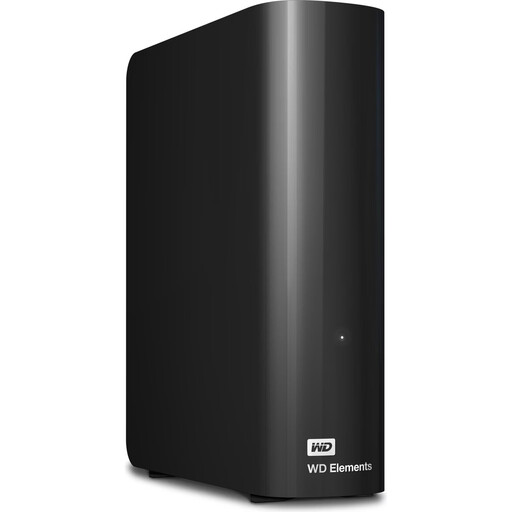
WD Elements Desktop external hard drive, 6 TB
An external desktop hard drive for backing up a computer if a stationary setup suits your routine.
6 TB; USB 3.0; 3.5-inch; NTFS.
A power adapter is required; the drive is designed for stationary use.
View on Joybuy
 No image available
WD Elements Desktop external hard drive, 10 TB
An external desktop hard drive for backing up computer files if it can remain in one place while in use.
10 TB; USB 3.2 Gen 1; 3.5-inch; NTFS.
A power adapter is required; the drive is designed for stationary use.
View on Joybuy
 No image available
WD Elements Desktop external hard drive, 8 TB
An external desktop hard drive for backing up a computer, if a stationary drive fits your backup plan.
8 TB; USB 3.0; 3.5-inch; NTFS.
A power adapter is required; the drive is designed for stationary use.
View on Joybuy
Frequently asked questions
Is mirroring across two NAS hard drives enough before a move?
No, not as a replacement for a separate copy: RAID 1 writes identical data to both drives in the same system. Keep another backup somewhere separate and check that you can restore files from it.
What should I test before dismantling my computer and NAS?
Check that the backup contains the files you need and that they are readable by restoring a few as a test. Also decide whether you want to back up individual files or an entire system.
Do NAS enclosures always include hard drives?
No, you shouldn't assume they do. The Synology DS223j is an empty enclosure; the official manual does not list a hard drive as included. Check the specific offer and remember to allow for drives and a separate backup device.
How should I dispose of an old NAS or hard drive in Germany?
The German Federal Ministry for the Environment refers to authorised collection points, including local authority recycling centres. Retailers only have take-back obligations under certain specified conditions. Before handing over the device, also check how to remove your personal data from the storage medium.


