NAS users who need more LAN ports
You want to connect your NAS and computer by cable at the same small workstation, and mainly need extra ports without having to configure network features.


A Gigabit switch is enough for a NAS and computer on a small desk if both devices use Gigabit Ethernet. 2.5 Gbit/s only makes sense if all the devices involved support that speed. The port speeds quoted by TP-Link and QNAP don’t replace compatible interfaces on your NAS and computer, nor do they guarantee a particular file transfer rate. A configurable model is worth considering if you specifically need VLANs or a NAS feature such as Link Aggregation, and your devices support the required modes.
You want to connect your NAS and computer by cable at the same small workstation, and mainly need extra ports without having to configure network features.
You want to make use of your NAS’s faster Ethernet interface with a suitably connected computer. Both devices and their connection need to support it.
You need specific VLAN configuration or other management features, rather than simply adding more LAN ports.
A good choice if: your NAS and computer use Gigabit Ethernet and you mainly need more wired ports.
Bear in mind: TP-Link lists five Gigabit ports for the TL-SG105; one port may be used to connect to your existing network. This model doesn’t provide individual devices with a 2.5 Gbit/s connection.
A good choice if: your NAS and at least one computer used for fast transfers support 2.5 Gbit/s Ethernet.
Bear in mind: TP-Link, QNAP and NETGEAR list five 2.5 Gbit/s ports on the respective models. A Gigabit device won’t become a 2.5 Gbit/s device as a result; the cables and negotiated port speed also matter.
A good choice if: you want to set up VLANs or a specific NAS network feature. TP-Link lists VLAN features for the TL-SG105E.
Bear in mind: the TL-SG105E has Gigabit ports, not 2.5 Gbit/s ports. For the Link Aggregation feature described by Synology, the NAS needs at least two LAN ports. The modes supported by the devices involved must also be compatible.
The percentages refer to consumers choosing a switch for a NAS on a small desk; each figure reflects their main buying priority.
| Priority | What to check before buying | Who it matters most to |
|---|---|---|
| Enough LAN ports | Count your NAS, computer and connection to the existing network, and allow for any extra devices. | If my NAS, computer and connection to the rest of the network each need a port, I want to know how many connections will be left over. Around 36% of consumers mainly want to add more ports. |
| Speed between NAS and computer | Check the Ethernet ports on both devices and the negotiated port speed; take the cables into account too. | If my NAS and computer both have 2.5 Gbit/s Ethernet, I want to be able to use that connection. Around 29% of consumers prioritise speed between their devices. |
| Noise and desk space | Check whether it’s fanless, its dimensions, and whether there’s room for cables and the power supply; allow for any required brackets. | If the switch is right next to my workspace, I look for a fanless model with enough room for the cables. Around 21% of consumers prioritise a quiet, space-saving setup. |
| VLANs or NAS configuration | Check the feature you need and that the supported modes are compatible. For Link Aggregation, check the NAS ports and compatibility. | If I need VLANs or a specific NAS network feature, I want to check the requirements before buying. Around 14% of consumers mainly want configurable features. |
If the switch also needs to connect to your existing network, that connection will use a port too.
Count your NAS, computer, connection to the rest of the network and any extra devices you’re likely to add before deciding how many ports you need.
The speed of the connected devices and the actual negotiated connection still matter; the port speed alone doesn’t predict a file transfer rate.
Check the Ethernet ports on your NAS and computer, along with the negotiated port speed. Treat the switch’s speed rating as a port specification.
The NAS feature described requires multiple LAN interfaces and a compatible configuration.
Synology says that the NAS needs at least two LAN ports for the Link Aggregation feature it describes. Also check what you want to achieve and which modes your NAS and switch support.
The models mentioned here range from Gigabit switches to 2.5 Gbit/s models. TP-Link describes the TL-SG105E as a configurable Gigabit switch.
QNAP describes the QSW-1105-5T as an unmanaged five-port 2.5GbE switch, also suitable for NAS with compatible hardware.
NETGEAR describes the MS305 as having five 2.5 Gbit/s ports and several desk-friendly placement options.
D-Link’s European datasheet describes the DMS-105 as a compact switch with five 2.5 Gbit/s ports, suitable for devices including NAS and work computers.
The models below are compact Gigabit switches that add wired connections for your NAS and computer. Depending on the model, you’ll also get management features or PoE+; the Ethernet ports listed support Gigabit, not 2.5 Gbit/s.
 No image available
For a NAS and computer with Gigabit Ethernet, when you need extra ports and management features such as VLANs.
5 10/100/1000 Mbit/s RJ45 ports; VLAN support; powered via USB-C or 802.3af/at PoE.
 No image available
An option for extra Gigabit connections if you also need to power PoE+ devices at your workstation.
5 Gigabit RJ45 ports, including 4 PoE+ ports; 60 W PoE budget; fanless metal casing; plug-and-play.
 No image available
For a NAS and computer with Gigabit Ethernet, when a simple expansion without switch configuration is all you need.
5 10/100/1000 Mbit/s RJ45 ports; automatic speed adjustment and Auto-MDI/MDIX; fanless operation.
 No image available
For Gigabit devices if you need VLAN features or want to connect PoE+ devices.
5 Gigabit ports; 4 PoE+ ports with 65 W; VLAN, QoS and IGMP; fanless metal casing; desktop or wall mounting.
 No image available
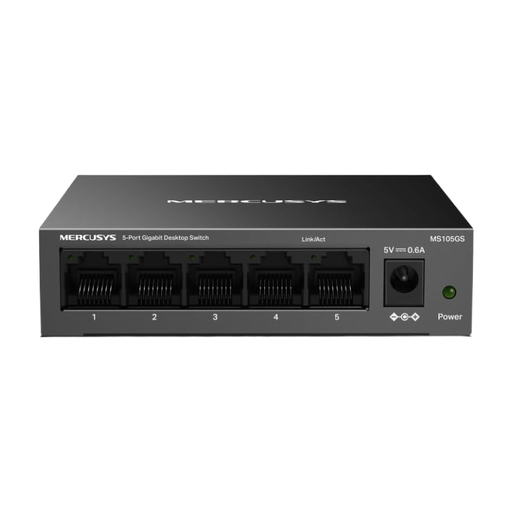
A compact option for extra Gigabit connections when you don’t need to configure the switch.
5 10/100/1000 Mbit/s Ethernet ports; plug-and-play; fanless metal casing; desktop or wall mounting.
Connect your NAS and computer to separate switch ports, then use another port to connect to your existing network if you want both devices to be accessible through it. With a five-port model, that leaves fewer ports for extra devices. Basic models don’t need configuring for this standard connection.
No. A faster switch won’t turn a NAS or computer’s Gigabit port into a 2.5 Gbit/s connection. Check the Ethernet ports on both devices and the negotiated port speed; the switch’s rated speed alone doesn’t guarantee a particular file transfer rate.
It depends on the NAS mode you choose and the features supported by your devices. Synology says that the NAS model needs at least two LAN ports for the Link Aggregation feature described. Check the mode requirements of your specific NAS and switch too, before making this feature a reason to buy.
Check the labelling and manufacturer’s information for the specific device. The Bundesnetzagentur lists CE marking, product traceability and manufacturer details among the points it checks as part of its market surveillance. For a switch that’s reached the end of its life, the Umweltbundesamt recommends disposing of it separately as electronic waste rather than putting it in household rubbish.