What to look for when buying
| Consideration |
What to check before buying |
Who should prioritise it |
| Suitable speed |
Check the RJ45 speeds of your NAS, workstations and the switch ports in use: 1GbE, 2.5GbE or 10GbE. |
If you transfer large files between a NAS and workstations, the connections along that route should be compatible. Around 36 % of consumers put suitable transfer speeds first. |
| Enough ports |
Count your NAS, workstations and uplink, then decide how many ports you need. |
If several workstations need a wired connection to the NAS and network at the same time, you’ll need to account for all the connections. Around 29 % of consumers prioritise having enough ports. |
| Network separation and management |
Check whether the specific model supports VLANs and whether the rest of your network equipment can be configured accordingly. |
If user groups or devices need separate networks, the right VLAN configuration matters more than simple plug-and-play setup. Around 21 % of consumers prioritise targeted network separation. |
| Quiet, straightforward operation |
Check the model’s fan specifications, mounting options and management type. |
If the switch will sit in your workspace and needs to run without complicated setup, noise and management requirements are important factors. Around 14 % of consumers prioritise quiet, straightforward operation. |
An unmanaged model may be enough for simple connections, but it won’t replace a targeted VLAN configuration. According to the Synology Knowledge Center, LACP must be enabled on the switch for dynamic 802.3ad link aggregation. Also check the bond mode on your specific NAS.
Joybuy products for NAS and studio use
The models below range from Gigabit switches to manageable options for VLANs. Compare port speeds with your devices’ connections and, where needed, check PoE, SFP and power supply requirements.
 No image available
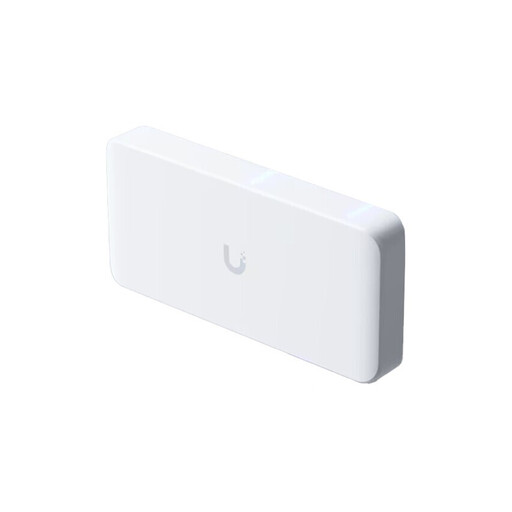
Ubiquiti UniFi Flex 2.5G PoE, 8-port managed switch, PoE++, 10GbE uplink, white
A good fit if your NAS and workstations have compatible 2.5GbE connections and you want to set up VLANs.
Specifications include eight 2.5GbE RJ45 ports, VLAN support and a 10GbE SFP+ uplink.
A power adapter is not included. A 10GbE RJ45 PoE+++ input is listed as an alternative power supply; available PoE power depends on the power source.
View at Joybuy
 No image available
D-Link DGS-1005P/E, 5-port Gigabit switch with 4 PoE+ ports
An option if your NAS and other devices use Gigabit Ethernet and you need additional PoE+ ports.
This unmanaged model has five Gigabit ports, four of which are PoE+ ports with a total power budget of 60 W, and a fanless metal casing.
This model is not listed as supporting targeted VLAN configuration.
View at Joybuy
 No image available
D-Link DGS-1210-10/E, smart managed Gigabit switch
A good fit if you want to connect several Gigabit devices and need VLAN management or a compatible LACP configuration.
Specifications include eight Gigabit RJ45 ports and two SFP slots, as well as VLAN and LACP features. It also has a fanless design.
For dynamic 802.3ad link aggregation, the NAS mode and switch configuration must be compatible. The Synology Knowledge Center states that LACP must be enabled on the switch for this mode.
View at Joybuy
 No image available
TP-Link TL-SG105PE, 5-port Gigabit smart switch with 4 PoE+ ports
A good option if your devices use Gigabit Ethernet and you need VLAN features or PoE+ ports.
The switch has five Gigabit ports, four PoE+ ports with a total power budget of 65 W, and VLAN support. A fanless design and desktop and wall mounting are also listed.
The Ethernet ports are Gigabit ports, so check that this speed is sufficient for your NAS and workstations.
View at Joybuy
 No image available
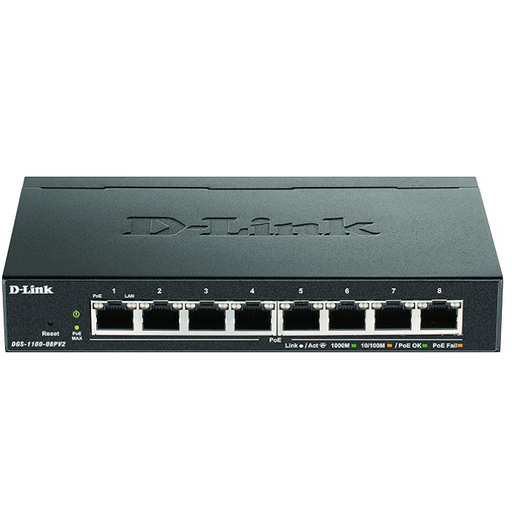
D-Link DGS-1100-08PV2, 8-port Gigabit smart switch with PoE
Suitable for several Gigabit devices if you also need VLAN configuration or PoE for connected devices.
The product specifications list eight Gigabit ports, VLAN support and a total PoE budget of 64 W. Fanless operation and web management are also described.
The combined power consumption of your PoE devices must stay within the stated 64 W budget.
View at Joybuy
Frequently asked questions
Does my router also need to support 2.5GbE?
Not for every connection between a NAS and workstation: what matters is the connections along the relevant route through the switch. Check the router uplink separately if that traffic needs to pass through the router. A 2.5GbE port on the switch doesn’t guarantee the same speed across every network route.
Do I have to use link aggregation with a NAS?
No, link aggregation isn’t necessary for every NAS connection. If you want to use it, check the LAN ports and bond mode on your specific NAS. According to the Synology Knowledge Center, dynamic 802.3ad mode requires LACP to be enabled on the switch. Adaptive Load Balancing doesn’t require this switch support.
What should I check about placement and running costs?
Check whether the specific model has a fan, what power supply is included and which mounting options are available. Manufacturers list fanless models; to compare annual electricity costs, you’ll need comparable power consumption figures.
What does the CE mark tell me about a switch?
The CE mark is a conformity marking for which the manufacturer is responsible; it isn’t an independent assessment of network performance. When monitoring the market for affected products, the Bundesnetzagentur checks, among other things, that the CE marking is correct, the product can be identified and the manufacturer’s information is accurate.
How should I dispose of an old switch?
In Germany, waste electrical equipment must be collected separately. The Umweltbundesamt lists local collection points that generally accept old devices free of charge. If your studio equipment is used for business, check the terms of the specific return route.


