What should you look for when buying?
First, check that your chosen reading app and titles work offline. Then choose a format to suit how you read: whether you’ll mainly be holding the tablet to read text, or want a larger area for viewing illustrated pages.
| What matters |
What to check before buying |
Who is this most important to? |
| Opening books in flight mode |
Install the app you need, download a title in full and check that it plays offline; if you’re borrowing books, check the licence too. |
If I need to read books I’ve chosen in advance without internet on my flight, I test the specific title beforehand. Around 28% of consumers say offline access is their main concern. |
| Holding the tablet for a long time |
Compare the weight of the exact device model and any case you might use, and consider your usual reading position. |
If I’m reading for a long time without somewhere to rest the tablet, weight matters more to me than having an especially large screen. Around 22% of consumers say ease of handling is their main concern. |
| Viewing images, maps and PDFs |
View a typical book page in its original layout on the display you’re considering; PDFs retain fixed page breaks. |
If my nature book has lots of photos, maps or captions, I want to see the page clearly without constantly scrolling. Around 22% of consumers say illustrated pages are their main concern. |
| Reading without needing to recharge |
Check the manufacturer’s battery life claims and the conditions they were tested under; try your reading app at your preferred brightness. |
If I don’t want to rely on finding a socket during a long flight, I’m mainly interested in battery life with my reading app. Around 17% of consumers say battery life is their main concern. |
| Adjusting the display to cabin lighting |
View text in dim light and check for distracting reflections; check which display options are available for the exact storage variant. |
If the lighting and my seat position change, I want to be able to adjust how the text looks. Around 11% of consumers say adapting the display to the light is their main concern. |
Joybuy products
The devices listed here are primarily for readers who want more display space for photos, maps or fixed-layout pages. Whichever model you choose, check that your reading app and the offline function are suitable for the title you plan to read.
 No image available
Samsung Galaxy Tab A11+ X230, 11-inch, Wi-Fi, 6 GB RAM, 128 GB
The 11-inch format could be a good choice for nature books with images and fixed-layout pages.
11 inches; Wi-Fi; 6 GB RAM; 128 GB storage.
View at Joybuy
 No image available
UXD S1 Android tablet, 13,4-inch, 2K, 256 GB
The large display and the stand listed in the product name make this better suited to use on a surface than to holding for long periods.
13,4 inches; 2K display; Android 16; 256 GB storage, expandable to up to 2 TB according to the product name. The product name also lists a keyboard, mouse, stylus, case and stand.
View at Joybuy
 No image available
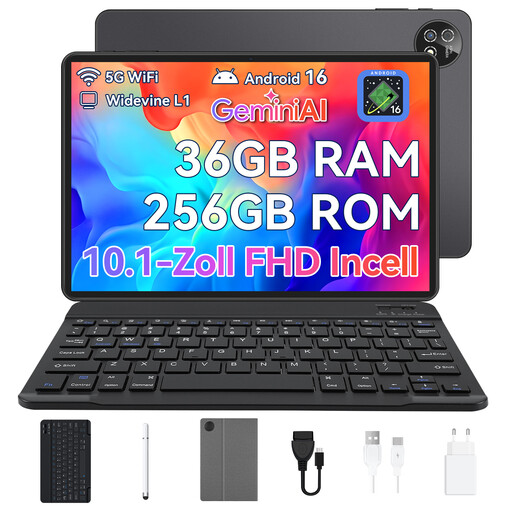
10,1-inch Android tablet, 256 GB
The 10,1-inch format offers more space than a compact tablet. If you often read PDFs, check how a typical book page looks on it.
10,1 inches; Android 16; 256 GB storage. The product name also lists a keyboard, mouse and protective case.
View at Joybuy
 No image available
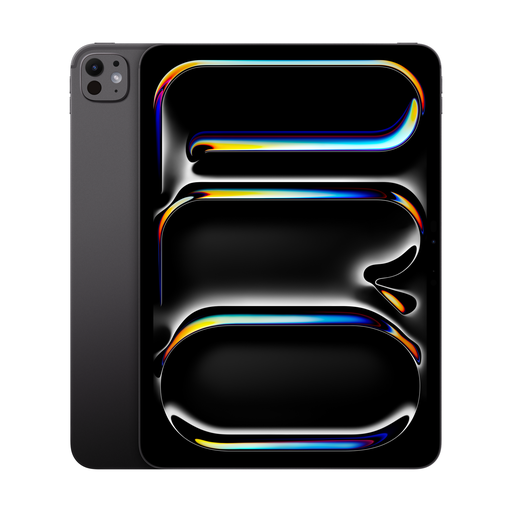
Apple iPad Pro, 11-inch, Wi-Fi, 2 TB, Nano-texture glass
The 11-inch display makes this a larger iPad option for illustrated nature books and fixed-layout pages.
11 inches; Wi-Fi; 2 TB storage; Nano-texture glass according to the product name.
View at Joybuy
 No image available
Microsoft Surface Pro 12 Snapdragon Plus, 24 GB RAM, 1 TB
If you expect to hold the device for most of your flight, take its stated weight of 686 g into account when making your decision.
Snapdragon Plus; 24 GB RAM; 1 TB storage; Platinum.
View at Joybuy
Frequently asked questions
Is it enough to install the reading app before my flight?
No. Download a specific title and try opening it without an internet connection. The Onleihe help centre from divibib GmbH warns that borrowed titles may not work offline on some devices. If needed, check the licence online before testing the title in flight mode.
Which Android or iOS version do I need for the Onleihe app?
The Onleihe help centre says the new Onleihe app requires at least Android 10 or iOS 15.1. Also check that the app is available on your specific tablet, and test offline access with the title you want to read on your flight.
Can I use a tablet on a plane?
According to the European Union Aviation Safety Agency (EASA), tablets can normally be used for reading on board. Follow the airline and crew’s instructions; EASA describes flight mode as a usual requirement. EASA says portable electronic devices with lithium batteries should be packed in your hand luggage. Before you travel, also check your airline’s rules on power banks.
Which tells me more about reading time: mAh or a battery life claim?
Both figures are useful only when you know what they refer to. Samsung lists 7.040 mAh for the Galaxy Tab A11+; Lenovo’s claim of up to 12,5 hours for the Tab One is based on YouTube streaming. To plan for your flight, try your reading app at the brightness you expect to use.
What are my rights if a tablet I bought from a retailer in Germany is faulty?
Under EU consumer protection rules, when you buy from a business seller, you have a legal guarantee of at least two years from the date you receive the goods; the seller is responsible. A voluntary manufacturer’s warranty does not replace these legal rights. These EU rules do not apply in the same way to purchases from private individuals.


