For reading a nature journal in a shared bedroom, an e-reader with adjustable brightness and colour temperature is a good choice if you mainly read text. However, the light may still disturb the other person. The specific file matters too: it could be a reflowable e-book, a PDF or a protected library loan. According to Onleihe’s help pages, Onleihe e-books cannot be opened on Kindle e-readers. If colour images or fixed PDF pages matter, check a sample page before you choose.
Which reader is right for you?
Evening readers in a shared room
If you want to keep reading after the bedroom light goes off, look for adjustable brightness and colour temperature. You can only tell whether a particular setting will disturb the other person in your actual surroundings. tolino and Kobo are among the brands that offer these features.
Readers with their own files or Onleihe loans
If your journal comes from a shop, is your own file or is borrowed from a library, the format, copy protection and transfer method all matter. Onleihe e-books have specific requirements depending on the device and software, as detailed in Onleihe’s help pages.
Readers of illustrated nature journals
If plant drawings, photos or coloured annotations are important to you, check the display and a page from the book you plan to read. With fixed-layout pages, you’ll also need to check that the text remains legible at your chosen display size.
What should you look for when buying?
First, check whether the lighting can be adjusted to suit your reading spot, then confirm the book’s source and file format. If images or fixed PDF pages are important, use a sample page to help you decide.
| Buying priority |
What to check |
Who it matters most to |
| Evening lighting |
Check that you can adjust the brightness and colour temperature to suit your reading situation. |
If I want to read in the evening in a shared room, I want to be able to adjust the light myself. For around 37% of consumers, lighting control comes first. |
| Access to your journal |
Check the file format, source and copy protection; for Onleihe, check the model and software version. |
If I first need to find out whether my own, purchased or borrowed journal can be read on the device, file access is my main concern. This is the top buying priority for around 27% of consumers; Onleihe’s help pages list device-specific requirements. |
| Images and page layout |
Check a sample page for colour requirements and readability at your intended display size. |
If plant illustrations or fixed-layout pages are important to understanding the content, I want to be able to see them clearly on my e-reader. For around 18% of consumers, image display is the main consideration. |
| Ease of use |
Compare the display size and weight of the specific model, and check that it’s comfortable to use in your reading position. |
If I want to hold and use my e-reader comfortably while reading in bed, size and ease of use matter most. For around 18% of consumers, this is the key buying consideration. |
Buying and using an e-reader: common pitfalls
-
Assuming ‘supports EPUB’ means ‘works with every borrowed e-book’
File format, copy protection, loan service and software are separate requirements. Onleihe’s help pages explain that its e-books cannot be opened on Kindle e-readers.
Before you buy, check where the specific journal comes from. For Onleihe 3, make sure you check the exact device and the software version specified for it.
-
Choosing an e-reader just because it supports PDFs
For a journal with a fixed page layout, file format support alone doesn’t tell you whether the page will be easy to read on your chosen display.
View a representative page at your intended display size and check that you’re comfortable with how it looks.
-
Assuming colour and greyscale resolution are the same
PocketBook lists different resolution figures for the Verse Pro Color Sage Glow: 300 ppi for greyscale and 150 ppi for colour.
If fine image details are important, check them on a sample page and consider whether you want to read in colour or greyscale.
Brands to consider
tolino
The shine 5 is a compact black-and-white option; the shine color adds a colour display for suitable illustrations.
- tolino’s specifications list a 6-inch display, a weight of 173 g and adjustable colour temperature for the shine 5. For direct access to Onleihe 3, Onleihe’s help pages specify that the shine 5 needs software version 5.15.253009 or later.
- Onleihe’s information applies to the specific models and software requirements listed. It doesn’t automatically apply to every tolino device or every book title.
PocketBook
The Verse Pro has a black-and-white display; the Verse Pro Color is a colour option for suitable illustrations.
- PocketBook lists support for EPUB, including DRM, and PDF, as well as physical buttons, among the Verse Pro’s features. For direct access to Onleihe 3, Onleihe’s help pages say to check that you have the right software version; version 6.3 or later is specified.
- For the Verse Pro Color Sage Glow, PocketBook lists 300 ppi for greyscale and 150 ppi for colour. These figures relate to different display modes.
Kobo
The Clara BW and Clara Colour offer black-and-white and colour displays respectively. Both are options for suitable personal files.
- Kobo describes ComfortLight PRO as offering adjustable brightness and colour temperature. According to Kobo, you can transfer unprotected EPUB and PDF files using a computer.
- Onleihe does not actively support Kobo e-readers or guarantee that they will work. The possibility of transferring a file does not mean that Onleihe compatibility is guaranteed.
Joybuy products for different reading needs
This selection includes devices with e-book reading functions, as well as models with a colour display or adjustable front light. Compare the specifications with your nature journal’s file format and type.
 No image available
Bigme HiBreak Pro Color Display, 6.13'', Android 14, 8GB+256GB
If your journal includes important colour images, the colour display mentioned in the product name is a useful feature to consider. Check a sample page on the actual device.
The product name lists a 6.13'' E-Ink display, Android 14 and 8GB+256GB.
View on Joybuy
 No image available
Bigme E-Book Reader B6, 6-Inch, White, 36-Level Front Light
If you read in the evening, you can adjust the front light mentioned in the product name across 36 levels. Whether it disturbs the other person will depend on your particular reading situation.
The product name lists a 6-Inch display and Android 14.
View on Joybuy
 No image available
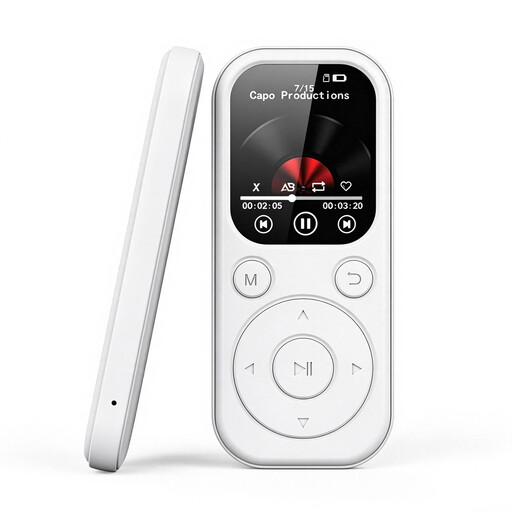
MP3-Player mit E-Book-Funktion, 2.01 inch Color Display, 32 GB, White
If your journal is a TXT file, the e-book function listed in the product name is worth considering. Check that the 2.01 inch Color Display mentioned in the product name suits your needs.
The product name lists 32 GB of storage and a colour display.
View on Joybuy
Frequently asked questions
Can I upload a nature journal I’ve created myself to an e-reader?
It depends on the file format and copy protection. EPUB and PDF are listed as supported formats for the tolino shine 5; Kobo says you can transfer unprotected EPUB and PDF files using a computer. Check the transfer method you plan to use and view a sample page from your specific book.
Will a borrowed Onleihe book work on a Kindle e-reader?
No. Onleihe’s help pages explain that its e-books cannot be opened or read on Kindle e-readers. For other devices, check the specific model and the software requirements listed for it.
How should I adjust the light for reading in a shared bedroom?
Adjust the brightness to suit your actual reading situation and try a warmer colour temperature if your model offers that setting. Kobo describes ComfortLight PRO as offering adjustable brightness and colour temperature; that doesn’t mean the other person won’t notice the light.
Is a colour display always the better choice for an illustrated nature journal?
A colour display is useful when colour is important to understanding the illustrations. Check a page from your journal on the specific device; for the PocketBook Verse Pro Color Sage Glow, PocketBook lists different resolutions for colour and greyscale.


