Readers of nature books with illustrations
If illustrations or maps in your edition contain important information, check the colours, page layout and labels on a typical page.


For a nature journal that consists mainly of reflowable text, a compact black-and-white e-reader is an obvious choice. If colour is important for the information shown in illustrations or maps, a colour e-reader may be worth considering. First, check a typical page from the edition you have, as a fixed PDF layout and small labels can be difficult to read even on a colour display. According to the divibib Onleihe Help Centre, protected Onleihe 3 e-books cannot be read on Kindle e-readers. For other devices, access and copy protection depend on the specific model and software.
If illustrations or maps in your edition contain important information, check the colours, page layout and labels on a typical page.
If your journal is available as an EPUB or PDF, or you want to borrow it from the German Onleihe service, the format, copy protection and, where applicable, software version must be compatible with your e-reader.
If you mainly read text and want an e-reader that’s easy to hold and put away on the bus, compare its dimensions and weight as well as its font settings and lighting.
| What matters to you | What to check before buying | Who will find this most important? |
|---|---|---|
| Image and layout readability | Check a typical EPUB or PDF page, colour details and the size of the labels. | If my edition includes maps or colour illustrations, I want to check the legends and small print on a sample page. Around 25% of consumers put image and layout readability first. |
| Access to the specific edition | Check the file format and copy protection, and for Onleihe titles, make sure the device and software version are supported. | If I want to read my own file or a library loan, the e-reader must be able to open that specific edition. Around 31% of consumers prioritise access to their own file or library loan. |
| Ease of use on the bus | Check the dimensions and weight with the case you plan to use, and try holding the specific device in one hand. | If I read often during the journey and want to put my e-reader away between reading sessions, I look for a device that’s comfortable to hold. Around 25% of consumers put ease of use on the go first. |
| Lighting and offline access | Adjust the lighting and font, then download and open the edition you want before setting off. | If I want to read in changing light or without an internet connection, I want to check the display and offline access in advance. Around 19% of consumers prioritise adjustable lighting and having their content ready to read. |
PDF pages have fixed line and page breaks, so small labels can be difficult to make out even on a colour e-reader.
Before buying, check a typical text, image and map page from your edition.
According to the divibib Onleihe Help Centre, protected Onleihe 3 e-books cannot be opened on Kindle e-readers. With compatible tolino and PocketBook devices, you also need to consider the specific model, software and copy protection.
Check the library title, e-reader and software against the latest Onleihe guidance.
A book shown in your library view isn’t necessarily fully saved on your device.
Download your journal while you’re connected and open it before setting off.
The tolino shine 5 is a compact black-and-white model for EPUB and PDF files. For direct access to Onleihe 3, the device model and software version must be compatible.
The Verse Pro Color is a compact colour option. For Onleihe 3, the specific device, software and copy protection all need to be compatible.
This selection from Joybuy includes e-readers and an MP3 player with e-book functionality. Before buying, check that the specific file format and display suit your nature journal.
 No image available
The colour display may be an option if colour illustrations are important in your edition. Check a typical page on the device to see how it looks.
The product title lists a 6.13-inch display, Android 14 and 8GB+256GB of storage.
 No image available
Its compact size may make it a good option for reading on the go. Check a sample page if your journal has small image labels or fixed PDF pages.
The product title lists a 36-level adjustable front light, Android 14 and 4+64GB of storage.
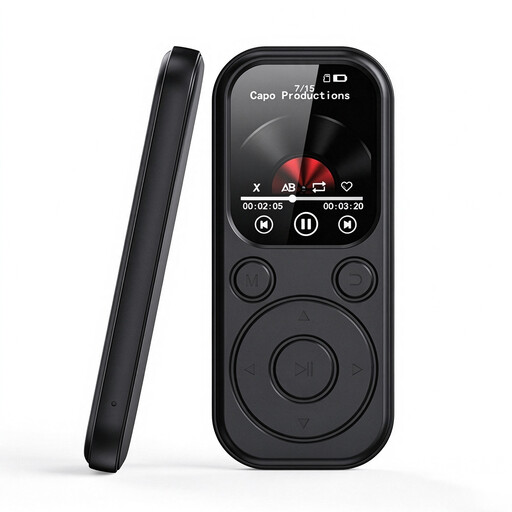 No image available
The title mentions e-book functionality. Check that its stated TXT support is compatible with your journal file format. This alone doesn’t confirm that it’s suitable for illustrated or fixed-layout pages.
The product title lists a 2.01-inch colour display, 32 GB of storage and expandable memory up to 128 GB.
According to the divibib Onleihe Help Centre, protected Onleihe 3 e-books cannot be opened on Kindle e-readers. With tolino and PocketBook devices, direct access and copy protection depend, among other things, on the supported model and software version.
Download your specific edition before setting off and try opening it. If you’re borrowing it through Onleihe, also check your login and the copy protection. For newly configured external e-reader software, Onleihe has described the move from Adobe ID to ByteBooks ID, effective from 23 June 2026.
No, a colour display alone doesn’t guarantee that. According to the Onleihe Help Centre, PDF pages have a fixed layout. PocketBook also lists different resolutions for colour and greyscale content on the Verse Pro Color. Check a typical page from your edition.
According to Verbraucherzentrale, a typical online purchase is generally covered by a 14-day right to cancel, subject to statutory requirements and exceptions. The German Federal Ministry for the Environment advises that an old e-reader should be taken to an authorised collection point, not put in household waste.