Readers who need large print
If you want to display longer journal entries in a larger size, check that your particular file and reading app support this. Apple and Google note that text size settings don’t work in every app.


Choose a tablet to suit the format of your nature journal first. In a compatible reading app, you can enlarge adjustable text, while a larger screen may be more important for fixed-layout PDF pages. If you often hold the device, weigh the extra screen space against its weight and portability, and test the original file in the app you plan to use before buying.
If you want to display longer journal entries in a larger size, check that your particular file and reading app support this. Apple and Google note that text size settings don’t work in every app.
If photos, sketches or fixed-layout PDF pages matter to you, view captions on the screen you’re considering and weigh the screen size against the device’s weight. Apple lists the Wi-Fi iPad (A16) at 477 g; Xiaomi lists the REDMI Pad 2 Pro at 610 g.
If you often hold your tablet or take it outside, consider the weight of the specific version and how easy the screen is to read in the light you usually use it in.
The key question is whether your journal contains adjustable text or fixed-image pages. After that, consider comfort, app availability and what’s included in the box.
The figures below show the main priority of consumers choosing a tablet to read this nature journal.
| Priority | What to check before buying | Who is this important to? |
|---|---|---|
| Enlarging text | Test the file format and text-size options in the specific reading app. | If I want to enlarge longer journal entries so they’re easy to read, I check a sample page and its controls in the app I plan to use. Around 36% of consumers put adjustable text at the top of their list. |
| Images and PDF pages | View a real journal page with a caption in the app you plan to use. | If the journal includes photos, sketches or fixed-layout pages, I want to check how the full page and small captions look on the screen I choose. Around 29% of consumers prioritise clear images and PDF pages. |
| Portability | Consider the weight of the specific version and how you usually read. | If I often hold the tablet or use it on the go, I weigh its weight against the screen size I want. Around 21% of consumers prioritise a handy reading device. |
| Apps and what’s included | Check that the reading app you need is available and whether a charger is included. | If I want to open my journal file with a particular app, I check that it’s available and whether a suitable power adapter is included. Around 14% of consumers put app access and avoiding extra purchases first. |
A larger screen doesn’t automatically make text in a fixed-layout document scalable. Kobo notes that you can’t change text size in PDF files on its e-readers; system-wide text settings don’t work in every app either.
Open the original file in the reading app you plan to use and check a page with a small caption.
A larger screen can be less comfortable to hold for long periods. Xiaomi lists the REDMI Pad 2 Pro at 12.1 inches and 610 g; Apple lists the Wi-Fi iPad (A16) at 477 g.
Think about whether you’ll mostly read while holding the tablet or with it propped up, and compare the weight of the versions you’re considering.
A stand or separate support may be useful for longer reading sessions.
The reading app you need won’t be available on every platform, and some models don’t include a power adapter. Xiaomi notes that a power adapter isn’t included with the REDMI Pad 2 Pro.
Before buying, check that the app supports your file format and confirm what’s included with the specific version you’ve chosen.
The iPad (A16) is an 11-inch colour tablet to consider if you want to use iPad reading apps.
The Galaxy Tab A11+ is an 11-inch Android option for journal entries, photos and other apps.
With its 12.1-inch colour screen, the REDMI Pad 2 Pro is an option for readers who want to view photos or fixed-layout PDF pages at a larger size.
This selection from Joybuy includes tablets with larger colour screens for journal entries, photos or fixed-layout pages. Whether you can adjust the text depends on the file and reading app.
 No image available
The 13.4-inch screen could suit image-rich pages; test text resizing in your reading app.
1920 × 1200 pixels, IPS display and 128 GB storage. The product title also lists a keyboard, mouse and stylus.
 No image available
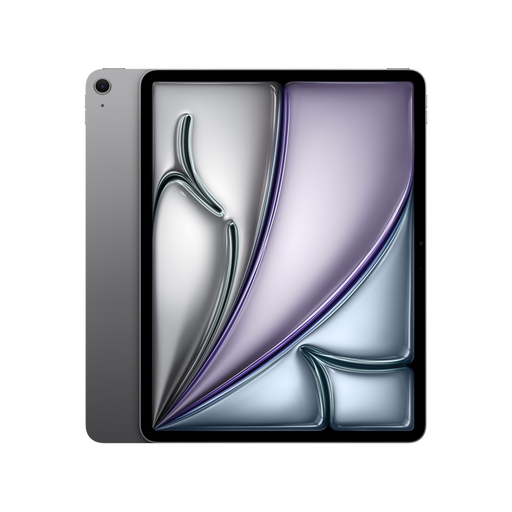
This could suit adjustable journal text if the app you use supports Dynamic Type; Apple describes this feature for compatible iPad apps.
13-inch Liquid Retina display and 616 g, according to the product details.
 No image available
The large screen could be useful for image-rich or fixed-layout pages; Google notes that Android’s font size setting doesn’t work in every app.
Android 16, 6 GB RAM plus 20 GB virtual RAM and 128 GB storage. The product title says a folio case is included.
 No image available
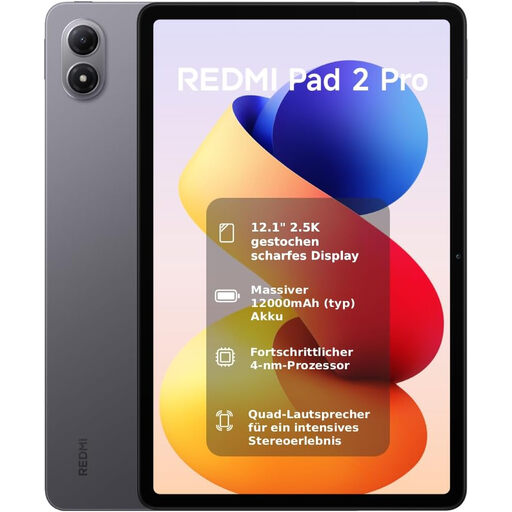
The large screen is useful for photos and fixed-layout PDF pages, but that doesn’t mean PDF text can be freely resized.
12.1-inch screen and 610 g, according to Xiaomi. The manufacturer says a power adapter isn’t included.
 No image available
The 12.1-inch screen gives you more room for journal pages; check whether the specific Android app supports larger text.
Android 15 and 500 nits typical brightness, according to the product details. Google notes that Android’s font size setting doesn’t apply to every app.
Not reliably for every file and app. Apple says text resizing works in apps that support Dynamic Type; Google also notes that Android’s font size setting doesn’t work in every app. Open a sample page of your journal in the app you plan to use.
First, check whether the reading app has its own text-size settings. On iPad, you can adjust text size and accessibility settings; on Android, you can change the font size in the system settings. What matters is whether the specific file responds to those settings in the app.
No. Text on fixed-layout PDF pages may be tied to the page layout. Kobo specifically notes that you can’t change the text size in PDFs on its e-readers. Test the original file in the app you plan to use.
Online purchases generally come with a 14-day right to cancel, subject to legal exceptions. This is separate from your rights if goods are faulty: consumers in the EU are generally entitled to at least two years of statutory protection from the date they receive the goods.