For chamber music in your home office, first make sure the network player is compatible with your existing active speakers, amplifier or DAC; passive speakers also need an amplifier. If you want to listen to works without pauses between tracks, check that gapless playback works with the specific service, format and playback route you plan to use. Size and ease of use are then useful criteria to consider. Extra features matter most when your setup will actually use them.
Who is a network player suitable for?
Owners of an existing stereo system
If you want to listen to chamber music through your existing active speakers or amplifier, first check that you have the right analogue or digital inputs. WiiM lists RCA, optical and coaxial outputs for the Pro Plus; passive speakers also need an amplifier.
Listeners who enjoy uninterrupted works
If you listen to complete works or recordings from your own collection, check whether playback continues between tracks without an extra pause. BluOS states that gapless playback is available for supported audio formats; this does not automatically apply to every service and playback route.
Listeners with a small desk
If you switch between music and other tasks while working, choose a control method that’s practical from your desk. App control, buttons and connecting other rooms serve different purposes; you won’t need every extra feature for a single desk setup.
What should you look for when buying?
First check the connections and whether you need an amplifier. Then consider how it handles your music sources, followed by ease of use, size and extra features.
| Criterion |
What to check before buying |
Who is this important to? |
| Connecting to your system |
Check that you have the right RCA, optical or coaxial inputs, and whether your speakers are active or passive. |
If I want to keep using my existing system, the signal path from the player to the speakers needs to work. Around 36% of consumers focus mainly on connecting to their existing audio system. |
| Gapless playback |
Check the format, music service, app and playback route with a familiar album that plays continuously between tracks. |
If I’m listening to a continuous movement or a complete work, I don’t want an extra pause between tracks. Around 29% of consumers prioritise uninterrupted playback of continuous music. |
| Desk controls |
Check whether app control, buttons or presets suit the way you work. |
If I switch quickly between music and other tasks while working, I want playback to be easy to control. Around 21% of consumers focus on ease of use at their workstation. |
| Space and extra features |
Check the space available and which device features you’ll actually need before choosing. |
If my desk has limited space, I don’t want to make room for features or equipment I won’t use. Around 14% of consumers focus mainly on the space required and the features they need. |
Common buying mistakes
-
Assuming a separate streamer can power an amplifier
A network player can provide the signal, but it can’t power passive speakers on its own.
Before choosing, check what type of speakers you have and whether you have an amplifier with a suitable input.
-
Assuming “gapless” is guaranteed for every source
BluOS’s statement on gapless playback applies to supported formats. It doesn’t confirm compatibility with every combination of service, app and playback route.
Try a familiar album that plays continuously using the source you actually plan to use.
-
Paying for connections and features you won’t use
An analogue output is only useful if you’ll connect it to your system; if you use an external DAC, a suitable digital input may matter more.
Decide on your intended signal path first, then compare the connections you’ll need.
-
Planning to play NAS files without checking compatibility
With UPnP playback, the file format, DRM status and server configuration can all make a difference.
Test playback using files from your collection and the server software you plan to use.
Key brands at a glance
WiiM
The Pro Plus is one way to add streaming to an existing system using analogue or digital outputs.
- WiiM lists RCA, optical and coaxial outputs, as well as several streaming protocols.
- If you only use an external DAC, check whether the analogue section is relevant to your signal path. Passive speakers still need an amplifier.
Bluesound
The NODE NANO is a compact BluOS player for an existing system and could be worth considering if you have other BluOS rooms.
- Bluesound lists RCA and digital outputs, presets and app control.
- BluOS describes gapless playback for supported formats; this doesn’t guarantee it will work with every service or playback route.
Cambridge Audio
The MXN10 is designed for compact hi-fi or desk setups, and can play music from USB or a NAS.
- Cambridge Audio lists analogue and digital outputs, as well as StreamMagic.
- For UPnP, the file type, DRM status and server configuration all need to be compatible with your source.
Yamaha
The WXC-50 is an add-on for an existing amplifier, particularly if you already use MusicCast devices.
- Yamaha describes its MusicCast integration and app control.
- Check that the specific services and features you need are supported by the device; being part of MusicCast alone doesn’t answer that question.
Eversolo
The DMP-A6 Gen 2 is worth considering if you need local music management, a screen or an XLR connection.
- The manufacturer’s manual describes local music management, a touchscreen, and XLR and RCA outputs.
- These features don’t automatically make this model a better choice for a simple desk setup without the right connections or a need for them.
Joybuy products on this topic
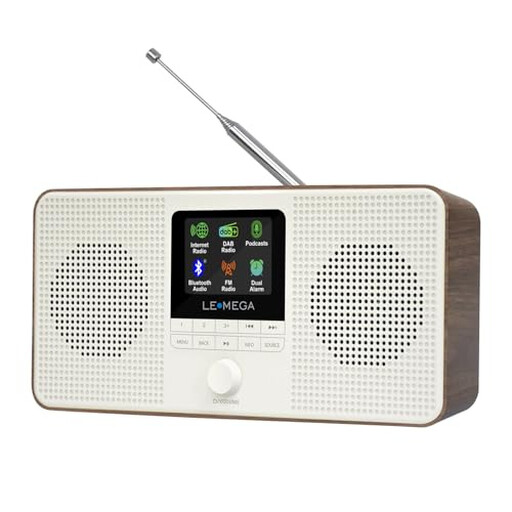
This selection includes a device for listening to the radio and podcasts at your desk. If you want to play chamber music from your own network library, check that your sources and playback routes are supported before buying.
 No image available
LEMEGA IR4S Internet Radio, Podcasts, Bluetooth, DAB & FM Stereo, Walnut
For a desk where you also want to listen to the radio and podcasts; the product name also lists Bluetooth, DAB, FM and stereo.
If you want to use Spotify Connect, note that the product information says you’ll need a Spotify Premium account.
Joybuy
Frequently asked questions
Do passive speakers need an additional amplifier?
Yes. Passive speakers need an amplifier downstream of a separate player such as the WiiM Pro Plus. For active speakers, WiiM lists the analogue line output as a way to connect.
How can I check whether music from my NAS will play?
Check that the player and server support the file format, that the files can be played without DRM and that the server is configured correctly. Cambridge Audio lists these as troubleshooting checks for UPnP; this doesn’t guarantee compatibility with every NAS setup.
Is gapless playback guaranteed with every service?
No. BluOS describes gapless playback as standard for supported audio formats. For your setup, the specific combination of service, app, format and transmission route is what matters.
What should I know about consumer rights and warranties when buying from a business seller?
According to EU consumer information, you have a statutory right to a minimum two-year guarantee of conformity from the date you receive the goods. This is separate from a voluntary manufacturer’s warranty. The EU rules outlined here apply to purchases from business sellers, not private individuals.
What should I check about product compliance in Germany?
CE marking is required for products covered by the relevant harmonised EU legislation. You can’t tell whether a particular device meets these requirements just by looking at its brand.


