What should you look for when buying?
First, work out whether your concert sound will come from an app or your TV. Then check your speakers, available inputs and whether you want to create a room group.
| What you need |
What to check |
Especially important if |
| Concert source and signal path |
Check which music services you use and whether you need AirPlay or Cast. For TV audio, check the output, player input and audio format. |
If I listen to concert recordings through an app or want to send TV sound to my audio system, the player must support the source. Around 34% of consumers put the right concert audio connection first. |
| Connection to your audio system |
Check your speaker type and available inputs. If you have passive speakers, make sure you have an amplifier. |
If I want to keep using my existing speakers, I need compatible inputs and an amplifier for passive speakers. Around 33% of consumers prioritise connecting to their existing audio system. |
| Listening position |
Decide where to position your speakers and where you’ll listen. Compare EQ or room correction only if you plan to use these features. |
If I want to listen from particular spots in an open-plan kitchen and dining area, I’ll consider speaker placement and any available settings. Around 20% of consumers prioritise how sound is delivered at their listening position. |
| Multi-room audio and control |
Check that your existing devices, preferred app controls and grouping requirements are compatible with the specific player’s documentation. |
If I want to play concert sound in other rooms and control the devices together, the grouping needs to work with my existing system. Around 13% of consumers prioritise multi-room audio and control. |
Joybuy products for concert sound in the kitchen
The products below are standalone Wi-Fi internet radios for listening to audio in the kitchen. They aren’t separate network players for connecting passive speakers to an existing system.
 No image available
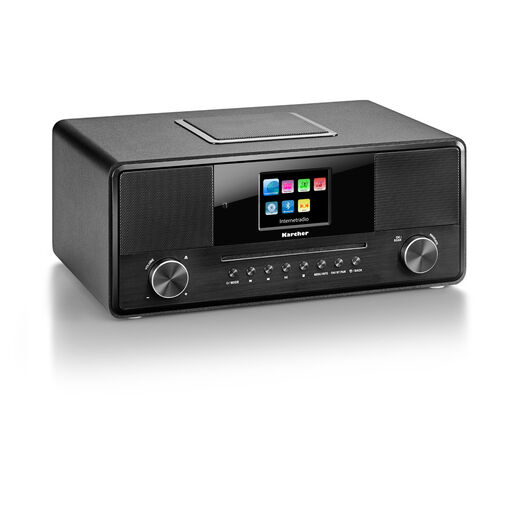
Karcher DAB 9000CDi internet radio with CD player
An option if you’re looking for a standalone Wi-Fi internet radio for concert sound, rather than a separate player to connect to an existing system.
Features include a CD player, DAB+, Bluetooth, USB, AUX-in, built-in subwoofer and 36 W.
View at Joybuy
 No image available
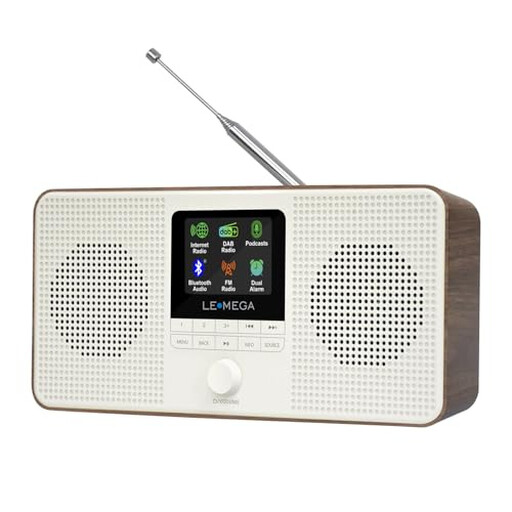
LEMEGA IR4S Wi-Fi internet radio, walnut
An option if you want to listen to concert sound through a standalone Wi-Fi internet radio with an integrated stereo speaker system.
The product description lists podcasts, Bluetooth, DAB and FM, as well as Spotify Connect and two 2.5-inch drivers. According to the product description, the device isn’t waterproof, so keep it away from water and excessive moisture.
View at Joybuy
Frequently asked questions about network players for concert sound
Can I connect passive speakers directly to a separate network player?
No, passive speakers need an amplifier. WiiM says this applies to the Pro and Pro Plus models. Active speakers or an existing amplifier can be connected using a suitable player output.
How do I get sound from a concert video on my TV to my audio system?
Compare your TV’s audio output with the input on the specific player. Bluesound lists HDMI eARC for the NODE, while WiiM lists HDMI ARC for the Ultra. For the WiiM Pro Plus’s optical input, WiiM specifies stereo PCM and excludes Dolby Digital and DTS. If you’re using Wi-Fi or Bluetooth playback, check picture and sound together too.
What should I consider when setting up and looking after a player in a kitchen-diner?
Connect the player to a suitable input on your audio system and set it up according to the manufacturer’s instructions. The Sonos Port setup guide recommends a stable, level surface with at least 5 centimetres of clearance on all sides. Set up other models according to their individual instructions. Keep the device and its connections away from splashes and cooking steam.
Can I use room correction on the Bluesound NODE without additional components?
No, Bluesound says you need a separately purchased licence and calibration kit to use Dirac Live. Check these requirements if you’d like to use the feature.
What are my rights when shopping online in Germany?
According to the European Union’s consumer information, purchases from a trader are generally covered by a legal guarantee of at least two years from the date you receive the goods. A voluntary manufacturer’s guarantee doesn’t replace it. The Verbraucherzentrale says online purchases generally come with a 14-day right to cancel after you receive the goods. Exceptions and the terms of the specific contract should also be taken into account.


