First, check whether the station you want appears in the device’s radio directory or can be played as a supported direct stream. Next, make sure the player’s outputs match the inputs on your existing system; passive speakers need an amplifier. Presets and easy-to-reach controls can make it simpler to get started while you’re working on a hobby project.
Who is a network player suitable for?
Listeners with an existing system
If you want to keep using an amplifier or active speakers in your hobby room, the player’s output needs to match the input you already have. WiiM lists both analogue and digital outputs for the Pro; passive speakers also need an amplifier.
Listeners who have a particular station in mind
If a particular station matters to you, check whether it’s available in the radio directory you’ll be using or can be played via a supported direct stream. The WiiM Help Center explains how to search for stations and add direct stream links.
Listeners who want quick, easy controls
If you want to switch quickly to a saved station while you’re working, look at the controls on the device and the available presets. WiiM describes a preset button on the Pro, while Bluesound lists five programmable presets on the NODE.
What should you look for when buying?
| Buying priority |
What to check |
Who cares most about this? |
| Access to the station you want |
Search for the station in the service you plan to use, or test a playable direct-stream address with the device. |
If a particular station matters to me, I want to know before buying whether I can listen to it through the device. Around 33% of consumers prioritise access to that specific station. |
| Connecting to your existing system |
Check whether your speakers are active or passive, then match the appropriate inputs and outputs. |
If I want to keep using my system, the signal path needs to work with the speakers I already have. Around 27% of consumers put compatibility with their existing system first. |
| Network connection where you’ll use it |
Check the connection in your hobby room. Ethernet is an option if you have a cable route and a network port available. |
If network reception is unreliable where I plan to keep the player, I want to work out how to connect it before buying. Around 20% of consumers prioritise a practical network connection at the player’s location. |
| Quick access to your station |
Check whether you can save the station and start it using the device or a compatible remote control. |
If I often listen to the same station while working on a hobby project, I want to be able to play it without searching again. Around 20% of consumers prioritise quick access to their station. |
Common misconceptions
-
A wide choice of stations doesn’t guarantee your favourite is included
A general radio directory doesn’t confirm that you can access a particular station through it. A directory and a direct stream are two different ways to listen.
Search for the station in the service you plan to use. If necessary, test a direct stream address before buying, provided the station offers one that can be played.
-
A dedicated network player isn’t an amplifier
A player such as the WiiM Pro won’t power passive speakers. You’ll need a suitable amplifier for those; active speakers need a compatible audio input.
Plan the signal path from the player to the speakers, then check that the connections on the specific devices match.
-
Models with similar names don’t necessarily have the same features
WiiM explicitly states that the Ultra doesn’t support AirPlay 2. Don’t assume that a feature on another model is available on this one without checking.
Before buying, check the full model name against the features you need.
Key brands at a glance
WiiM
WiiM offers standalone network players for existing systems, as well as the Amp, which has built-in amplification for passive speakers.
- According to WiiM, you can save radio stations as presets and add direct stream links in the WiiM Home app.
- According to the manufacturer, the WiiM Ultra doesn’t support AirPlay 2. The Pro needs an additional amplifier for passive speakers.
Bluesound
Bluesound describes the NODE as a player for radio and music streaming through an existing stereo system.
- Bluesound lists five programmable presets and several audio outputs.
- Check that the station you want is actually available through the service you plan to use.
Cambridge Audio
The MXN10 is a compact network player for an existing hi-fi or desktop system.
- Cambridge Audio lists internet radio, StreamMagic control, and RCA, coaxial and optical outputs.
- General specifications don’t tell you whether a particular station is available. Check the station and how you want to control the player before buying.
Denon
The DNP-2000NE is a network audio player for an existing system; Denon also describes HEOS as offering internet radio.
- Denon lists HDMI ARC for connecting TV audio as an additional option.
- Extra connections aren’t automatically necessary if you only want to listen to the radio. Check that your chosen station and the inputs you need are supported.
Products at Joybuy
The selection includes an internet radio with a CD player for your hobby room.
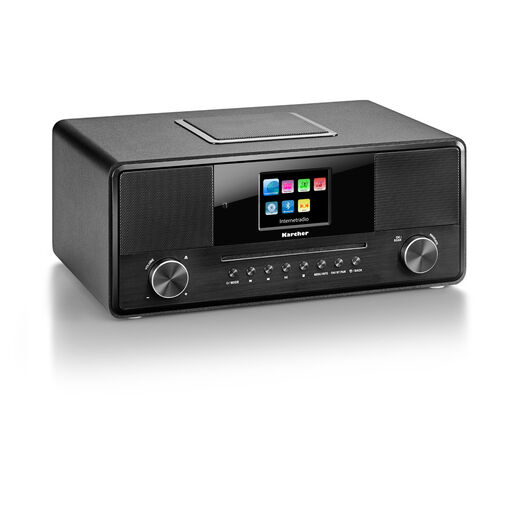 Image unavailable
Karcher DAB 9000CDi internet radio with CD player
This model is described as an internet radio with a CD player; the product name also specifies a remote control.
Features listed include Wi-Fi, Bluetooth, DAB+, RDS, a 2.8-inch colour display, built-in subwoofer, USB, AUX-in, headphone socket and 36 W.
Joybuy
Frequently asked questions
Can I connect passive speakers directly to a dedicated network player?
No. Passive speakers need a suitable amplifier as well. WiiM explicitly specifies this for the Pro; active speakers instead need a compatible audio input.
How do I set up a radio station that isn’t listed?
If the station provides a playable direct stream address, the WiiM Help Center explains how to add and test these links in the WiiM Home app. Whether your particular station works depends on its actual address and whether the device supports it.
What should I know about returns and customer service?
According to the Verbraucherzentrale, online orders in Germany generally come with a 14-day cancellation period from the date you receive your order. The right to cancel is separate from your statutory rights if goods are faulty and from any voluntary guarantee. Check the details for the specific seller and product.
Do I need DAB+ as well for internet radio?
You don’t need DAB+ to listen to internet streams; it would give you an additional way to receive radio. If you also want to use DAB+, check that it’s specifically listed for the model you’re considering.


