Owners of a stereo system
If you want to keep your existing speakers, check whether you have a spare input available. Passive speakers also need an amplifier, as explained by the WiiM Help Centre.


If you already have an amplifier or active speakers, a network player with a compatible audio output could be a good fit. First, check whether your favourite stations are available through the device’s app or a supported direct stream. If you don’t already have a playback system, an internet radio with built-in speakers may be a better option. In a large living room, speaker placement and listening position also affect the sound.
If you want to keep your existing speakers, check whether you have a spare input available. Passive speakers also need an amplifier, as explained by the WiiM Help Centre.
If you want quick access to specific stations, look for a suitable station directory, the option to play a direct stream and easy-to-use favourites. The WiiM Help Centre and Cambridge Audio explain the different options available on specific models.
If you listen from different spots in a large living room, consider your speaker placement and usual listening positions. Genelec notes that room acoustics and speaker positioning both influence the listening experience.
A good fit if: You have a suitable spare input on an amplifier or active speakers and want to keep using your existing playback system.
Bear in mind: A network player won’t replace an amplifier for passive speakers, and its extra features won’t improve your room acoustics by themselves.
A good fit if: You want to listen to the radio without a separate system and select stations directly on the device, using a remote control or through an app.
Bear in mind: Teufel recommends leaving at least 40–50 cm of space above and around the RADIO 3SIXTY, so placement needs to be part of your plans.
| Buying priority | What to check | Who should pay particular attention? |
|---|---|---|
| Connecting to your system | Check whether you have active or passive speakers and an amplifier, then compare any spare RCA, optical or coaxial inputs with the outputs on the specific player. | If I want to keep my system, I need to be sure the player, amplifier and speakers are compatible. Around 26% of consumers prioritise connecting to their existing system. |
| Favourite stations | Search for specific stations in the app you plan to use; if needed, check whether you can add and save a direct stream. | If my favourite station doesn’t appear in the search, I need a reliable alternative way to play it. Around 26% of consumers prioritise access to stations. |
| Sound in your listening areas | Assess your speaker placement and usual seating positions; only consider room-correction features if you plan to use them. | I want to listen from my usual seats, rather than relying on a feature in the player alone. Around 21% of consumers prioritise sound in their listening areas. |
| Station controls | Check whether you can play favourites on the exact model using an app, button, display or remote control. | I want to play the stations I listen to often without searching for them again, using whichever method I prefer. Around 16% of consumers prioritise quick station controls. |
| What the setup includes | Consider your existing system and any extra components you’ll need; for room correction, check whether a licence or calibration equipment is required. | I want to know in advance whether I’ll need an amplifier or other accessories as well as the device. Around 11% of consumers prioritise the overall setup. |
A player without a speaker amplifier can’t drive passive speakers on its own. Without a suitable amplifier, you won’t get any sound from those speakers.
Before choosing a model, check whether you have active speakers or an amplifier with a spare, compatible input.
A station directory and a direct stream are two different ways to access stations. The availability of a directory alone doesn’t confirm that a particular station is listed.
Search for the specific station in the app you plan to use and, if necessary, check whether its direct stream is supported.
Room acoustics and speaker placement affect the sound. On a compatible Bluesound device, ‘Dirac Live Ready’ doesn’t mean that the licence and calibration equipment are included.
First assess your speaker placement and listening positions, then check what features and components you’ll need for the room correction you want.
Even devices from the same brand can support different streaming options. For example, WiiM states that the Ultra doesn’t support AirPlay 2.
Check that the specific model supports the streaming option you need.
The brands listed here cover different types of devices and connections. Feature information relates to the specific model ranges mentioned and isn’t an independent comparison of sound quality.
The Pro Plus is designed for an existing system with compatible analogue or digital inputs; the Ultra adds options for TV and subwoofer connections, among other features.
The MXN10 is a compact network player for an existing hi-fi system, with internet radio available through StreamMagic.
The NODE is described as a network player for existing stereo systems or active speakers, including setups where you also want TV audio and additional connections.
According to Teufel, the RADIO 3SIXTY combines internet radio with DAB+ and FM, and has built-in speakers.
The MP 2000 R Mk II is a fully featured hi-fi media player with internet radio, designed for a larger component-based system.
The following devices are standalone internet radios with built-in speakers, for anyone who wants to listen to the radio without a separate hi-fi system.
 No image available
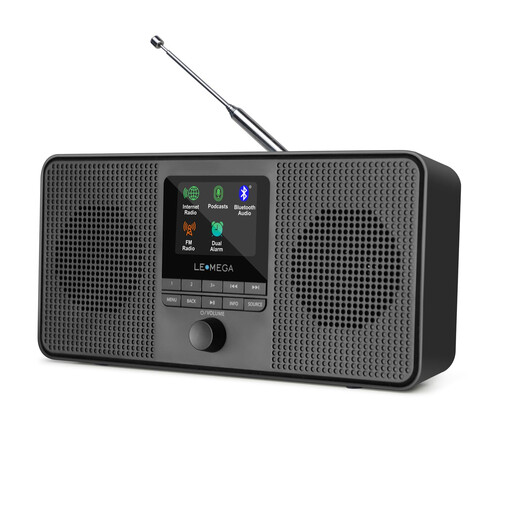
This standalone internet radio with built-in stereo speakers could suit you if you don’t want to connect a separate system. In a large room, sound coverage will still depend on speaker placement and listening position.
Product information lists Wi-Fi, a colour display, 40 internet radio presets and the option to add your own stations by URL. The device is also described as having two 2.5-inch drivers.
 No image available
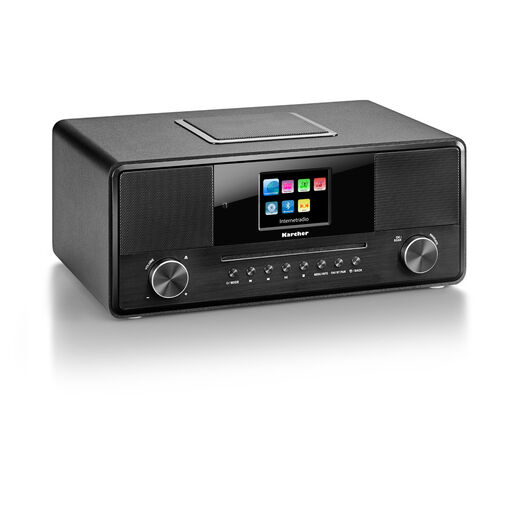
This all-in-one device is an option if you want to listen to internet radio without a separate system. Its built-in subwoofer and stereo playback don’t provide an independent indication of how it will sound from different seating positions.
Product information lists DAB+, Wi-Fi, Bluetooth, a colour display, remote control, USB, AUX input and headphone socket, as well as 36 W of power.
Not to a player without a speaker amplifier, such as the WiiM Pro Plus. You’ll also need a suitable amplifier for passive speakers. If you have active speakers or an existing system, make sure the inputs and outputs are compatible.
First, check the station search in the relevant app. WiiM also documents an option to add a direct stream URL and a test function; the station must provide a playable link for this to work. Being able to play another station doesn’t guarantee that your chosen station will be available.
Connect the player to a compatible input and test playback from your usual listening positions. Speaker placement and room acoustics affect the sound. For the standalone RADIO 3SIXTY, Teufel also recommends leaving at least 40–50 cm of space above and around the radio.
Not necessarily. Bluesound describes compatible players as Dirac Live Ready, but says you’ll need to buy a licence and calibration kit to use the feature. Check what’s included with the exact model.
According to the German Federal Network Agency, products covered by relevant EU harmonisation legislation and placed on the market in the EU by a manufacturer or importer must carry the CE marking. A model description alone doesn’t confirm that the specific unit for sale meets the requirements; check the product labelling and accompanying documentation.