A separate network player can be connected to your existing hi-fi system if you have a suitable input and, for passive speakers, an amplifier as well. If you don’t have a hi-fi system, an internet radio with a built-in speaker could be an option. First check whether your briefing is available as a live stream or an on-demand episode, and whether the specific device supports that access method. Tone controls and presets can make adjustments and starting playback easier, but they don’t prove that speech will be clearer.
Who is a network player for?
For listening to the news at low volume
If you want to listen to speech at low volume through your existing hi-fi system, suitable volume and tone settings matter. WiiM documents tone control options for the WiiM Pro. These let you adjust the sound, but don’t prove that speech will be clearer.
For owners of existing speakers
If you want to keep using your speakers or amplifier, check that the player’s outputs match a free input on your system. WiiM points out that the WiiM Pro isn’t an amplifier for passive speakers.
For listeners of daily briefings
If you want to listen to a news programme regularly, first check whether you’ll be listening to a live stream or an on-demand episode. In Germany, for example, Deutschlandradio offers both live streams and podcasts; that doesn’t mean every player supports both.
What should you look for when buying?
First check how you can access your programme, then make sure you can connect the player to your speakers. It’s also worth checking how easy it is to adjust the volume and sound, and start playback each day.
| What matters |
What to check when buying |
Who is this important for? |
| Adjusting speech for low-volume listening |
Check the volume controls for the whole system and whether the specific model has an easy-to-access EQ; try it with your own briefing. |
If I listen to the news at low volume, I want to be able to adjust the volume and sound to suit my system. Around 36% of consumers would consider being able to adjust speech for low-volume listening their top priority. |
| Connecting to your hi-fi system |
Check whether your speakers are active or passive, then match a free input to a suitable output on the player. |
If you want to keep your existing speakers or amplifier, you need a suitable connection and, for passive speakers, an amplifier. This matters to around 29% of consumers. |
| Access to your programme |
Check the exact programme name and the radio, podcast or app access method supported by the specific model. |
If I want to listen to the same live programme or a particular episode every day, I need to be able to access that exact content. Around 21% of consumers would put access to their briefing first. |
| An easy daily start |
Check whether you can save stations as favourites or presets, and whether the service requires an account, an app or a subscription. |
If you want to start the same station each morning without a long search, a short, repeatable process can help. Around 14% of consumers would put this convenience first. |
Avoid common buying mistakes
-
Assuming a streamer can replace a complete speaker system
A separate network player such as the WiiM Pro doesn’t amplify passive speakers. You’ll need an amplifier as well to use them.
Before choosing a model, check whether your speakers are active or passive and which inputs are free on your existing system.
With passive speakers, you may also need an amplifier and suitable cables.
-
Assuming internet radio gives you access to every podcast episode
A live stream and an on-demand episode are different ways to listen. Finding a radio station doesn’t confirm that the briefing you want is available too.
Before buying, search for the exact programme name and check which service or app-casting method is supported by the specific device.
-
Assuming AirPlay support on one model means it’s supported on another
WiiM says that the WiiM Ultra doesn’t support AirPlay.
If you want to play episodes from an Apple device using AirPlay, check that this feature is supported by the exact model you’re considering.
-
Choosing a digital streaming transport without a suitable downstream connection
The Eversolo T8 is designed to send digital audio to other devices. You can’t simply connect it like a player with an analogue output unless you have a compatible DAC or an amplifier with the right inputs.
Match the outputs you need to the inputs on your system. Additional digital equipment, on its own, hasn’t been shown to make a news briefing easier to understand.
A guide to relevant brands
WiiM
The WiiM Pro is a separate streamer for your existing hi-fi system. It could be a good fit if its outputs, tone controls and radio presets suit the way you plan to use it.
- WiiM documents analogue and digital outputs, EQ options and storable radio presets for the Pro.
- The Pro isn’t an amplifier for passive speakers. The models also differ: according to WiiM, the Ultra doesn’t support AirPlay.
Bluesound
NODE players are one option for existing hi-fi systems if BluOS controls and access to radio stations or your own audio streams are important to you.
- Bluesound documents internet radio support for the NODE N130 and the option to add direct audio streams to BluOS.
- Bluesound lists the NODE N130 as archived and no longer on sale. The NODE ICON is a different model with different connections; this doesn’t confirm that a particular news programme is available.
Denon
The DNP-2000NE is a network audio player for an existing hi-fi system, with an HDMI ARC connection for your TV if you need one.
- Denon lists HEOS and HDMI ARC for this specific model.
- For news briefings alone, the extra TV connection is only relevant if you’ll use it too. There’s no evidence that it makes speech easier to understand at low volume.
Eversolo
The T8 is a digital streaming transport for a hi-fi system with a compatible DAC or suitable digital inputs.
- Eversolo describes its digital outputs as being for connecting external DACs.
- You’ll need suitable additional components to connect it to existing speakers using a simple analogue connection. This doesn’t independently prove that it makes speech clearer.
Products for briefings without a separate hi-fi system
This selection includes Wi-Fi radios and players with built-in speakers for listening to briefings without a separate hi-fi system.
 No image available
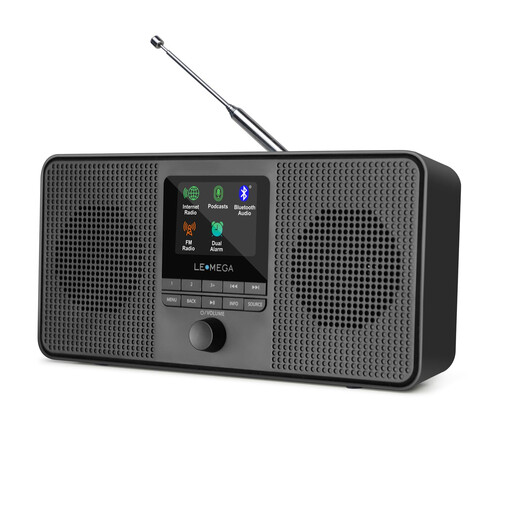
LEMEGA IR4S internet radio, black
For regular listening via internet radio or podcasts, without a separate hi-fi system; according to the product details, it has two built-in 2.5-inch speakers.
Features include 40 internet presets and mains or battery power. Bluetooth, DAB and FM are also listed.
A colour display, controls and the UNDOK app are listed as options for navigating or controlling the radio remotely.
View at Joybuy
 No image available
MP3 player with Wi-Fi, Bluetooth 5.0 and 4-inch touchscreen
For Wi-Fi streaming or FM radio played through the built-in speaker; the product name also lists a 3.5 mm headphone socket.
Specifications include Android 11, 2 GB RAM and 16 GB of storage, expandable to up to 256 GB.
View at Joybuy
Frequently asked questions
Can I connect passive speakers directly to a network player?
Not with the WiiM Pro: WiiM says you’ll also need an amplifier for passive speakers. For active speakers, the input must match the player’s output.
How do I save my daily radio station?
With WiiM, you can save a station found through a supported radio service as a preset in the WiiM Home App. First check whether your station is available there. An on-demand podcast episode isn’t automatically the same as a station preset.
Is an on-demand news programme the same as internet radio?
No. A live stream and an on-demand episode are different ways to access content. Check the exact programme name and whether the relevant radio, podcast or app method works with the specific player.
Does an equaliser make the news easier to understand at low volume?
An equaliser lets you adjust the sound, but it doesn’t prove that speech will generally be clearer. WiiM documents EQ options for the Pro; the best way to see whether they suit your speakers and briefing is to try them with that exact combination.
What should I check to make sure a Wi-Fi player complies with German requirements?
For radio equipment, the German Federal Network Agency lists checks including correct CE marking, identifiable manufacturer details, a declaration of conformity and any required German-language instructions and warnings. The CE mark is the manufacturer’s declaration, not an independent quality mark. Check the details for the specific product listing.


