Owners of a stereo system
If you want to keep your amplifier and speakers, choose a player with an input that’s compatible with your existing system. WiiM lists analogue and digital connection options for the Pro Plus.


If you already have an amplifier or suitable active speakers, choose a network player with a compatible output and support for your music source. A separate player cannot power passive speakers on its own. In an open-plan living space, speaker placement and your listening position matter too; room correction or multi-room features are only essential if you’ll actually use them.
If you want to keep your amplifier and speakers, choose a player with an input that’s compatible with your existing system. WiiM lists analogue and digital connection options for the Pro Plus.
If you mainly listen to piano music from a particular spot, you can factor in speaker placement and any room settings when choosing a player. KEF notes that the room affects how music sounds.
If you want to play recordings from a music service, NAS or USB storage, check that the specific model supports your preferred source and is easy to use. Cambridge Audio says the MXN10 supports playback from USB and NAS, and can be controlled via StreamMagic.
Start by checking your existing audio setup and music source. Then choose extra features to suit your listening spot and habits.
| What to consider | What to check before buying | Who is it important to? |
|---|---|---|
| Connecting to your system | Check your speaker type and available inputs; match an analogue or digital input to the output on the exact player model. | If I want to keep using my amplifier and speakers, the whole signal path needs to be compatible. Around 33% of consumers put connectivity first. |
| Sound at your listening spot | Decide where you’ll listen and where your speakers could go; only compare room correction or a subwoofer output if you have a specific need. | If I usually listen from one spot in an open-plan living space, I want to tailor speaker placement and any settings to that spot. Around 27% of consumers prioritise this. |
| Music service or personal collection | Check that the exact model supports your preferred service, app, playback method and storage location; don’t assume it supports AirPlay 2 just because another model from the same brand does. | If I want to listen to piano recordings from my own collection or through a particular service, having the right access is essential. Around 20% of consumers rank their music source as their top priority. |
| Transitions between tracks | Check whether gapless playback works with your own source or preferred service. | If I want to listen to piano pieces without extra pauses between tracks, it depends on how the model, source and app work together. Around 20% of consumers put this type of playback first. |
A line or digital output cannot power passive speakers on its own.
Before choosing a model, map out the signal path from the player through the amplifier or active speakers to the speakers themselves.
Passive speakers need a suitable amplifier if you don’t already have one.
WiiM lists the Pro Plus as AirPlay 2-compatible, but the Ultra and Amp Pro are not compatible.
Check support against the full model name and your preferred playback method.
According to Bluesound Support, calibrating Dirac Live on the Bluesound NODE N132 requires an additional licence and suitable measuring equipment.
Before buying, factor in the licence, the equipment you’ll need and the set-up involved.
You’ll need to budget separately for a Dirac Live calibration licence and suitable measuring equipment.
A stated audio resolution doesn’t guarantee that consecutive tracks will play without a pause.
Try the album sequence you want to listen to using your own source and the app you plan to use.
The Pro Plus and Ultra are separate players for use with existing amplification or active speakers. The Amp Pro is a streaming amplifier for compatible passive speakers.
The NODE N132 is a separate player for an existing system and, according to Bluesound, features HDMI eARC and is Dirac Live-ready.
The MXN10 is a separate player for existing hi-fi equipment and, according to Cambridge Audio, can play music from USB or NAS.
According to Sonos, the Port adds streaming to an amplified stereo system and may be suitable for connecting it to a Sonos multi-room system.
The products below are internet radios with network-based playback options. They’re described as all-in-one devices, rather than separate network players for an existing hi-fi system, so check that this type of device suits your set-up.
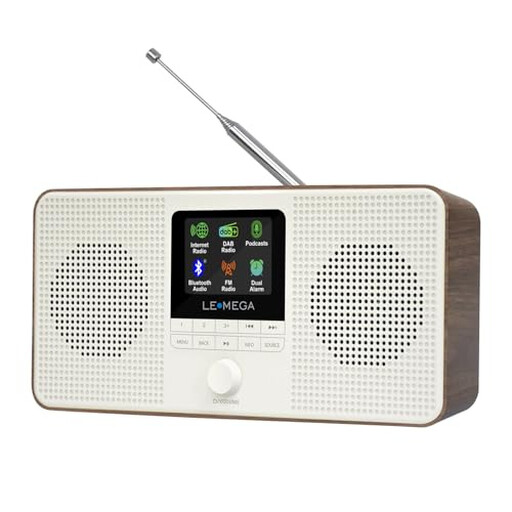 No image available
If you’re looking for an internet radio rather than a separate network player, this model is a different type of device from a component designed to connect to an existing stereo system.
Features named in the product title: podcasts, Bluetooth, DAB and FM. According to the product description, Spotify Connect requires a Spotify Premium account.
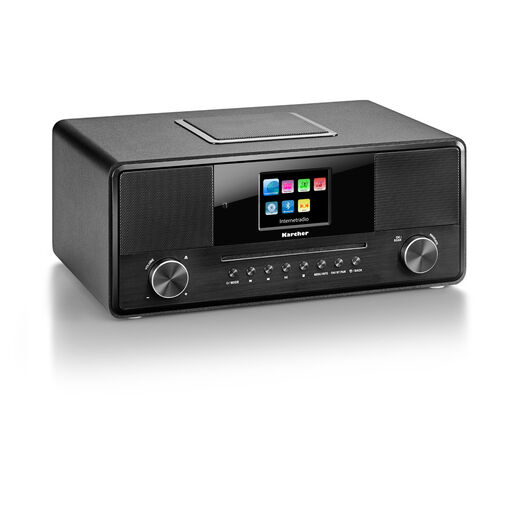 No image available
If you’re looking for an internet radio with several playback options, this all-in-one device is designed differently from a separate player for an existing amplifier.
Features named in the product title: Wi-Fi internet radio, CD player, Bluetooth, DAB+, USB, AUX input, built-in subwoofer and 36 W.
No. To play music through passive speakers, you need suitable amplification between the player and the speakers. You could use an existing amplifier or a compatible streaming amplifier, as long as the connections match.
First, decide where you’ll listen most and check where your speakers could go. Then connect the player’s compatible output to your system; assess any optional room settings based on your actual speaker placement.
No. Bluesound Support says Dirac Live calibration requires an additional licence and suitable measuring equipment or a calibration kit. It doesn’t guarantee a particular result at your listening spot.
According to GEMA, there’s no GEMA fee for listening to music privately; music played in public is treated differently. Any music streaming subscription you may need is a separate matter.
Radio equipment newly placed on the EU market is subject to the Radio Equipment Directive. Once conformity has been assessed successfully, the manufacturer must draw up an EU Declaration of Conformity and affix the CE marking. This isn’t a blanket confirmation for every product version or listing.