If you already have an amplifier or powered speakers, a separate network player could be a good fit, provided its audio outputs are compatible with your system. If you have passive speakers but no amplifier, a streaming amplifier is the right type of device. If you don’t already have a system, a Wi-Fi speaker can simplify your set-up, although it offers different connection options. Your choice will also depend on your music service, how you want to control playback and the devices you already own.
Who are these types of device for?
Owners of an existing stereo system
If you want to keep using your amplifier or powered speakers, make sure your system’s inputs are compatible with the network player’s outputs. WiiM and Cambridge Audio describe their network players as devices for connecting to an existing system.
Owners of passive speakers
If you have passive speakers but no compatible amplifier, you’ll need amplification as well as network access. WiiM describes the WiiM Amp as a streaming amplifier; according to the manufacturer, the WiiM Pro is not a speaker amplifier.
Listeners without an existing system
If you don’t want to set up a separate audio system, you could choose a Wi-Fi speaker that combines networking features with a speaker. Sonos says the Era 100 SL can be used on its own or as part of a stereo pair.
What should you consider when choosing?
| Buying priority |
What to check |
Who it matters most to |
| Connecting to your existing system |
Check whether your speakers are powered or passive, and whether your system’s inputs are compatible with the player’s analogue or digital outputs. |
If I want to keep using my system, the player should be compatible with its connections. Around 31% of consumers say that connecting to existing equipment is their main priority. |
| Compact set-up |
Consider the space available and the speakers you already own. If you want a separate stereo pair, check how many speakers you’ll need. |
If I want to keep the number of separate devices to a minimum in my small living room, I’ll compare a streaming amplifier with a Wi-Fi speaker. Around 25% of consumers prioritise a space-saving new set-up. |
| Music service and control |
Check whether the exact model supports your music service and preferred controls, such as a device app or multi-room playback. |
If I want to listen to my online music library through a particular service, support for that service matters more to me than a high quoted resolution. Around 25% of consumers prioritise access to their services and ease of control. |
| Complete set-up |
Compare devices that work with your equipment, and factor in any speakers, amplification or adapters you may need. |
If I don’t yet have a complete system, I want to know which devices and accessories I’ll actually need for playback. Around 19% of consumers are mainly concerned with the complete set-up. |
Buying mistakes to avoid
-
Assuming a separate streamer is a complete system
A standalone network player such as the WiiM Pro won’t amplify passive speakers. You can’t connect these speakers directly to it without a suitable amplifier.
Before choosing a device, plan the signal path from your music service through the player and amplifier to your speakers.
If you have passive speakers but no amplifier, you’ll also need a suitable one.
-
Assuming a high audio resolution guarantees great sound
A quoted maximum resolution applies only to supported sources. On its own, it says nothing about how the sound will turn out with your speakers in your room.
First check your music service, signal path and existing system. Treat resolution figures as one feature of the device, not a guarantee of sound quality.
-
Overlooking accessories and stereo options with a Wi-Fi speaker
Sonos specifies an input adapter for connecting an analogue source to the Era 100 SL. According to Sonos, you’ll need two Era 100 SL speakers for a separate stereo pair.
Before buying, consider whether you want to connect an analogue source or set up a stereo pair.
Depending on your preferred set-up, you may need an input adapter or a second speaker.
Key brands at a glance
WiiM
According to the manufacturer, WiiM offers a separate player for existing systems, as well as the WiiM Amp, a streaming amplifier for passive speakers.
- The WiiM Pro is described as having analogue and digital audio outputs.
- The WiiM Amp combines streaming and amplification.
- The WiiM Pro does not amplify passive speakers. Manufacturer specifications for connections and resolution don’t guarantee a particular sound in your room with your speakers.
Cambridge Audio
According to Cambridge Audio, the MXN10 is a network player for buyers who want to add streaming to an existing system and use StreamMagic.
- The manufacturer lists analogue and digital outputs, as well as support for several music services.
- The MXN10 is a network player, not an amplifier for passive speakers.
Bluesound
According to the manufacturer, the NODE NANO is a separate network player for existing audio systems, particularly if you want BluOS and its multi-room features.
- Bluesound lists RCA, optical and coaxial outputs, as well as control through BluOS.
- Manufacturers’ descriptions of sound quality are not independent comparative measurements.
Sonos
According to Sonos, the Era 100 SL is a compact Wi-Fi speaker that can be used on its own or as part of a stereo pair.
- You don’t need a separate system to play music directly through a Wi-Fi speaker.
- Sonos specifies an input adapter for connecting an analogue source. Information about the Era 100 SL does not necessarily apply to other Sonos devices.
Denon
The Home 150 NV is a Wi-Fi speaker option for buyers who want to use or build a HEOS system.
- Denon lists HEOS multi-room and AirPlay 2.
- According to Denon, the NV version has no microphones or built-in voice assistant. This does not rule out voice control through another compatible device.
Joybuy products for compact listening
The devices below offer compact Wi-Fi playback and internet radio with built-in speakers. If you’re looking for a separate network player for an existing system, be sure to check that its audio connections are compatible.
 No image available
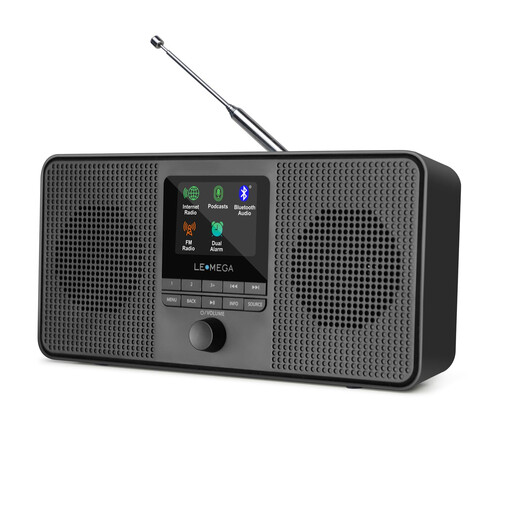
LEMEGA IR4S Internet Radio
An option if you’re looking for Wi-Fi playback and built-in stereo speakers in one compact device.
The product specifications list Spotify Connect; according to the description, this requires a Spotify Premium account.
Other listed features include Bluetooth, AUX, a 3.5 mm headphone socket, and the option to run it from the mains or on four AA batteries.
View at Joybuy
 No image available
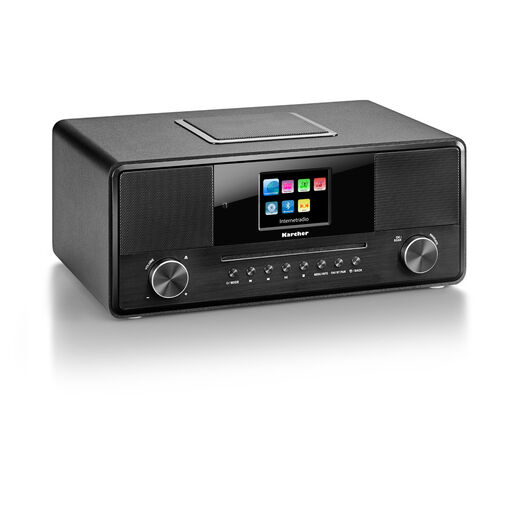
Karcher DAB 9000CDi Internet Radio
An all-in-one option if you want internet radio and speakers in a single device.
The product name lists a CD player, Wi-Fi, Bluetooth, DAB+, USB, AUX input, a headphone socket and a remote control.
Bluetooth music playback from a mobile device is also listed in the product specifications.
View at Joybuy
 No image available
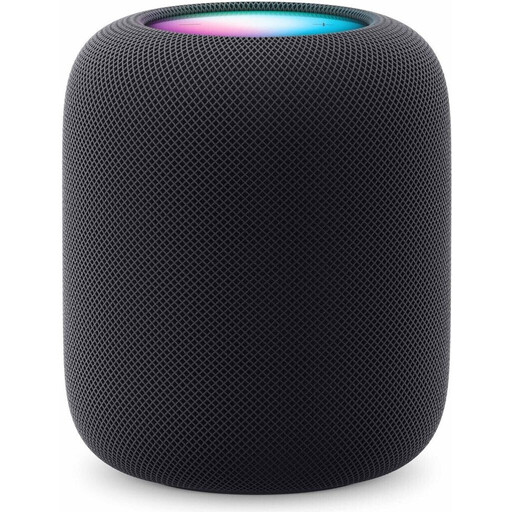
Apple HomePod (2nd Generation), Midnight
An option if you’re looking for a Wi-Fi speaker with AirPlay for playback from a compatible Apple device.
According to the product specifications, you’ll need Wi-Fi and a compatible iPhone or iPad. Some services or content may require a subscription or additional compatible Apple devices.
The stated height is 168 mm.
View at Joybuy
Frequently asked questions
Can I connect a network player directly to passive speakers?
Not if it’s a standalone player such as the WiiM Pro: you’ll need an amplifier. A streaming amplifier is a different type of device; also check that it’s compatible with your particular speakers.
What should I check when setting it up in my living room?
Connect the player to your system using compatible audio connections, then set up the network using the app for your model. If you have connection problems, check your home network and the connection between the devices. The exact set-up process varies by model.
When is a Wi-Fi speaker a better choice than a separate network player?
A Wi-Fi speaker could be right for you if you don’t want to set up a separate system and would rather play music directly through a speaker. Before buying, check that it supports your music service and whether you want to connect an analogue source or use a stereo pair.
What should I know about CE marking on a Wi-Fi or Bluetooth device?
The German Federal Network Agency explains that products covered by the relevant EU harmonisation legislation must carry a CE marking when placed on the market in the EU. A manufacturer’s declaration for a model does not replace checking the marking and documentation for the actual device on offer.


