If you already have an amplifier and speakers, or suitable active speakers, a separate network player could be a good fit. Make sure its output and streaming service are compatible with your system and the app you use; a standalone streamer cannot replace an amplifier for passive speakers. If you don’t have a suitable audio setup, a Wi-Fi speaker with built-in streaming may be the simpler choice, provided its app and controls work for you. Spotify Support distinguishes shared playlists from a Jam: the player alone won’t let you edit a playlist together or add tracks to a listening session as a group.
Which option is right for you?
Sharing playlists on an existing system
If you’d like to add tracks together and play them through an amplifier and speakers in your kitchen and dining area, check both the playlist features in your music app and the audio output you need. Spotify Support distinguishes shared playlists from Jam; WiiM describes the Mini as a streamer, not an amplifier.
A household using different music apps
If you use different phones or streaming services, check that the full model supports your service and preferred way of controlling it. Bluesound and Cambridge Audio list features such as Spotify Connect and AirPlay 2 for specific models; you can’t assume that other models offer the same features.
A household without an audio system
If you don’t have suitable active speakers or an amplifier with speakers, a Wi-Fi speaker with built-in streaming could be an alternative to a separate player. Sonos describes the Era 100 as a speaker with built-in streaming; a separate player for a stereo system, on the other hand, requires a compatible playback setup.
What should you look for when choosing?
First, decide whether you want to edit a shared playlist together over time or add tracks to a queue during a listening session. Then make sure the app, audio output and existing audio setup all suit the way you’ll use them.
| What you need |
What to check before buying |
Who is this particularly important to? |
| Choosing tracks together |
Check the difference between a shared playlist and Jam in Spotify. According to Spotify Support, Premium is required to start and host a Jam. |
If we want to choose tracks together over time, everyone should be able to edit the playlist; around 36% of consumers put choosing tracks together first. |
| App and device compatibility |
Check that the full model supports the service and connection method you want. According to Spotify Support, devices need to be on the same Wi-Fi network the first time you connect to Spotify. |
If we use different phones and music apps, I want to be able to use my service with the specific model; around 29% of consumers give app and device compatibility the greatest weight. |
| Connecting to your audio system |
Check that the audio output matches an available input. Passive speakers need a suitable amplifier as part of the playback setup. |
If we want to keep our existing speakers, the player needs to work with our amplifier and available inputs; around 21% of consumers prioritise connecting to their existing system. |
| Controls and adding more rooms |
Check the controls and compatibility with your existing devices. Apple says that AirPlay 2 playback on multiple speakers requires them to be on the same Wi-Fi network. |
If I don’t always want to use the same phone to control playback, or might want to add more rooms later, the specific controls and system compatibility matter; around 14% of consumers prioritise controls and expandability. |
Which common buying mistakes should you avoid?
-
Confusing Spotify Connect with a shared playlist
Spotify Connect lets you choose a playback device. Shared playlists and Jam offer different ways to collaborate in Spotify, as Spotify Support explains.
First, decide whether you want to collect tracks together over time or add songs to the queue together during a listening session.
-
Planning to connect a standalone streamer directly to passive speakers
According to the manufacturer, the WiiM Mini is a streamer, not an amplifier. Passive speakers therefore need a suitable amplifier as part of the audio setup.
Before buying, note how the player’s output will connect to the amplifier and speakers, then check that it matches the connections you have available.
-
Assuming one WiiM model has the same AirPlay support as another
WiiM lists AirPlay 2 support for the Mini, but explicitly says the Ultra does not support it.
Check the connection method you want against the full model name rather than assuming that all products from the same brand have the same features.
Which brands offer suitable devices?
WiiM
Separate streamers for existing systems; connections and control features vary by model.
- WiiM says the Mini supports Spotify Connect and AirPlay 2. The Ultra lists Spotify Connect and Google Cast, but not AirPlay 2.
- The Mini isn’t an amplifier, so you’ll need suitable active speakers or an amplifier for passive speakers.
Sonos
According to Sonos, the Port connects an existing stereo system to a Sonos system; the Era 100 is an alternative with a built-in speaker.
- Sonos lists AirPlay 2 for the Port and the option to extend your system to more Sonos rooms.
- You’ll need an external amplifier to connect passive speakers to the Port. Sonos says that an additional input adapter is required for an analogue connection to the Era 100.
Bluesound
The NODE is a separate player for a stereo system or suitable active speakers, and part of a BluOS system.
- Bluesound lists Spotify Connect, AirPlay 2 and several audio outputs for the current NODE.
- These features and connections are specific to the model and can’t automatically be assumed for older NODE versions.
Cambridge Audio
The MXN10 is a compact, separate network player for an existing system.
- Cambridge Audio lists Spotify Connect, AirPlay 2, Chromecast and RCA, coaxial and optical outputs for the MXN10.
- As a separate player, the MXN10 still needs a suitable playback setup with speakers and, where necessary, an amplifier.
Suitable products at Joybuy
This selection is for anyone who’d prefer a Wi-Fi speaker with built-in streaming in the kitchen and dining area, rather than a separate player.
 No image available
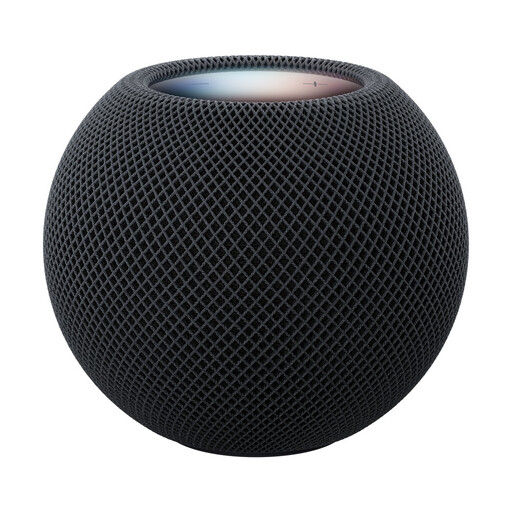
Apple HomePod Mini 2 – Midnight
This model is a smart speaker with built-in streaming, making it an alternative if you’d like to use a Wi-Fi speaker rather than a separate network player in your kitchen and dining area.
The product details list AirPlay playback, touch controls, stereo pairing and AirPlay multi-room.
You’ll need a compatible iPhone or iPad, Wi-Fi and an Apple ID to set it up.
View at Joybuy
Frequently asked questions
Can several people edit the same Spotify playlist without a dedicated network player?
Yes. Spotify Support describes shared playlists that invited people can add tracks to, remove tracks from or rearrange. You set up the playlist in Spotify; the player then needs to suit how you want to listen to it.
Is Spotify Jam the same as a shared playlist?
No. A Jam is a shared listening session with a queue, while a shared playlist can be edited over time. According to Spotify Support, the person who starts and hosts a Jam needs Premium; users on the free service can join a Jam hosted in person and add songs.
Is a network player enough for passive speakers?
Not if the player doesn’t have a built-in amplifier. WiiM explicitly describes the Mini as a streamer, not an amplifier; passive speakers need a suitable amplifier as part of the audio setup.
What should I check if the player doesn’t appear when I first connect to Spotify?
Check that your phone and playback device are on the same Wi-Fi network. Spotify Support lists this as a requirement for the first connection through Spotify Connect.
What do I need to set up the Apple HomePod Mini 2?
You’ll need a compatible iPhone or iPad, Wi-Fi and an Apple ID to set it up. Before choosing, check that these requirements suit your household.


