People who listen to the radio quietly on a hi-fi system
You want to listen to speech or music quietly through your existing system. Make sure you can adjust the player, amplifier and speakers together to get the right volume.


If you have an amplifier or active speakers, choose a network player with a compatible audio output. Then check whether your specific stations are available and how you can control the volume across your whole system. The WiiM Pro Plus offers features including an adjustable output level and station presets; the Sonos Port is designed to connect a hi-fi system to a Sonos system, while the Bluesound NODE also has a headphone output. None of these features, on its own, proves that speech will remain clear through your system at the low volume you want.
You want to listen to speech or music quietly through your existing system. Make sure you can adjust the player, amplifier and speakers together to get the right volume.
You regularly switch between a few web radio stations. Check that your stations are available through the service you plan to use and find out how to save and recall them as presets.
You want to listen to the radio without using speakers. Check whether the specific model has a suitable headphone socket.
First, decide whether you want to control the volume on the player or the amplifier. Then check that the connections, station access and any headphone use are compatible with your system.
| What you need | What to look for | Who is it most relevant to? |
|---|---|---|
| Volume when listening quietly | Check whether the output can be set to fixed or variable, and how the player and amplifier control the volume. A maximum volume limit does not prove that speech will be clearer. | When I listen quietly, I want to set up the player and amplifier so I can get the volume I want. Around 36% of consumers have this as their main concern. |
| Connecting to an existing system | Check that the amplifier’s inputs match the player’s outputs, and find out whether your speakers need a separate amplifier. | If I want to keep using my existing speakers, the player needs to work with my system, and I need to have the right amplification. Around 29% of consumers have this as their main concern. |
| Finding and saving favourite stations | Search for your specific stations in the service you plan to use. Manual stream links may have format and service requirements. | If I regularly listen to particular stations, I want to know whether I can access them and find them again quickly. Around 21% of consumers prioritise access to their stations. |
| Listening directly through headphones | Check whether the model has a headphone output and whether the connection and controls suit your headphones. | If I want to listen to the radio directly through headphones, I need a suitable socket on the player. Around 14% of consumers have this as their main concern. |
A limit caps the maximum volume, but it tells you nothing about how clear a station will sound or how the connected speakers will perform.
Set up the player and amplifier to work together, and if possible, assess speech at the volume you want to listen at.
A line output is not automatically a suitable speaker output for passive speakers.
Before buying, check the type of speakers you have and the inputs on your system. Passive speakers need suitable amplification.
Sonos describes night mode for TV sound through a home cinema product, not as a feature of the Port for internet radio.
Choose the Port based on its documented radio, connection and volume features.
A particular station may use a stream that is unavailable or has changed.
Check the station and its stream format specifically. For Sonos, the support information lists TuneIn and streams in MP3, AAC or WMA format as requirements for manually added station URLs.
The Pro Plus is a separate streamer designed for use with an amplifier or active speakers.
The Port connects an existing system to a Sonos system and provides internet radio through its services.
The NODE is a network player for an existing system, with direct controls and a headphone output.
The MXN10 is a compact StreamMagic network player for listening to internet radio through an existing hi-fi system.
The Joybuy products below are radios and stereo systems. Their listed features do not prove that they offer the internet radio services you want from a network player, so check before buying that you can access your specific stations using the feature you need. Products for which EU regulations require CE marking must meet the relevant conformity requirements; WLAN or Bluetooth devices are also subject to radio equipment requirements (Bundesnetzagentur; Your Europe – European Union).
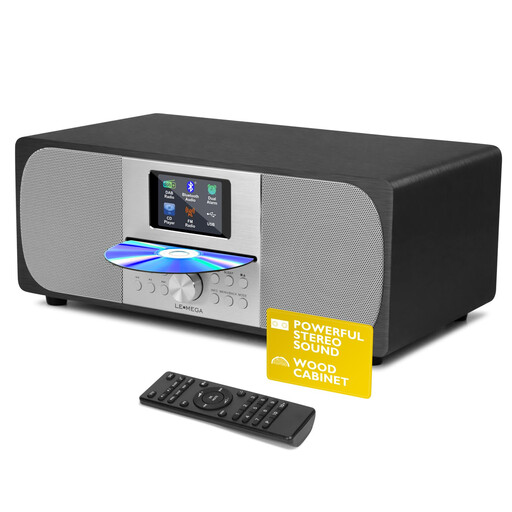 No image available
A stereo system with a CD player and DAB+ and FM radio.
The product name lists Bluetooth, 40 presets and a headphone socket.
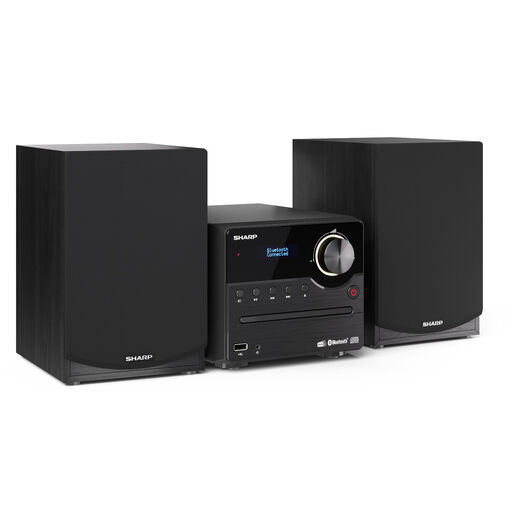 No image available
A compact stereo system with DAB+ and FM radio and CD playback.
The product name lists Bluetooth, USB playback and 45 W.
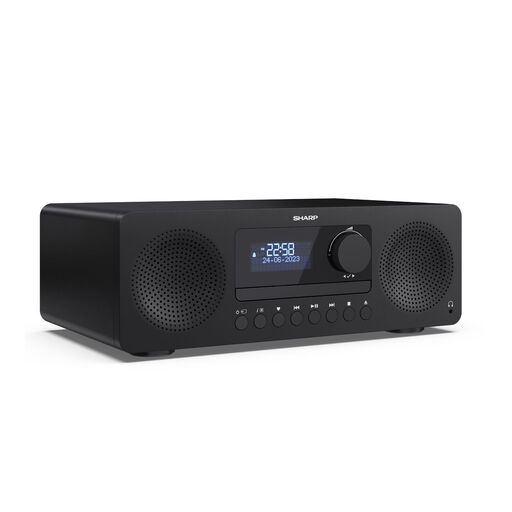 No image available
An all-in-one system with DAB+ and FM radio and CD playback.
The product name lists Bluetooth 5.3, USB, AUX, 20 preset stations and 150 W audio output power.
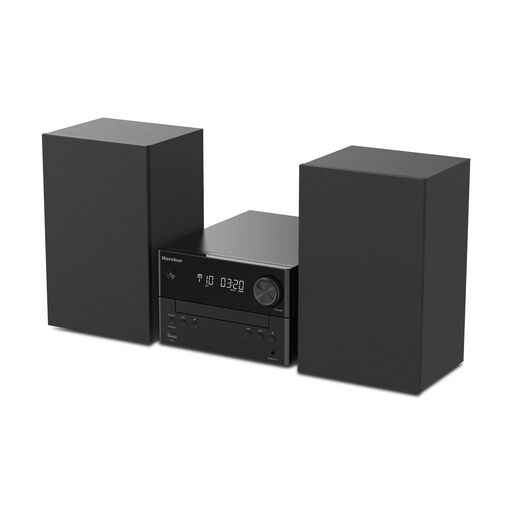 No image available
A compact system with a CD player and DAB+ and FM radio.
The product name lists Bluetooth, USB, AUX, MP3 playback and 20 W.
No. A line output alone does not provide suitable amplification. WiiM describes the Pro Plus as connecting to an amplifier or active speakers; passive speakers need suitable amplification somewhere in the playback chain.
It depends on the player and the station’s stream. WiiM describes using direct stream links; for manually added station URLs, Sonos requires TuneIn, a TuneIn account and a stream in MP3, AAC or WMA format. Check that your station meets these requirements.
First, check the station’s stream or the saved link, then set up the preset again if needed. Cambridge Audio notes in its support information that when a single station stops working, the issue is often with the stream rather than the player.
Products for which EU regulations require CE marking must meet the relevant conformity requirements; WLAN and Bluetooth products are also subject to radio equipment requirements. The Bundesnetzagentur lists marking and manufacturer information among the things checked during market surveillance. CE marking is not proof of sound quality or speech clarity at low volume.