Which solution is right for you?

A studio short on LAN ports

If your printer has an Ethernet port, you can connect it to a suitable spare port on your router, switch or hub. A simple switch is an option if you need more LAN ports; HP Support Germany lists a router, switch and hub as possible connections.

A growing studio

If you’re planning to add more wired workstations, count the router connection, printer and other devices, then choose a suitable number of ports. The documented models from TP-Link Germany and NETGEAR Germany, for example, offer different numbers of ports.

A studio with separate user groups

If you need to keep user groups separate while making a shared printer accessible, consider a configurable switch with suitable VLAN settings. TP-Link Germany describes VLAN features for the TL-SG108E; communication between separate networks also needs to be configured appropriately.

What to look for when buying

Connect directly to the router

A good fit if: there’s a suitable free LAN port on your router and your printer supports Ethernet; HP Support Germany lists a router as a possible network connection.

Bear in mind: this connection doesn’t give you any extra LAN ports.

Unmanaged switch without PoE

A good fit if: you want to connect your printer and other devices to the same accessible LAN.

Bear in mind: a basic switch doesn’t manage VLAN access rules, and the connection to the router uses up one port.

Configurable switch with VLAN

A good fit if: user groups need separate network areas and you want to set up access to a shared printer for specific users.

Bear in mind: VLAN features need to be configured; a VLAN switch alone won’t enable communication between VLANs.

Switch with PoE

A good fit if: you want to power additional compatible devices, such as access points, IP phones or cameras, over Ethernet.

Bear in mind: the number of PoE ports and the total power budget need to meet the needs of your additional devices; don’t assume your printer needs PoE.

Buying priority What to check before buying Who it matters most to
Simple printer connection Check that the printer has an Ethernet port and that there are spare ports on your router and switch. If I want to connect my printer to my existing LAN, I first need to know whether the ports are compatible. Consumers who prioritise a simple connection are likely to account for around 36%.
Enough ports Count the router uplink, printer and existing devices, and allow for any additional devices you’re planning. If I’m planning more wired workstations, I want enough connections for the devices that will actually be used in the studio. Consumers whose main priority is room to expand are likely to account for around 29%.
Separate user groups Check VLAN and access rules across the whole network, and decide which groups should be able to print. If different user groups need to work separately, the shared printer must remain accessible to the people who need it. Consumers who prioritise network separation are likely to account for around 21%.
PoE for additional devices Check each device’s PoE support and power requirements, as well as the switch’s ports and total power budget. If I want to power additional compatible devices over Ethernet, the PoE budget needs to meet their requirements. Consumers whose main priority is this PoE requirement are likely to account for around 14%.

Common buying mistakes

  • Counting every switch port for an end device

    The connection to your existing router also uses a switch port.

    Count the router uplink, printer and other devices individually before choosing between five and eight ports.

  • Assuming VLAN support means you can print straight away from any network

    Segmenting a network and enabling communication between segments are two different things. Incorrect configuration can prevent the required access to the printer.

    Decide which user groups should be able to print, and check that your router and wider network support the VLAN and access rules needed to make this work.

  • Buying PoE just because you have a network printer

    PoE only powers compatible devices; the available power and budget depend on the switch and its power supply.

    For every device you actually need to power, check PoE support and power requirements, as well as the switch’s PoE ports and total power budget.

    For the NETGEAR GS308PP, NETGEAR Germany states a total PoE output of up to 83 W with the standard power supply described; up to 123 W requires a separately purchased power supply.

Key brands to consider

TP-Link

The documented models range from a basic five-port switch to a configurable eight-port model with VLAN features.

  • TP-Link Germany describes the TL-SG105 as plug and play, and lists 802.1Q VLAN features among those available on the TL-SG108E.
  • The VLAN features on the TL-SG108E need to be configured correctly to allow the required access to the printer.

NETGEAR

The documented options include a basic five-port switch and an eight-port switch with PoE.

  • NETGEAR Germany describes the GS305v3 as an unmanaged five-port switch and lists eight PoE ports on the GS308PP.
  • For the GS308PP, NETGEAR Germany states up to 83 W with the standard power supply described; up to 123 W requires a separately purchased power supply.

D-Link

The DGS-105 is a documented example of a basic five-port Gigabit switch.

  • D-Link Germany describes the DGS-105 as fanless and plug and play.
  • This information relates to the DGS-105; check the model and revision when buying.

Ubiquiti

The European store lists the USW-Lite-8-PoE as a fanless, eight-port Layer 2 PoE switch.

  • For the version described, Ubiquiti states an available total PoE output of 52 W with an external 60 W power supply.
  • For a studio without compatible PoE devices, this power feature is not a proven advantage when choosing a switch.

Products available at Joybuy

This selection includes basic switches for devices on the same LAN, as well as PoE and VLAN options for additional power or separate user groups.

D-Link DGS-1005P/E 5-port Gigabit desktop switch with four PoE+ ports

D-Link DGS-1005P/E 5-port Gigabit switch with 4 PoE+ ports

An option if you want to connect other compatible devices to your wired network as well as your printer.

5 Gigabit RJ45 ports; 4 PoE+ ports; stated PoE budget: 60 W; fanless casing.

As an unmanaged switch, it doesn’t provide VLAN segmentation for separate user groups.

View at Joybuy

D-Link DGS-1210-10/E 10-port Gigabit Smart Managed switch

D-Link DGS-1210-10/E 10-port Gigabit Smart Managed switch

An option if you want to set up separate user groups while keeping the shared printer accessible to specific users.

8 Gigabit RJ45 ports and 2 SFP slots; 802.1Q VLAN support; Layer 2/Layer 3 management; fanless design.

VLAN segmentation needs to be configured correctly; the VLAN feature alone won’t enable communication between separate networks.

View at Joybuy

TP-Link TL-SG1008P Gigabit switch with 8 ports and PoE

TP-Link TL-SG1008P 8-port Gigabit switch with PoE

An option for a studio with several wired devices and additional compatible PoE devices.

8 Gigabit ports; 4 PoE ports compliant with IEEE 802.3af; unmanaged switch.

As an unmanaged switch, it doesn’t provide VLAN segmentation for separate user groups.

View at Joybuy

TP-Link TL-SG1005D 5-port Gigabit desktop switch

TP-Link TL-SG1005D 5-port Gigabit desktop switch

An option if you need a few extra wired connections on the same LAN.

5 RJ45 ports with 10/100/1000 Mbit/s; auto-negotiation and Auto-MDI/MDIX; described as plug and play.

As an unmanaged switch, it doesn’t provide VLAN segmentation for separate user groups.

View at Joybuy
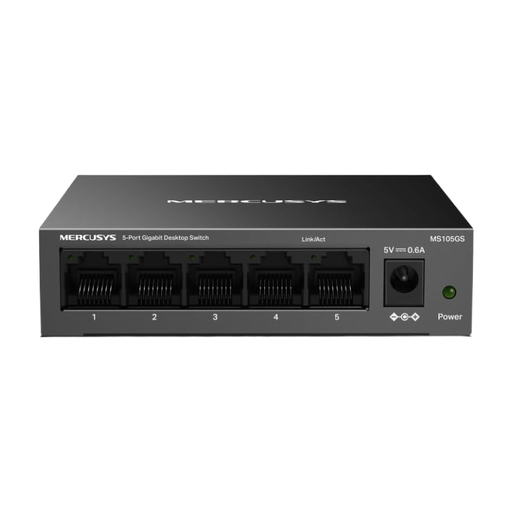
MERCUSYS MS105GS 5-port Gigabit network switch

MERCUSYS MS105GS 5-port Gigabit network switch

An option for connecting a printer and a few other wired devices to the same LAN.

5 Gigabit RJ45 ports; unmanaged plug-and-play operation; fanless design with a metal casing.

As an unmanaged switch, it doesn’t provide VLAN segmentation for separate user groups.

View at Joybuy

Frequently asked questions

Do I have to use a switch for a network printer?

No. If your printer supports Ethernet and there’s a suitable spare port on your router, you can connect it directly. A switch is useful if you need additional LAN ports; you’ll still need to set up the printer afterwards. HP Support Germany lists a router, switch or hub as possible network connections.

What should I check if the printer isn’t detected after I connect it?

First, check the Ethernet cable and connection lights. If you have a compatible HP model, you can also print a network configuration report. The steps described by HP Support Germany apply to HP printers; for other models, follow the relevant instructions.

Can separate studio networks use the same printer?

Yes, as long as access between the separate networks is configured appropriately. A switch with VLAN features segments the network, but doesn’t by itself enable communication between VLANs; TP-Link and Cisco describe these technical limitations.

Might a PoE switch need an additional power supply?

It depends on the switch model and the PoE budget you need. For the NETGEAR GS308PP, NETGEAR Germany states up to 83 W with the standard power supply described; up to 123 W requires a separately purchased power supply.

What legal requirements apply when buying an electrical switch in Germany?

Electrical and electronic equipment covered by the relevant rules must meet the applicable conformity and labelling requirements. The German Federal Network Agency lists requirements including correct CE marking, product traceability and a responsible economic operator in the EU. Check the details for the specific product listing.