What should you look for when buying?
First, check how the streamer connects to your speakers. Then consider your music sources, listening position and preferred listening areas.
| What matters |
What to check before buying |
Who it matters most to |
| Connecting to your system |
Check your speaker type and available inputs. Make sure the streamer’s RCA, optical or coaxial connection matches an available input. |
If I want to keep my existing system, the streamer needs to fit into its signal path; passive speakers still need an amplifier. Around 33% of consumers put compatibility with their existing system first. |
| Accessing recordings |
Check that it supports your preferred music service and control method. For your own files, check where they’re stored and which formats the specific model supports. |
If my guitar recordings are on a USB drive or NAS, or I listen to them through a particular service, I need the right access option. Around 27% of consumers prioritise music sources. |
| Listening position and room |
Start by positioning your speakers and listening spot sensibly. Then compare the tone controls or calibration features actually available. |
If I mainly listen from one spot, I want to tailor playback to the room without assuming an automatic solution will do the job. Around 20% of consumers put listening position and room first. |
| Listening considerately |
Check the listening areas you want to use and how the volume is controlled. If you want to listen privately, look for a suitable headphone output too. |
If other people share my living space or quiet hours matter, I want to be able to adapt how I listen. Around 20% of consumers prioritise considerate listening. |
Suitable products at Joybuy
This product selection also includes an internet radio as a possible way to play recordings available through Spotify. It isn’t a separate network streamer for an existing hi-fi system.
 No image available
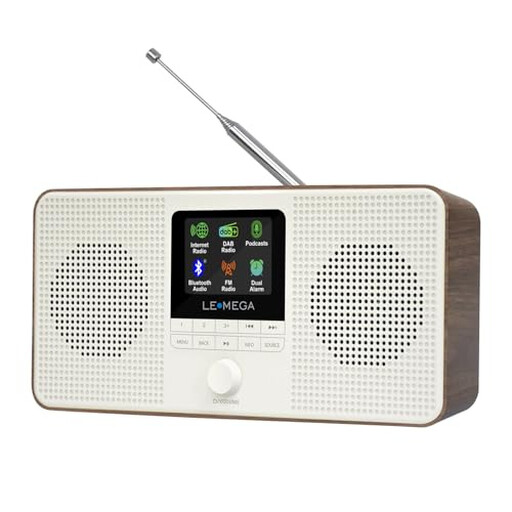
LEMEGA IR4S internet radio, Walnut
If your guitar recordings are available on Spotify and you’re looking for a standalone radio rather than a separate streamer for your hi-fi system, Spotify Connect could be a suitable playback option.
Features named in the product title: Bluetooth, DAB, FM and stereo. The product description lists built-in stereo speakers, a headphone output and control via the UNDOK app.
The IR4S is an internet radio, not a separate network streamer for connecting to an existing system. Also check the documentation and markings on the specific device intended for the German market.
View at Joybuy
Frequently asked questions
Can I connect passive speakers directly to a separate network streamer?
No. Passive speakers need an amplifier. WiiM says that the Pro and Pro Plus also need to be connected to a suitable amplifier input.
How can I play my own guitar recordings through a network streamer?
First, check where your files are stored and which formats you use. Cambridge Audio lists USB and NAS playback through StreamMagic for the MXN10. Check your files and network access against the documentation for the specific model.
Will room correction completely fix the acoustics in an open-plan flat?
No. Genelec points out that calibration alone won’t solve every room-acoustics problem. Start by checking your listening position and speaker placement. Bluesound also says that Dirac Live requires a separate licence and calibration kit.
Are the same quiet hours for music in force everywhere in a home?
For noise between neighbours, the German Environment Agency refers to rules set by Germany’s federal states, local requirements and house rules. Check which rules apply to your home and adjust the volume to suit the situation.
What should I check on a Wi-Fi or Bluetooth streamer intended for the German market?
Germany’s Federal Network Agency lists points including correct CE marking, manufacturer details, a declaration of conformity and a German instruction manual with the necessary usage and safety warnings. Check these against the specific device and its documentation. Mentioning a model doesn’t confirm that a particular listing has the correct markings.


