
Lieferung heute & morgen

Qualitätsgarantie

Willkommens-Angebote freischalten: KOSTENLOSE Lieferung | Bis zu 80 % RABATT | Kostenlose 30-Tage-JoyPlus-Testphase
App herunterladen
A stable, wired network is the foundation for fast internet, buffer-free streaming, and reliable home office work. However, the LAN ports on a router are often quickly occupied. A network switch is the obvious solution to expand your network. But the market is flooded with models whose technical specifications can be confusing for non-experts. Certain marketing terms and unclear product descriptions frequently lead to poor purchasing decisions, causing performance issues or unnecessary costs.
This guide will show you the three most common pitfalls when buying a switch and explain the crucial parameters you need to look for to make an informed decision for your home network or business.
Before you decide on a model, you should be aware of the following points to avoid spending more money than necessary or buying a device that doesn't meet your needs.
To avoid these pitfalls, focus on three core technical features. These will determine if an Ethernet Switch is suitable for your use case.
The number of ports determines how many devices you can connect. Always plan for one or two spare ports for future expansions. An 8 Port Switch is sufficient for most home networks, while offices or power users often require a 16 Port Switch or 24 Port Switch.
Even more important is the speed:
The PoE function significantly simplifies the installation of network devices, as no separate power cable is needed. This is ideal for IP surveillance cameras, VoIP phones, or Wi-Fi access points.
Two standards are relevant here:
Important: Always check the total PoE budget of the switch. Add up the maximum power consumption of all your PoE devices and ensure the switch's budget exceeds this value.
The choice of management type depends on your technical requirements.
Here are three recommendations tailored to different user profiles that specifically avoid the pitfalls mentioned.
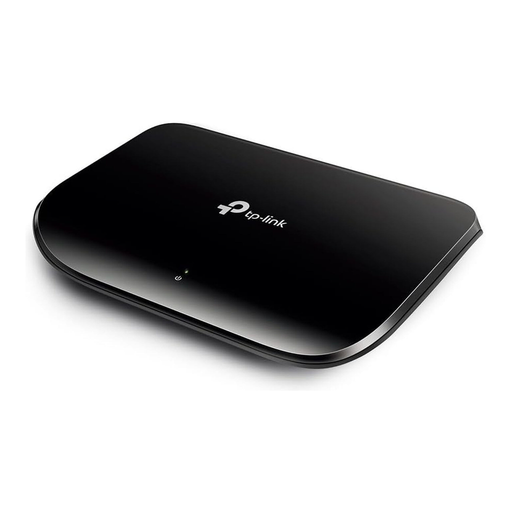
Why it's a good fit: Ideal for easily expanding a home network. It provides enough ports for a PC, game console, smart TV, and printer without any unnecessary complexity.
All 5 ports offer full Gigabit speed, avoiding the "Gigabit trap." As an unmanaged switch, it also sidesteps the pitfall of unnecessary complexity.
Plug-and-play installation with no configuration required. The fanless design ensures silent operation, and its Green IT technology reduces power consumption, according to the manufacturer.
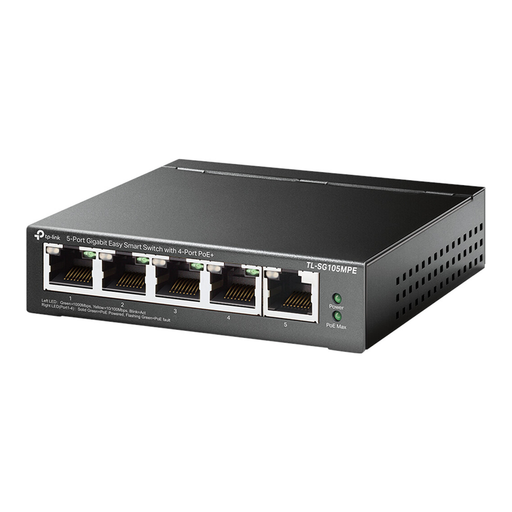
Why it's a good fit: Perfect for users who run PoE devices like IP cameras or access points and need more control over their network. Suitable for advanced home networks or small offices.
With 4 PoE+ ports and a high total budget of 120 watts, it safely avoids the pitfall of an insufficient PoE budget. It can easily power multiple high-consumption devices.
As a managed switch, it offers advanced features like VLAN and QoS for network optimisation. The robust metal casing and fanless design ensure durability and silent operation.
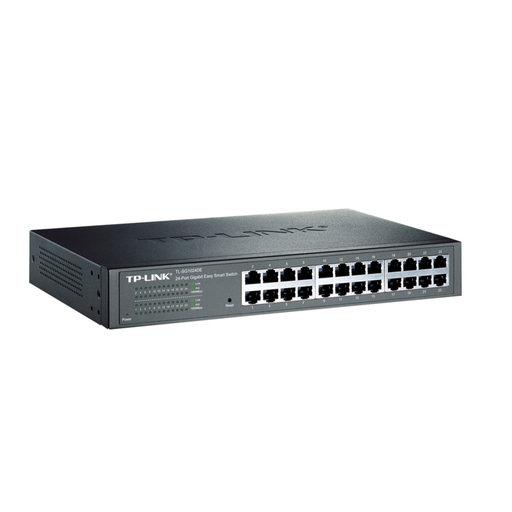
Why it's a good fit: A scalable solution for small and medium-sized businesses (SMBs) that need high port density and essential management features for efficient network organisation.
This "Easy Smart" switch provides key management functions (VLAN, QoS, IGMP Snooping) without the cost and complexity of a full-fledged L3 managed switch.
24 full-featured Gigabit ports for maximum performance. The device can be mounted as a 19-inch rackmount switch and offers useful diagnostic tools like port mirroring and cable diagnostics.
We have compiled a complete, up-to-date list of products that fully meet these strict selection criteria and UK safety regulations.
1. How do I install an unmanaged network switch? Installation is very simple. Connect the switch to a power outlet using the included power adapter. Then, connect a network cable from a free LAN port on your router to any port on the switch. You can now connect your end devices (computers, printers, etc.) to the remaining ports on the switch. No software installation or configuration is required.
2. Do I need a Gigabit switch, or is Fast Ethernet enough? For most modern applications, a Gigabit Switch (1000 Mbps) is the recommended choice. Fast Ethernet (100 Mbps) can become a noticeable bottleneck for data-intensive tasks like copying large files across the network, streaming 4K content, or using high-speed fibre optic internet connections. Investing in Gigabit technology is future-proof and ensures consistently high performance throughout your entire network.
3. What is the difference between a switch and a hub? A hub is an outdated technology that forwards incoming data packets to all connected devices, regardless of which device the data is intended for. This creates unnecessary traffic and slows down the entire network. A LAN Switch, on the other hand, is intelligent: it detects which device is connected to which port and forwards data packets specifically only to the respective recipient. This makes switches significantly more efficient and faster than hubs. Hubs are practically no longer sold today.