If a suitable LAN connection is already available at your workspace and you simply want to connect more wired devices, an unmanaged Gigabit switch with enough spare ports will do the job. For genuinely separate network segments or PoE devices, you’ll need the right VLAN or PoE features. If you’re running a connection between buildings, plan the link and how to protect it first, rather than treating a desktop switch as the solution. NETGEAR describes simple plug-and-play models, Zyxel offers VLAN-capable switches, and DEHN highlights the importance of data links between buildings when assessing lightning protection risks.
Who can benefit from which type of switch?
Add more connections in your garden office
If a suitable LAN connection is already available at your workspace and you want to connect wired devices in addition to your PC, look for spare ports and straightforward operation. NETGEAR describes the GS305 and GS308 as plug-and-play switches.
Separate networks in a studio
If you share the infrastructure with others and need separate network segments, the switch’s features must work with the rest of your network configuration. Zyxel describes VLAN as a way to separate traffic, but this feature alone won’t configure the whole network.
Plan a connection between buildings
If your garden office is in a separate building or the cable runs outdoors, start by planning the route and how to protect it. DEHN includes communication cables between buildings in its lightning protection risk assessment.
What should you look for when choosing?
First, check whether a suitable network connection is already available in your garden office. Then consider how many ports you need, whether you want to separate networks and whether you need PoE power.
| What you need |
What to check before buying |
Who it matters most to |
| Extra LAN ports |
Count the connection to the existing network and all the devices you plan to connect; check the port count for the exact model variant. |
If there’s already a LAN connection in my garden office, I want to connect my PC and other devices without unnecessary setup. Around 36% of consumers put simple LAN expansion first. |
| Connection to the garden office |
Check whether the cable runs between buildings or outdoors, and confirm the planned cable type and protection measures. DEHN includes data cables between buildings in its lightning protection risk assessment. |
If I have a separate garden office, I want to know first whether the existing link is suitable. Around 29% of consumers prioritise planning a connection between buildings. |
| Separate network segments |
Check whether separation is really needed and whether the router, uplink and any other switches can be configured accordingly. Zyxel describes VLAN as a feature for organising separate data segments. |
If several people use the same infrastructure, I only want to set up separate network segments if the whole network can be configured to support them. Around 21% of consumers put network separation first. |
| PoE for additional devices |
Compare the PoE standard and power requirements of each device with the PoE ports and total power budget of the exact switch variant. |
If I want to power compatible network devices as well as my PC, I want to check their power requirements against the switch’s specifications. Around 14% of consumers prioritise PoE power. |
Which assumptions should you avoid?
-
The switch will also connect your separate garden office
A switch adds wired connections to an existing network link. It doesn’t replace the planning needed for a cable between buildings. DEHN includes data cables of this kind in its lightning protection risk assessment.
First, check where the existing network connection ends and whether the link runs between buildings or outdoors.
-
A shared studio automatically has separate networks
An unmanaged switch doesn’t offer configurable VLAN separation. With a VLAN-capable model, the rest of your network equipment must also support the planned setup.
First, decide whether you need separate network segments, then make sure the configuration works across the whole network.
-
A similar model name means the same PoE features
NETGEAR lists the GS305 and GS305P as different models; PoE specifications for the P variant don’t automatically apply to the model without a P.
Check the exact model number, PoE standard, power per port and total power budget against the requirements of your devices.
Which brands are worth considering?
TP-Link
The documented TL-SG105 and TL-SG105E models differ in whether you need a simple expansion or a management interface.
- According to TP-Link, the TL-SG105 has five Gigabit ports and a fanless design; the TL-SG105E adds a management interface.
- These features apply to the models listed and don’t confirm that they’re suitable for outdoor use or that other TP-Link switches have the same specifications.
NETGEAR
The GS-300 range includes straightforward switches with five or eight Gigabit ports, as well as separate PoE variants.
- NETGEAR describes the GS305 and GS308 as plug-and-play models; the GS305P and GS308P add PoE.
- PoE specifications for a P variant don’t apply to the model without a P.
Zyxel
The GS-100 series is designed for straightforward wired expansion, while the GS1200 series offers web management and VLAN features.
- According to Zyxel, VLANs can be used to separate network traffic.
- A VLAN feature on its own doesn’t ensure that the rest of your network infrastructure is fully separated.
Joybuy products for studio network connections
The following Joybuy products offer different options for existing LAN connections: unmanaged switches, models with management features and PoE variants. Before choosing, check which features and connections your setup needs.
 No image available
Ubiquiti UniFi Switch Flex Mini USW-FLEX-MINI-EU, 5-Port Gigabit Managed Ethernet Switch
For an existing LAN connection where a manageable 5-port Gigabit switch could be suitable. The product name lists USB-C or 802.3af/at PoE power; check which option works for your setup.
View at Joybuy
 No image available
D-Link DGS-1005P/E, 5-Port Gigabit Desktop Switch
For an existing LAN connection where you also need to connect compatible PoE devices. The product name lists 4 PoE+ ports and a 60 W PoE budget; check your devices’ requirements against the exact variant.
View at Joybuy
 No image available
D-Link DGS-1210-10/E, 10-Port Gigabit Smart Managed Switch
For a setup where a manageable switch with RJ45 and SFP connections could be suitable. The product name lists 8 Gigabit RJ45 ports and 2 SFP slots; check that these connection types suit your existing link.
View at Joybuy
 No image available
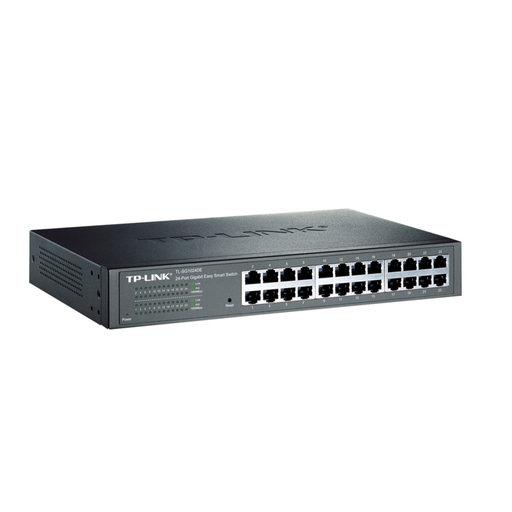
TP-Link TL-SG1024DE, Managed-L2-Gigabit-Ethernet-Switch
For a setup that needs basic network management. The product name lists Managed L2 and Gigabit Ethernet; check the port count and features of the exact variant before choosing.
View at Joybuy
 No image available
TP-Link TL-SG1005D, 5-Port Gigabit Desktop Switch
For an existing LAN connection where five Gigabit ports and operation without extra configuration meet your needs. Count the connection to the existing network and all the devices you plan to connect.
View at Joybuy
Frequently asked questions
Can I connect my garden office PC directly to a switch?
Yes, as long as the switch is already connected to the existing network by a suitable link. A switch adds wired connections, but it doesn’t create the connection between separate buildings.
Will a VLAN switch automatically protect everyone’s data in a shared studio?
No. VLANs let you separate traffic on a suitably configured switch, but the router, uplink and other network equipment must also support the planned separation. Zyxel describes VLAN as a feature for organising separate data segments.
Can I put an ordinary desktop switch outside in my garden office?
The term “desktop switch” doesn’t mean that a product is suitable for outdoor use. For example, TP-Link specifies an operating temperature of 0–40 °C and relative humidity of 10–90% without condensation for the TL-SG105. Check the operating conditions for the exact variant and plan its location accordingly.
What should I plan for when using PoE or running a cable to an outbuilding?
For PoE, the standard and power requirements of your devices must match the switch. A link between buildings may need extra planning for the cable route and protection; DEHN includes data cables of this kind in its lightning protection risk assessment.
What should I look for when buying a new switch in Germany?
Check the markings and information for the exact product version. The Bundesnetzagentur’s market surveillance covers matters including CE marking, product identification and manufacturer details; the EMVG contains rules on CE marking for equipment. A model name alone doesn’t prove that the specific version on offer complies with the requirements.


