Studios with too few LAN ports
If you want to connect a console and other fixed devices to an existing router port, a switch can provide additional wired connections. The connection to the existing network uses one port itself.


If there’s a usable LAN port on the router or existing network, and all devices are allowed to use the same network, a straightforward plug-and-play Gigabit switch is usually enough. Count the connection to the existing network as well, and check whether the console itself has a suitable LAN port. A VLAN-capable switch is only useful if the studio needs a coordinated network separation; a switch is no substitute for a router or internet access.
If you want to connect a console and other fixed devices to an existing router port, a switch can provide additional wired connections. The connection to the existing network uses one port itself.
If you need to find out whether devices belonging to different users can remain on the same network, speak to the person responsible for network administration before buying. A VLAN feature alone won’t set up a coordinated separation.
If the switch will be near a recording or work area, its design and fanless operation may be important factors. Check these details for the specific model.
For a shared studio, the main considerations are having enough ports, access to the existing network and whether devices need to be kept separate.
| Buying criterion | What to check | Especially relevant if |
|---|---|---|
| LAN ports | Count all devices used at the same time, as well as the uplink to the router or existing network. | I want to connect a console and other devices, so I need enough ports without planning for more than necessary. Around 36% of consumers put having enough LAN ports first. |
| Usable network access | Before buying, check whether there’s a usable LAN uplink and what kind of LAN connection your console needs. | Before choosing, I want to be sure that the studio connection and console support the planned wired connection. Around 29% of consumers prioritise access to the existing network. |
| Network separation | Check with the person responsible whether VLANs are needed and whether the router and rest of the network support the planned configuration. | If devices belonging to different users need separate network areas, the setup must be compatible with the rest of the studio network. Around 21% of consumers put separating different devices first. |
| Noise and space | For the specific model, check whether it’s fanless, how it can be positioned and whether there’s room for the power supply and cables. | If the switch will be near a work or recording area, I want a device that fits the space and doesn’t need a fan. Around 14% of consumers prioritise quiet operation and a space-saving design. |
The connection to the existing router or LAN also uses a port. Add the uplink and all devices you’ll use at the same time before choosing the number of ports.
A switch’s VLAN feature alone won’t set up coordinated access rules for the studio. If separation is required, plan it with the person responsible for network administration before buying.
The setup may take extra work and require changes to the rest of the network.
The stated port speed describes the connection at the switch, not the internet speed you’ll actually get. Check the existing network route before choosing a different model for a supposed speed benefit.
The TL-SG105 and TL-SG105E models cater to different needs: simple port expansion or additional management features.
The GS305v3 is a straightforward five-port option, while the GS305E is a separate model line with basic management features.
The DGS-105 is a compact option for a shared studio when network separation isn’t required.
According to Zyxel, the GS-100 series includes five- and eight-port models for different connectivity needs.
According to MERCUSYS, the MS105G V2 is a five-port option for straightforward expansion without planned switch management.
This selection includes straightforward Gigabit switches for adding wired connections, as well as models with VLAN and management features. Before buying, also check the product identity and the conformity information required for the specific version on offer.
 No image available
Suitable if your planned studio setup needs five Gigabit connections and PoE+ ports.
Five Gigabit RJ45 ports; four PoE+ ports; fanless operation; desktop or wall mounting; plug and play.
 No image available
An option if you want to connect several wired devices in addition to the console.
Eight Gigabit RJ45 ports; four PoE ports; unmanaged design; plug and play.
 No image available
Suitable for basic LAN expansion with five ports and no additional switch configuration.
Five Gigabit RJ45 ports; auto-negotiation and Auto-MDI/MDIX; plug and play; described as fanless in the product details.
 No image available
A good fit if VLAN features are planned for the studio network and the person responsible can coordinate the configuration.
Five Gigabit ports; VLAN, QoS and IGMP Snooping; four PoE+ ports with a 65 W total power budget; fanless metal casing.
VLAN, QoS and monitoring settings can be configured through the web interface.
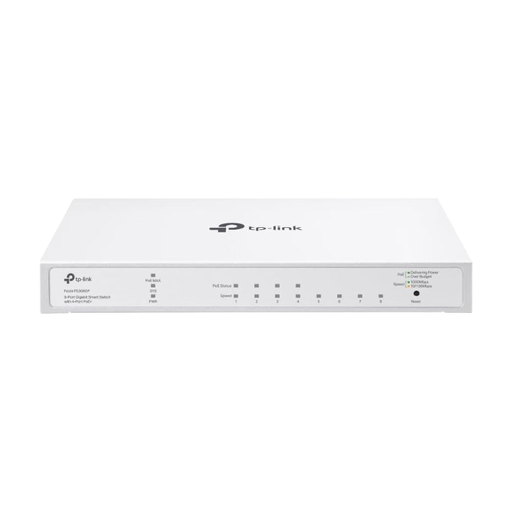 No image available
An option if your planned studio setup needs eight Gigabit connections and VLAN features.
Eight Gigabit ports; VLAN, ACL and IGMP Snooping; four PoE+ ports with a 62 W total power budget and up to 30 W per port; fanless.
Cloud management requires setup through the app or web interface and a Festa account.
Only if the dock you’re using doesn’t have a built-in LAN port. You may then need a compatible USB LAN adapter for a wired connection; Nintendo’s instructions explain how to connect via LAN in TV mode. Check your specific console and dock.
Connect one port to a usable port on the existing router or LAN, then connect the other ports to the devices you want to use. The unmanaged models described don’t need switch configuration for basic port expansion; the studio’s access rules still apply separately.
The unmanaged models described don’t need initial switch configuration for a basic connection. However, if the studio uses VLANs, their settings must work with the rest of the network; the exact steps depend on the model.
Check the specific version on offer and the requirements that apply to it. Relevant electrical equipment must meet electromagnetic compatibility requirements. CE marking is required where applicable harmonised EU rules call for it. When carrying out market surveillance, the German Federal Network Agency checks, among other things, product marking and whether the product can be identified.