Which switch is right for you?

Laptop on an authorised LAN

If you need extra wired connections at a shared workspace without managing the existing network yourself, a basic switch could be a good fit. Check with the IT team responsible for the network that you’re authorised to connect and have the necessary access details.

Those responsible for separate studio networks

If work devices and other groups of devices need different access rules, the studio or workplace IT team should plan the network architecture and switch configuration together.

Studios working with large local files

If you’re also connecting a NAS or other high-speed network devices, check the speed of the entire local data path, not just your internet connection.

What should you look for when buying?

Unmanaged Gigabit switch

A good fit if: The studio has authorised the LAN connection and the connected devices are allowed to use the same designated network.

Consider: Plug-and-play means minimal set-up, but you can’t configure VLAN separation yourself.

VLAN-capable managed switch

A good fit if: The IT team responsible is planning separate device groups and coordinating the uplink, gateway and access rules accordingly.

Consider: Configuration requires coordination and ongoing ownership; VLANs alone don’t control communication between networks.

Unmanaged switch with 2.5 GbE

A good fit if: Your laptop or adapter, NAS and other relevant devices support the faster local data path.

Consider: Without compatible devices at the other end, faster ports won’t deliver a corresponding benefit and won’t replace network separation.

PoE switch

A good fit if: The studio needs to power compatible access points, IP phones or other PoE devices over the network cable.

Consider: PoE won’t replace a laptop charger or dock; the standard and power available per port and overall must suit the devices.

Buying priority What to check before buying Who it matters to
Enough LAN ports Count the uplink and all planned devices together; with five ports, the uplink uses one. Check for an RJ45 socket on your laptop or an authorised adapter. If I mainly need more connections at my desk for my laptop and other devices, I want to know how many ports will actually be left free. Around 31% of consumers are likely to have extra LAN ports as their main priority.
Separation on the studio network Check with IT who will configure the switch, uplink, gateway and access rules. The BSI describes network separation alongside controls on communication. If work devices and other users need different access, I want to plan the separation with the IT team responsible. Around 31% of consumers are likely to have network separation as their main priority.
Speed for local files Compare the speeds supported by your laptop or adapter, NAS and all relevant connections. If I’m transferring large files between compatible devices, I want to check that the entire local data path supports the higher speed. Around 23% of consumers are likely to have fast local data transfer as their main priority.
Power for network devices Match each device’s PoE standard and power requirements against the per-port limit and the overall budget of the specific model. If I want to power additional compatible network devices over an Ethernet cable, I want to choose a switch that meets their requirements. Around 15% of consumers are likely to have PoE power as their main priority.

Avoid common buying mistakes

  • Assuming a switch provides network access or security separation

    A basic switch adds more ports. For separation between different groups of users and devices, the BSI also describes the need to control their communication.

    Before connecting your work laptop, check authorisation and responsibilities with the studio and workplace IT teams. Only buy a VLAN feature if it will actually be configured and integrated with the rest of the network.

  • Counting every listed port as a free device connection

    The connection to the existing network uses a port too. With five ports and one uplink, that leaves four connections for devices.

    Count the uplink and planned devices together before deciding how many ports you need.

  • Choosing 2.5 GbE just because the number is higher

    A faster switch port only helps with local transfers if the other connected ports also support the faster data path. Manufacturers describe 2.5 GbE switches as suitable for devices with compatible connections.

    Check the connections on your laptop or adapter and NAS, as well as your actual local transfer needs.

  • Confusing the number of PoE ports with the total power available

    TP-Link specifies up to 40 W in total for the TL-SG1005LP and up to 65 W for the TL-SG105PE. So four PoE+ ports don’t mean that every device can receive unlimited power at the same time.

    Compare each device’s requirements with the per-port limit and the overall budget for the exact model version.

Key brands and differences between models

TP-Link

The TL-SG105, TL-SG105E and TL-SG105PE models cater for different needs, from basic connections to managed features and PoE.

  • According to TP-Link, the TL-SG105 is a fanless 5-port unmanaged switch, while the TL-SG105E has a management interface and supports 802.1Q.
  • TP-Link lists four PoE+ ports for the TL-SG105PE, with up to 30 W per port and a total budget of up to 65 W.
  • Features listed for one model don’t automatically apply to other switches in the range.

NETGEAR

The GS305v3 and GS305E differ in particular in whether you need managed features.

  • NETGEAR lists five Gigabit ports for the GS305v3.
  • NETGEAR lists VLANs, QoS and IGMP snooping for the GS305E.
  • Having the same number of ports doesn’t mean the models offer the same management options; no PoE budget is specified for the GS305v3.

Zyxel

The GS1200 series is an option if the studio IT team wants to configure VLANs through a web interface.

  • Zyxel describes VLAN separation, web management and fanless operation for the series.
  • These listed features don’t prove that a specific installation will automatically be adequately secured.

QNAP

The QSW-1105-5T is designed for a local 2.5 GbE network with compatible devices at the other end.

  • QNAP lists five 2.5 GbE ports and fanless plug-and-play operation.
  • The unmanaged model doesn’t list an option for configurable VLAN separation.

D-Link

The DGS-105 is a compact Gigabit switch for straightforward connections at your workspace.

  • For revision E1, D-Link lists five Gigabit ports, plug-and-play operation and a fanless design.
  • QoS and IGMP features aren’t the same as configurable VLAN separation.

Joybuy products for studio use

The selection includes basic Gigabit switches, managed models for coordinated VLAN configurations, and a switch with PoE+ ports for compatible network devices.

Ubiquiti UniFi Switch Flex Mini USW-FLEX-MINI-EU

Ubiquiti UniFi Switch Flex Mini USW-FLEX-MINI-EU

A good fit if the IT team manages VLANs or port isolation and five Gigabit RJ45 connections are enough.

Five Gigabit RJ45 ports; managed via the UniFi Network application.

The switch can be powered via USB-C or 802.3af/at PoE. The PoE port powers the switch and doesn’t supply PoE to connected devices.

View at Joybuy

D-Link DGS-1210-10/E 10-Port Gigabit Smart Managed Switch

D-Link DGS-1210-10/E 10-Port Gigabit Smart Managed Switch

A good fit if the studio IT team manages several wired devices and needs to set up VLANs for separate device groups.

Eight Gigabit RJ45 ports and two SFP slots; supports 802.1Q VLANs and web management.

VLAN features alone don’t guarantee complete network separation; the uplink, gateway and communication rules need to be planned accordingly.

View at Joybuy

TP-Link TL-SG1005D 5-Port Gigabit Desktop Switch

TP-Link TL-SG1005D 5-Port Gigabit Desktop Switch

A good fit if you need extra connections on an authorised network without having to configure the switch.

Five Gigabit RJ45 ports; plug-and-play operation and fanless design.

An uplink to the existing network uses one port, leaving four connections for devices.

View at Joybuy

TP-Link TL-SG105PE 5-Port Gigabit Easy Smart Switch

TP-Link TL-SG105PE 5-Port Gigabit Easy Smart Switch

A good fit if the IT team is coordinating VLAN features and also needs to power compatible network devices over PoE.

Five Gigabit ports and four PoE+ ports; up to 30 W per PoE port and a total budget of up to 65 W, according to TP-Link.

Each device’s power requirements must stay within both the per-port limit and the overall budget. VLAN features alone don’t guarantee complete network separation.

View at Joybuy
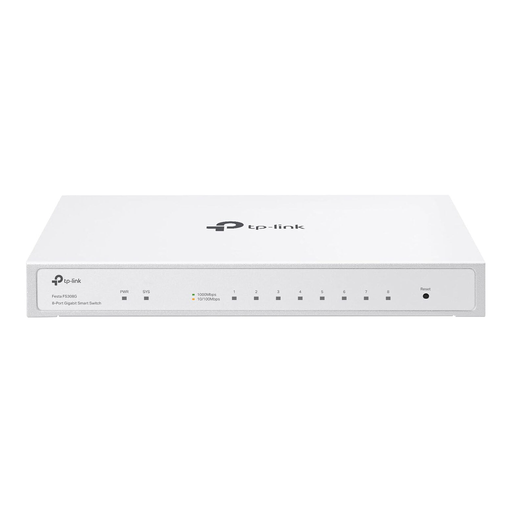
TP-Link Festa FS308G 8-Port Gigabit Switch

TP-Link Festa FS308G 8-Port Gigabit Switch

A good fit if you need more wired connections and the IT team manages device groups.

Eight Gigabit RJ45 ports; VLAN and ACL features, plus cloud management, are listed.

An optional PoE input and fanless design are also listed. VLAN features alone don’t guarantee complete network separation.

View at Joybuy

Frequently asked questions

How do I connect my work laptop if there’s only one LAN connection at my desk?

Only with authorisation from the studio and workplace IT teams responsible: connect the uplink to one switch port and your laptop to another via Ethernet. The existing network infrastructure will continue to manage the network; a switch doesn’t replace the router. Check whether your laptop has an RJ45 port or needs an adapter approved by your workplace IT team.

Does a VLAN-capable switch automatically make my laptop secure in a shared studio?

No. Alongside separating groups of users and devices, the German Federal Office for Information Security describes the need to control their communication. The IT team responsible should also clarify the requirements for your work laptop and who manages the networks.

What maintenance does a managed switch need?

The studio IT team should plan who is responsible, as well as configuration backups and firmware maintenance. Zyxel lists configuration backups and firmware upgrades as management tasks for the GS1200 series; with a basic unmanaged switch, there’s no VLAN configuration to maintain.

What else should I plan for when setting up a switch in a studio?

Check whether you’ll need suitable network cables, a laptop adapter approved by your workplace IT team, or compatible devices if you’re using PoE. For PoE, the standard and power requirements of each device must match the switch.

What marking must an electrical switch carry in Germany?

Where the relevant marking requirements apply to the device, they must be met. Among other requirements for products sold in Germany, the Federal Network Agency specifies correct CE marking, clear identification of the device and manufacturer, and German-language instructions for non-commercial users. A statement on a product page alone doesn’t prove that a specific item has been independently tested.