A simple computer-and-server setup
If you want to connect your computer and backup server over LAN and get started without complicated switch configuration, look for enough ports and a straightforward setup.


If your router doesn’t have enough spare LAN ports and Gigabit speeds are sufficient, a small, fanless Gigabit switch is a good way to connect a computer and backup server. TP-Link Germany and D-Link Germany list fanless operation for specific models; 2.5 Gigabit is only worthwhile if both devices also have compatible ports. If you’re using a student accommodation network, check the provider’s rules too, as the University of Erfurt and Studierendenwerk Frankfurt am Main set out different connection requirements.
If you want to connect your computer and backup server over LAN and get started without complicated switch configuration, look for enough ports and a straightforward setup.
If both your computer and backup server have compatible, faster network ports, consider whether a multi-Gigabit switch is suitable for your local file transfers.
If your room is connected to a student accommodation or campus network, check the provider’s requirements before connecting devices or planning to separate your network.
| What you need | What to check | Who should pay particular attention? |
|---|---|---|
| Ports and setup | Count all cable connections, including any uplink; first check which router ports are free. | If I want to connect my computer and backup server in the same place, I need to include the uplink when planning the ports; around 36% of consumers prioritise having enough connections. |
| Local backup speeds | Check the LAN ports on your computer and server, as well as the planned connection path. | If faster local backups matter to me, both devices need compatible ports; around 29% of consumers put transfer speed first. |
| Quiet, continuous operation | Check whether the model has a fan and its specific power consumption. | If the switch is in a living or sleeping area, I’ll want to consider fanless operation and the power requirements of the specific model; around 21% of consumers prioritise quiet operation and day-to-day running. |
| Management and network rules | Check the provider’s rules for managed connections; only choose management features if you need them and can set them up. | If I need to use VLANs or comply with my student accommodation’s connection requirements, I’ll need the right management features and clear rules; around 14% of consumers consider this particularly important. |
If you connect the switch to your router or an authorised network connection, that link also uses a port.
Before buying, sketch out all the cable connections and count every port that will be in use.
If you forget the uplink, you may need another switch later to make your planned setup work.
The port rating describes what the switch port can support, not the measured speed of the entire connection.
Check the LAN ports on both devices and treat the stated speed as a port capability.
A switch provides network connections, but it doesn’t replace data backup. The terms of use for managed student accommodation connections also determine what setup is allowed.
Plan backup and recovery separately. The Federal Office for Information Security recommends making sure that data can be restored too; if you’re using a student accommodation connection, also check the provider’s requirements.
The TL-SG105, TL-SG105-M2 and TL-SG105E are worth considering when comparing basic Gigabit switches, a 2.5 Gigabit model and a configurable Gigabit option.
The five-port MS305 is an option for an unmanaged multi-Gigabit setup.
The DGS-105 is a five-port Gigabit option for a simple desktop setup.
The Joybuy products below are Gigabit switches for wired connections. They differ in features such as port count, PoE support and management options.
 No image available
For a Gigabit setup where you want to make use of management features; check which features you need before buying.
5 Gigabit ports; powered via USB-C or 802.3af/at PoE; switching capacity: 10 Gbit/s, not the speed of an individual port.
 No image available
An option if your setup includes devices that need PoE+, as well as your computer and server.
5 Gigabit ports; 4 PoE+ ports; PoE budget: 60 W; fanless; switching capacity: 10 Gbit/s, not the speed of an individual port.
 No image available
For a simple Gigabit setup when you don’t need any additional switch configuration.
5 Gigabit RJ45 ports; auto-negotiation and Auto-MDI/MDIX; plug-and-play; fanless.
 No image available
For a Gigabit setup where you need management features or PoE+ for connected devices.
5 Gigabit ports; 4 PoE+ ports; PoE budget: 65 W; VLAN, QoS and IGMP; fanless metal casing.
 No image available
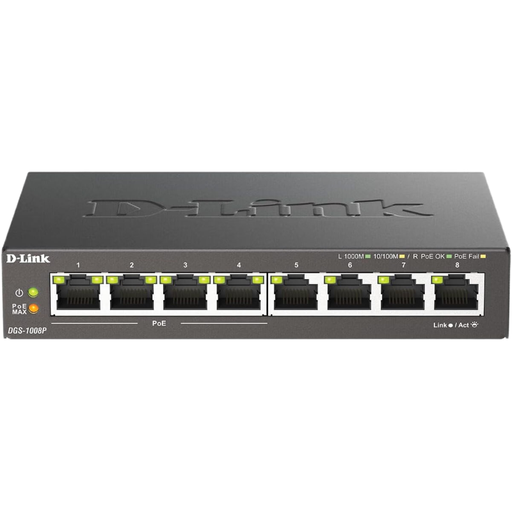
An option if you need more wired connections than a five-port model offers and plan to connect PoE devices.
8 Gigabit ports; 4 PoE ports; unmanaged; desktop design; fanless and plug-and-play.
Connect both devices to the switch with LAN cables and allow for another port if you plan to connect an uplink to your own router or an authorised network connection. TP-Link Germany says the TL-SG105 can be used without configuration; for a managed student accommodation connection, the provider’s requirements also apply.
No. A faster switch guarantees neither a particular backup speed nor data backup. First check the network ports on your computer and server, as the connection between them affects the speed you can achieve. The Federal Office for Information Security also recommends considering how you’ll restore backed-up data.
That depends on the rules for your specific connection. The University of Erfurt allows a basic switch to connect several devices to the student accommodation connections it describes; other providers may have different requirements. Check the current terms with your accommodation or campus network provider.
According to the European Union, CE marking is required for products covered by relevant harmonised legislation that requires it. It is the manufacturer’s declaration that the product meets the applicable requirements, not an independent assessment of its backup performance.