If there’s a spare LAN port on your router at your workspace, you may not need an additional switch. If you’re short of ports on your existing LAN connection, a gigabit switch can expand your wired network. Remember to count the connection to the router when choosing how many ports you need: a five-port switch leaves up to four ports for devices, while an eight-port model leaves up to seven. 2.5 Gbit/s or VLAN features are only useful if your devices and the rest of your network equipment can make use of them. A switch doesn’t replace your router or internet connection, and on its own it won’t reduce online gaming latency.
Who would benefit from a switch?
A console and work devices on one LAN connection
If there’s a network connection at your workspace and you want to connect a console and other devices to it, look at the number of available ports after the router uplink and how easy the switch is to set up.
A quiet desk with several LAN devices
If the switch will be within earshot, check its design and whether the specific model is fanless. Make sure the number of ports also suits the devices at your workspace.
A home office with an expanded network
If you’re planning faster local connections or want to separate your work and personal networks, check that your connected devices and the rest of your network equipment support these features.
What should you look for when buying?
Start by checking the connection to your router and counting your devices. Then consider whether you have any specific requirements for noise levels, local speeds or network configuration.
| What you need |
What to look for |
Who is it important to? |
| Enough LAN ports for your console and work devices |
Count the router uplink, console and all wired work devices. Check whether there’s a usable LAN connection to the router where you plan to put the switch. |
If I want to connect my console and work devices through the same LAN connection, every available port counts. Around 46% of shoppers have this as their main requirement. |
| Quiet operation at your workspace |
Check whether the specific model version is fanless, along with its intended placement or mounting options. |
If the switch will be within earshot, a quiet workspace matters more than extra expansion features. Around 27% of shoppers prioritise quiet operation. |
| The right speed for local connections |
Compare the LAN capabilities of your router, console and, where relevant, NAS or work computer. A higher port speed rating alone doesn’t tell you anything about your internet speed. |
If I want to connect compatible devices faster on my local network, I’ll first check whether they support 2.5 Gbit/s. Around 18% of shoppers have this as their main requirement. |
| Separating work and personal networks |
Check whether you need VLAN features and whether your router and other network equipment can be configured to support them. |
If I want to separate my work and personal networks, the configuration needs to suit the whole network setup. Around 9% of shoppers prioritise this type of network separation. |
Common buying and connection mistakes
-
Counting every port as a connection for a device
The connection from the switch to the router also uses a port. So a five-port model leaves up to four ports for devices, while an eight-port model leaves up to seven.
Before you buy, make a list of the connections you need, including the router uplink, console, work devices and any spare capacity.
-
Expecting 2.5 Gbit/s ports to automatically make online gaming faster
The switch negotiates a connection with each device. Its port speed rating is not a measure of your internet connection or gaming latency.
Choose multi-gigabit ports mainly when specific local devices and connections support those speeds.
-
Assuming VLAN features automatically mean your network is already separated
VLANs are configurable features. Simply connecting a console won’t separate your network.
Plan how you want to separate your network, including the uplink and router, before choosing a VLAN-capable switch.
Key brands to consider
TP-Link
The models listed cater for different needs in terms of port count, configuration and local transfer speeds.
- The TL-SG105 has five gigabit ports; the TL-SG108E has eight gigabit ports and, according to TP-Link, management and VLAN features.
- The TL-SG105-M2 is designed for compatible 2.5 Gbit/s connections.
- Features can vary by hardware version, so check the specifications for the specific model.
D-Link
The DGS-105 is a five-port gigabit switch for connecting extra wired devices at your workspace.
- D-Link describes revision E1 as fanless and states that it comes with a five-year warranty.
- Check which revision is on offer and which warranty terms apply to that specific product. The manufacturer’s specifications aren’t an independent performance test.
NETGEAR
The GS305v3 is a five-port gigabit switch for adding extra wired connections.
- NETGEAR lists five gigabit ports, plug-and-play operation and a metal case for this model.
- The manufacturer doesn’t specify a PoE budget for the GS305v3. This doesn’t necessarily apply to other models from the brand.
Joybuy products for expanding your LAN
The Joybuy products below are designed to expand the wired network at your home office, from compact multi-gigabit models to switches with more ports or management features.
 No image available
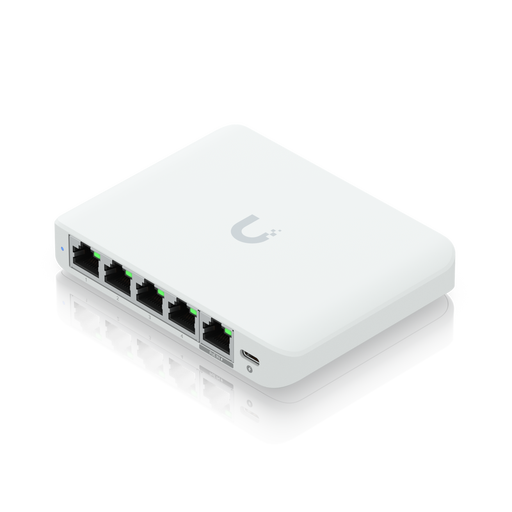
Ubiquiti UniFi Flex Mini 2.5G Managed
For a workspace with several wired devices and compatible 2.5 Gbit/s devices. The product name lists Ethernet speeds of 100/1000/2500 Mbit/s. It requires a compatible PoE power source or USB-C power supply.
Joybuy
 No image available
D-Link DGS-1005P/E, 5-port gigabit with 4 PoE+ ports
For adding gigabit LAN connections when you also need to connect compatible PoE+ devices. The product name lists five gigabit ports, four PoE+ ports and a PoE budget of 60 W.
Joybuy
 No image available
D-Link DGS-1210-10/E, Smart Managed
For a home network with several wired devices and plans to use management features. The product name lists eight gigabit RJ45 ports and two SFP slots. VLAN features require the network to be configured accordingly.
Joybuy
 No image available
TP-Link TL-SG1008P, 8-port gigabit with PoE
For adding gigabit connections and connecting compatible PoE devices through the same LAN connection. The product name lists eight gigabit Ethernet ports and PoE support.
Joybuy
 No image available
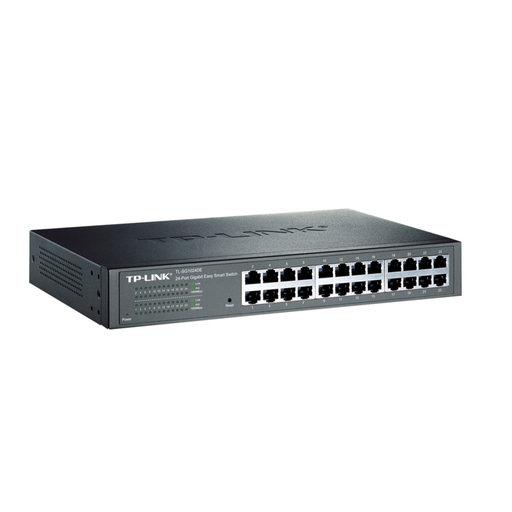
TP-Link TL-SG1024DE, 24-port Easy Smart gigabit
For a workspace or network with lots of wired devices and a need for additional management features. The product name lists a 24-port managed Layer 2 gigabit switch. Features such as VLANs need to be set up to suit your network.
Joybuy
Frequently asked questions
How do I connect a console and work devices?
Connect a LAN port on your router to a port on the switch, then connect your devices to the remaining ports. For a PS5, PlayStation explains how to set up a wired connection in the network settings; for other consoles, follow the relevant manufacturer’s instructions.
Do I need to configure or maintain a basic switch?
According to the manufacturers, the unmanaged models listed don’t need any configuration for basic operation. If you run into problems, check the power supply, cables and link lights. An Easy Smart model needs to be configured appropriately to use features such as VLANs.
What extra costs and warranty terms should I check?
Check whether a compatible power supply is included, which LAN cables you’ll need and how much power the specific device uses. D-Link lists a five-year warranty for revision E1 of the DGS-105; the terms for the specific offer will apply.
What should I know about labelling and disposal in Germany?
Electrical equipment is subject to the relevant EU product regulations. CE marking is required if the regulations applicable to the device call for it. Your Europe explains that CE marking is a manufacturer’s declaration, not an independent quality mark. In Germany, electrical waste must be collected separately and must not be put in household rubbish, as explained by the Federal Environment Agency.


