What to consider when choosing
For indexing historical newspapers, the key question is whether you mainly need to make recurring entries easier, improve hand positioning, enter text accurately or connect a keyboard to your workstation.
| Priority |
What to look for when buying |
Who it matters most to |
| Recurring entries |
Programmable keys or software shortcuts; test the output in the right field and keep duplicate checking as a separate step. |
If I enter the same field values often, I want to call them up easily without creating duplicate records. Around 36% of consumers put recurring entries first. |
| Hand position during long sessions |
Check the dimensions, palm rest, tilt and how long it may take to get used to the keyboard at your workstation. |
During long indexing sessions, I want a layout that suits the way I hold my hands and my desk. Around 29% of consumers prioritise hand position. |
| Familiar layout |
Check for a German QWERTZ layout, as well as the characters and function keys you need. |
When names, dates and historical spellings need to be entered accurately, I want to use a familiar layout. Around 21% of consumers prioritise accurate entry. |
| Connection and setup |
Check the available ports, permitted software and, for wireless keyboards, the type of receiver required. |
I want to connect the keyboard to my existing workstation without any extra steps. Around 14% of consumers say connection and setup are their main concerns. |
Joybuy products for newspaper indexing
The Joybuy products below are mainly suited to programmable inputs and longer typing sessions. Check the layout and features of each model variant individually.
 No image available
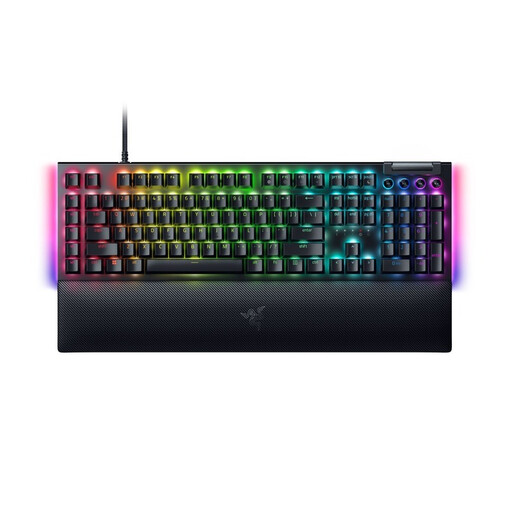
Razer BlackWidow V4, Yellow Switches, German layout
May suit you if you want to set up recurring commands on programmable keys; macros don’t replace a separate duplicate-checking process.
This variant is described as having a German QWERTZ layout and a USB-C cable.
Media keys and a palm rest are also listed.
Joybuy
 No image available
Razer Ornata V3 Tenkeyless, German layout
A wired option if you want a German layout and programmable keys.
The description lists a low-profile design and a detachable palm rest.
Joybuy
 No image available
Akko 5087S V1 TKL, V3 Pro Cream Yellow Switches, ISO-DE QWERTZ
May suit you for recurring entries if the macro function works with your indexing software; it doesn’t replace duplicate checking.
This variant is described as wired, with an ISO-DE-QWERTZ layout, hot-swap support and RGB lighting.
It has a TKL form factor, so check in advance whether you need a separate number pad.
Joybuy
 No image available
Wired USB keyboard with 104 keys
A straightforward option if you want a full-size layout with a wired connection and don’t need dedicated macro features.
It’s described as having a USB connection and a 1.35 m cable. Check the key layout before choosing it for accurate German metadata entry.
Joybuy
 No image available
CHERRY MX 2.0S, German QWERTZ layout
May suit you for accurate German metadata entry if you want a full-size layout and adjustable tilt.
The specifications list a USB-A cable, CHERRY MX2A Red Switches and RGB lighting.
A palm rest is listed as an optional accessory.
Joybuy
Frequently asked questions
Will a macro key remove duplicate newspaper entries?
No. A key assignment can repeat text or commands, but it can’t check whether an entry already exists. Before creating a record, compare the identifying details specified for your project.
How do I set up recurring text snippets?
On Windows, PowerToys Keyboard Manager can assign a text string to a key or keyboard shortcut. Test the output in the correct input field first; the assignment only works while PowerToys is running. Whether you’re allowed to install it at your workstation depends on the rules in place there.
What should I check about the connection and receiver?
Check that the keyboard matches the USB or Bluetooth connection available on your device, and check the receiver type for wireless models. Logitech notes that Logi Bolt and Unifying aren’t compatible with each other. Follow the instructions for the specific model when cleaning it.
What rules apply to screen-based work in Germany?
Workplaces covered by Germany’s Workplace Ordinance must meet requirements for the design of screen-based workstations. Germany’s Federal Institute for Occupational Safety and Health provides further detail in ASR A6; these rules don’t apply universally to every personal indexing project. The workplace rules don’t mean that ordinary keyboards need special government approval before purchase.
What rights apply to online purchases and faulty goods?
For online purchases by consumers in Germany, you generally have a 14-day right to cancel after receiving the goods, as explained by the Consumer Advice Centre. Your statutory rights against the seller are separate from any voluntary guarantee; if an item is faulty, the first step may be to ask the seller to repair or replace it. Check the terms of your specific purchase.


