What to look for when buying
First, check which inputs your indexing software supports and which commands you can actually assign. Then compare the layout, connection and key arrangement with your workflow.
| Buying consideration |
What to check |
Who it matters most to |
| Source references and commands |
Does the software support the commands you want? Can you assign them using the keyboard or its configuration software? |
When I record entries with their sources, I want to assign only commands that my programme actually supports. Around 33% of consumers put source references and repeat commands first. |
| OCR and text correction |
Check how easy it is to reach the typing, arrow and correction keys. Make sure the layout includes the characters you need. |
When comparing a scan with its text line by line, I want to navigate comfortably and correct recognised characters. Around 27% of consumers prioritise text correction. |
| Comfort during long sessions |
Assess the key arrangement and set-up at your workstation. If you choose a split layout, allow time to get used to it. |
When typing for longer periods, I want a key arrangement that suits the way I position my hands and my workstation. Around 27% of consumers prioritise typing comfort. |
| Connection and layout |
Check that USB-A, Bluetooth or a wireless receiver will work with your devices. Make sure you select the correct language layout. |
When using an existing computer, I want to check the connection and character layout in advance. Around 13% of consumers focus primarily on device compatibility. |
Joybuy keyboards for typing and data entry
This selection from Joybuy includes keyboards for typing and data entry. In particular, check that the layout and connection suit your workflow.
 No image available
Inateck KB01003G Bluetooth keyboard with QWERTZ layout
For typing in German and switching between several devices.
QWERTZ layout; Bluetooth connection with up to three devices; shortcut keys for media, brightness and screenshots.
View at Joybuy
 No image available
Logitech 920-012404 Ergonomic Wave, German QWERTZ
For typing in German and for people who want to include a wave-shaped keyboard with wrist rest in their workstation set-up.
Bluetooth; German QWERTZ; memory foam wrist rest; membrane keys; nine media keys. Compatible systems listed include macOS, iPadOS and iOS.
View at Joybuy
 No image available
Logitech K120, German QWERTZ layout
For a fixed workstation with wired typing and frequent number entry.
Full-size with number pad; German QWERTZ layout; USB plug and play; low-profile keys and adjustable tilt legs.
View at Joybuy
 No image available
Wired keyboard with number pad, QWERTY
For typing and entering numbers, provided the QWERTY layout suits the characters you need.
Wired with plug and play; full-size with number pad, function keys and a separate navigation area. The listed layout is QWERTY.
View at Joybuy
 No image available
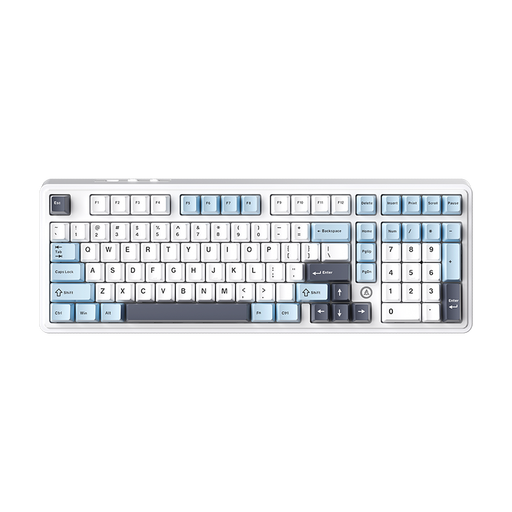
AJAZZ AK980 V2, 98% QWERTY, Flying Fish Switch, Blue White Dark Blue
For typing and data entry if a compact QWERTY layout with number pad suits your workstation.
98% layout with number pad; wired connection, Bluetooth and 2.4G; 10000mAh battery; RGB lighting; replaceable switches.
View at Joybuy
Frequently asked questions
Do I need a special keyboard to keep newspaper entries linked to source files?
No. The keyboard features mentioned don’t automatically link files. It depends on how your data-entry software saves sources and entries, so check its fields and commands before setting up programmable keys.
How should I set up a split keyboard for longer sessions?
Allow time to get used to it, and assess the keyboard alongside your chair and armrests. The German Social Accident Insurance (DGUV) offers an ergonomic assessment tool, but it doesn’t confirm that any particular model will treat discomfort.
What rights do I have if a product develops a fault after an online purchase?
For consumer purchases from a trader in the EU, you generally have at least two years of statutory rights if goods are faulty, as explained by Your Europe. An additional manufacturer’s guarantee doesn’t replace these rights. Online distance purchases are also generally covered by a 14-day right to cancel from delivery, although statutory exceptions may apply.
What should I check on a wireless keyboard’s labelling?
The German Federal Network Agency lists CE marking, product identification and correct manufacturer details among the points it checks as part of market surveillance. According to the Agency, CE marking is a declaration made by the manufacturer under its own responsibility. It isn’t an independent quality mark and doesn’t confirm that the keyboard is suitable for your indexing software.


